






































Rendering Problem with WindowBlinds 6.3 Desktop
Sunday, November 16, 2008 by wildkatana | Discussion: Stardock Support General
Hello all,
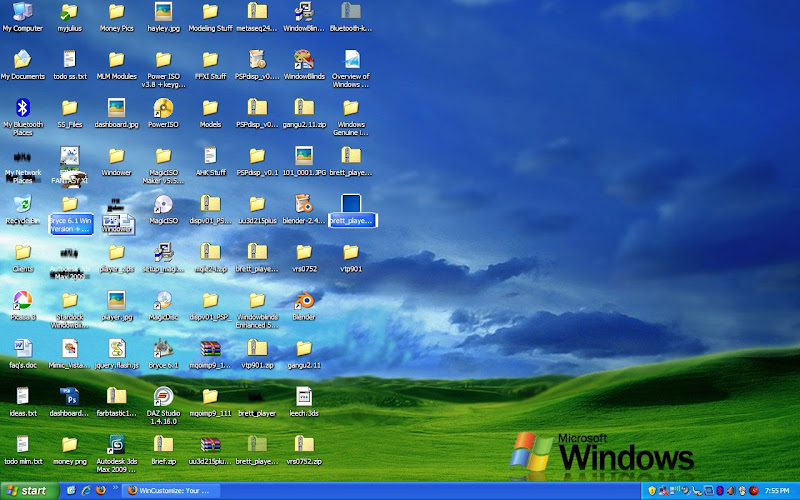
I just bought a new Acer Laptop (Aspire 4930) and I wanted it to look like Vista, so I decided to purchase WindowBlinds. It is really nice and I love it, except for one problem. It seems that whenever I minimize a full screen window, to see the desktop, I am left with these ugly shadows behind some (not all) of my icons on the desktop. In addition, some of the icons are not even shown, with remnants of the previous window in their place. The only way to get them to go away is to press Refresh many times (maybe 10) or to open window blinds and apply the skin again, or to move another open window over the icons and then off again. This only fixes it until another full screen window is minimized, and it is very annoying. In addition, I have experienced error with the right click menu being all black and unreadable. Attached is a screenshot of the former problem. Any ideas?

Reply #2 Sunday, November 16, 2008 8:54 AM
If you haven't done so already, please email [email protected] and start a trouble ticket. They will be able to assist you.
Support does monitor the forums also and WC members often assist when they can.
Reply #3 Sunday, November 16, 2008 12:54 PM
I have opened a support ticket like you suggested, but still would like to hear if anyone else has encountered this problem before?
Reply #4 Sunday, November 16, 2008 1:45 PM
Reply #5 Sunday, November 16, 2008 2:04 PM
I was just about to post into my opened thread, that I fixed it, but it seems it has been deleted without comment. Good. But strange.
Do you have the /3GB switch in your boot.ini?
Reply #6 Sunday, November 16, 2008 6:29 PM
I don't use Gigastudio or another memory manager as far as I know (though I am planning on installing Uniblue soon). I have 3gb ram but I haven't changed anything in the boot.ini. However, it may have come changed, because I had the ram installed at the time I bought it and the guy may have changed that part as well. Is it an issue if I have 3gb ram?
Reply #7 Monday, November 17, 2008 9:25 PM
I have been trying a few things and I still can't fix this problem. It's really too bad because I love my new skins, but if it keeps doing this, I am going to have to ask for a refund 
Has anyone else encountered this problem? Any ideas?
Please login to comment and/or vote for this skin.
Welcome Guest! Please take the time to register with us.
There are many great features available to you once you register, including:
- Richer content, access to many features that are disabled for guests like commenting on the forums and downloading skins.
- Access to a great community, with a massive database of many, many areas of interest.
- Access to contests & subscription offers like exclusive emails.
- It's simple, and FREE!
Reply #1 Sunday, November 16, 2008 8:50 AM
Here is my system info:
WindowBlinds version : WindowBlinds 6.3 (build 68 x86)
WindowBlinds is installed correctly on this PC
WindowBlinds appears to be activated on this PC
Your machine supports per pixel borders on WindowBlinds skins.
(Plug and Play Monitor) 1 is attached to Mobile Intel(R) 4 Series Express Chipset Family
Wblind.dll 2008/10/18 16:42:20
Wbsrv.dll 2008/09/16 08:44:42
Wbconfig.exe 2008/09/16 08:44:32
Wbload.exe 2008/04/26 16:14:14
Wbhelp.dll 2008/04/26 16:14:07
Wbui.dll 2008/04/26 16:14:05
Tray.dll 2008/04/26 16:14:21
Screen.exe 2008/07/15 11:31:09