









































Halloween Theme
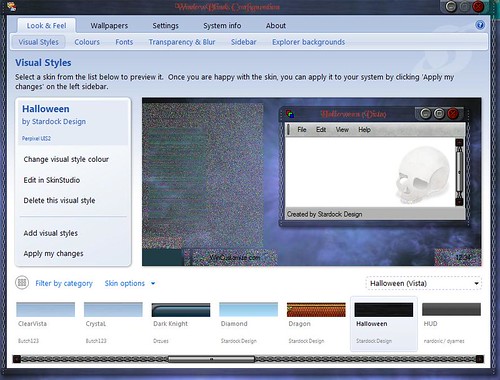
Weird looking images
Thursday, October 16, 2008 by Musical-Mayhem | Discussion: MyColors
I really like the Halloween theme from Stardock....everything works as it should ie animations etc..
But I cannot get any transparancy in the taskbar at all...and if I try using a diffent taskbar and start menu eg: Dragon
it looks really weird
I;d include a screenshot of what I mean, but am usure how
Your computer has a Windows Experience Index base score of 2.1
Your Windows Graphics Experience score is 2.1
WindowBlinds version : WindowBlinds 6.3 (build 110 x86 - Vista Edition)
WindowBlinds is installed correctly on this PC
WindowBlinds appears to be activated on this PC
(Generic PnP Monitor) 1 is attached to RADEON X300/X550 Series (Microsoft Corporation - WDDM)
Wblind.dll 2008/09/23 10:59:20
Wbsrv.dll 2008/09/23 10:59:22
Wbconfig.exe 2008/09/23 10:59:32
Wbload.exe 2008/02/14 11:05:14
Wbhelp.dll 2007/08/27 11:54:07
Tray.dll 2007/09/12 17:58:21
Wbload.dll 2008/04/29 05:34:28
Screen.exe 2008/07/23 04:10:09
Any help would be appreciated

Reply #2 Thursday, October 16, 2008 11:52 PM
yes I am using onboard graphics....but I don't have transparancy problems with any other theme at all.
It's just this particular theme.....I have opend up an image at random using Gimp and they just look weird.
Kind of frustrating as I'd really like to show you what I mean with a screenshot...but don't know how to put one in a post like this

Reply #3 Friday, October 17, 2008 12:01 AM
That is actually what I would have asked for and it is pretty easy. Stage the picture somewhere (MySpace, Flicker, any URL will do really) then copy the link address and paste it in using the tool on the bar above the reply window. The button with the little picture of the tree on it. You will want to scale the picture size down some but if it is too big the forums will also help with that.
Reply #4 Friday, October 17, 2008 12:46 AM

Reply #5 Friday, October 17, 2008 12:49 AM
I've uploaded a screenshot to my Flickr page inserted the url....and...nothing......please excuse my lack of knowledge mate 
Reply #7 Friday, October 17, 2008 12:53 AM
Not sure what I'm doing wrong...I copied the url into the required box, typed in the dimensions....etc....and nothing

Reply #9 Friday, October 17, 2008 1:23 AM
Might be a hell of a lot easier if I could email you a screenshot methinks
Not having any luck at all uploading


Reply #12 Saturday, October 18, 2008 10:52 AM
Music-Mayhem,
Go into regedit and check the following entry:
HKEY_LOCAL_MACHINE\Software\Stardock\ObjectDesktop\WindowBlinds\Path
Make sure that if you have WB installed it points to the following directory:
32bit: C:\Program Files\Stardock\Object Desktop\WindowBlinds (or the path to where you have WB installed)
64bit: C:\Program Files (x86)\Stardock\Object Desktop\WindowBlinds (or the path to where you have WB installed)
If you just have MyColors and no WB, make sure that it points here:
32bit: C:\Program Files\Stardock\MyColors (or the path to where you have WB installed)
64bit: C:\Program Files (x86)\Stardock\MyColors (or the path to where you have WB installed)
This should clear this distortion. If this does not help, and you installed through Impulse, right click on the entry for MyColors and select "Verify Application". This shoulkd check and see if all the MyColors files are installed and in tact. If they are not, it will give you the option to update to fix it. Once you do MyColors, do the same for WindowBlinds.
If all this fails, e-mail us at [email protected]
Please login to comment and/or vote for this skin.
Welcome Guest! Please take the time to register with us.
There are many great features available to you once you register, including:
- Richer content, access to many features that are disabled for guests like commenting on the forums and downloading skins.
- Access to a great community, with a massive database of many, many areas of interest.
- Access to contests & subscription offers like exclusive emails.
- It's simple, and FREE!
Reply #1 Thursday, October 16, 2008 10:18 PM
2.1 is a pretty low score for a graphic experiance. Are you using onboard video graphics? You might have hardware that can't run transparency.