





































Windows Explorer STILL crashes all the time when Windows Blinds is installed
Sunday, October 12, 2008 by geminisama | Discussion: WindowBlinds
Okay hi. Since the beggining of this year, I've been having a major issue with Windows Blinds. No matter WHAT I do, Windows Explorer crashes FREQUENTLY when I have Windows Blinds on. I tried seeking help around February, but failed to get ANY useful help. For the last year, I've made sure to patch when I could, trying both stable, and beta releases, but Explorer STILL crashes all the time. So today I got fed up with it, after it crashed SEVEN times within 10 minuits. ALL I was doing, was talking on msn, and listening to iTunes. Windows Blinds would make it crash just about every other time I switched between the windows. So after getting pissed off, I removed Windows Blinds, and guess what, it's stable! I tried re-creating the conditions for the crash, and it won't mess up.
So this time, will I get support, or will I try, and have it all cast aside, and ignored?
The system info is here:
Your computer has a Windows Experience Index base score of 3.4
Your Windows Graphics Experience score is 3.4
WindowBlinds version : WindowBlinds 6.3 (build 110 x86 - Vista Edition)
WindowBlinds is installed correctly on this PC
WindowBlinds appears to be activated on this PC
(Generic PnP Monitor) 1 is attached to ATI Radeon X1050
Wblind.dll 2008/09/22 14:59:20
Wbsrv.dll 2008/09/22 14:59:22
Wbconfig.exe 2008/09/22 14:59:32
Wbload.exe 2008/02/14 12:05:14
Wbhelp.dll 2007/08/27 11:54:07
Tray.dll 2007/09/12 17:58:21
Wbload.dll 2008/04/28 09:34:28
Screen.exe 2008/06/13 11:24:09
Sorry if I sound like a grumpy person, but I'm fed up with this, as I've dealt with it ALLL year, with no help, or change.
 |
|
Page 2 of 3 | |
|
|---|


Reply #23 Monday, October 13, 2008 11:45 AM
I didn't install that til June-ish, and I've been having these crashes since early this year, so I don't think it's that..

Reply #24 Monday, October 13, 2008 12:43 PM
What toolbars are you using in IE? If any, open Internet Options/ Advanced. Hit Reset.
Reply #26 Monday, October 13, 2008 2:21 PM
Ok...let's see if it's really Windows doing this.
Open Administrative Command Prompt as before and type: bcdedit /set nx AlwaysOff
Reboot.
Reply #27 Monday, October 13, 2008 3:10 PM
Well, I'm about to go out for a while, so I'm gonna hold back on doing that for NOW, since my friend said, "Don't do that. Because if that's not your precise problem, shit's gonna get worse." Since I won't be here to monitor my comp, I'll do that when I'm back.
I appreciate the help so far.
Reply #28 Monday, October 13, 2008 5:47 PM
He doesn’t even know what it is or does and he’s predicting Armageddon??? You might want to consult with someone a bit more optimistic.
After your machine doesn’t self-destruct or turn into shit (in spite of my best efforts), let me know if the crashes stopped……
Reply #29 Tuesday, October 14, 2008 5:03 AM
He knows what it is, you told me to do. But putting that aside, I believe it IS windows fucking up.
Problem signature:
Problem Event Name: APPCRASH
Application Name: Explorer.EXE
Application Version: 6.0.6000.16549
Application Timestamp: 46d230c5
Fault Module Name: USER32.dll
Fault Module Version: 6.0.6000.16438
Fault Module Timestamp: 45d3dc0e
Exception Code: c0000005
Exception Offset: 00023123
OS Version: 6.0.6000.2.0.0.256.1
Locale ID: 1033
Additional Information 1: 8d13
Additional Information 2: cdca9b1d21d12b77d84f02df48e34311
Additional Information 3: 8d13
Additional Information 4: cdca9b1d21d12b77d84f02df48e34311
One minuit it's WB crashing things. Then it's something else, and then something ELSE, repeat. I honestly don't know what to do anymore. I run registry cleaners, nothing gets fixed. I run virus scans, and never find anything. :/
Do you still want me to disable the DEP?
Reply #30 Tuesday, October 14, 2008 11:54 AM
yes.
If it still crashes, re-enable: Command Prompt (Adm)/ type: bcdedit /set nx OptIn Reboot.
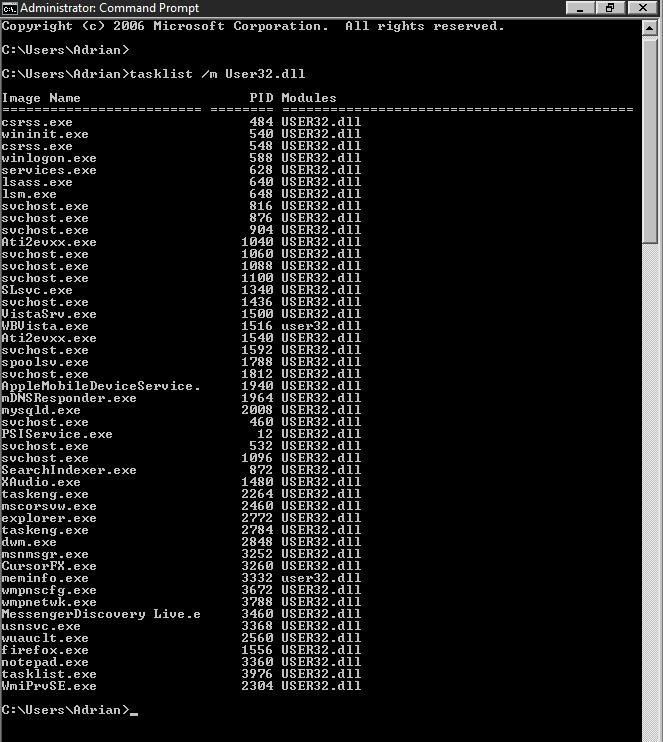
These errors are all over the place, but that last one may give us a clue. Start/ Run/ type: tasklist /m User32.dll Post the results.
While all these errors are Window system file related, my guess is that all the errors are being caused by something you have installed. It could be as simple as having Avast and Spyware installed, but disabled. Both put shell extensions in Explorer. I will assume the definitions are up to date. That said, let's review: You have no toolbars installed. You have no shell extensions installed (other then the aforementioned). Windows Firewall. UAC and Windows Defender are on with Security Center off. Windows update is current and your hardware drivers are current (with the exception of ATI, which work for you). Avast and Spyware Doctor are disabled and you have no other security apps installed. 'C' is your system drive (Vista 32bit). Correct me if any of that is wrong.
You recently formatted/installed Vista, so the question is when, after the format/install, did the crashes start. Something you installed started this.....and yes, I probably wouldn't remember either...but try. All we have to do is find it, instead of it finding you constantly. Short of that, it's a format and then installing one thing at a time until the errors start.
When you post the above user32 info, post Taskmgr Processes (all users).
Reply #31 Tuesday, October 14, 2008 3:57 PM
Okay, I turned off the DEP. I then did as you said with the Run command, and a dos like box opened, made a list really fast, and then closed. I have no idea how I'm supposed to post those results..or even read what it said. Now about Avast! and Spyware Doctor, I uninstalled both, to be on the safe side. No toolbars in any browser installed, no shell extensions I'm aware of. Windows Defender is on, but the UAC isn't. Windows is fully updated (but now, it's even acting faulty. Sometimes it tells me to install SP1, when it's already installed  ) Everything else is correct.
Well, the last format wasn't very recent, but according to one of my old topics, the errors started around Feb. 27th (see here: https://forums.wincustomize.com/301630). Around that time, other people were getting WB caused explorer crashes, so thats how I came to realize it HAD to be WB, but NOW I don't think it's causing the issues alone (see here to confirm others getting it: https://forums.wincustomize.com/301628)
I don't know how I'm supposed to post the user32 info, unless it logged somewhere, but here are screenshots of running processes.
http://i57.photobucket.com/albums/g227/geminisama/Processes1.jpg
http://i57.photobucket.com/albums/g227/geminisama/Processes2.jpg
Edit: Haha, thats amusing. After mentioning it being stupid about SP1, and installing todays security update, upon reboot, it's telling me to install SP1.

Reply #32 Tuesday, October 14, 2008 5:01 PM
Open Start -> All Programs -> Accessories -> R-Click Command Prompt -> Choose Administrator
This will open the command prompt window and leave it visible for you.
Reply #34 Tuesday, October 14, 2008 6:48 PM
Problem signature:
Problem Event Name: APPCRASH
Application Name: Explorer.EXE
Application Version: 6.0.6000.16549
Application Timestamp: 46d230c5
Fault Module Name: ntdll.dll
Fault Module Version: 6.0.6000.16386
Fault Module Timestamp: 4549bdc9
Exception Code: c0150014
Exception Offset: 00077dc2
OS Version: 6.0.6000.2.0.0.256.1
Locale ID: 1033
Additional Information 1: 8d13
Additional Information 2: cdca9b1d21d12b77d84f02df48e34311
Additional Information 3: 8d13
Additional Information 4: cdca9b1d21d12b77d84f02df48e34311
Looks like my buddies back. Time to re-enable DEP.
Edit:
Got it again, just 1 or 2 minuits from rebooting after re-enabling the DEP.
Problem signature:
Problem Event Name: APPCRASH
Application Name: Explorer.EXE
Application Version: 6.0.6000.16549
Application Timestamp: 46d230c5
Fault Module Name: USER32.dll
Fault Module Version: 6.0.6000.16438
Fault Module Timestamp: 45d3dc0e
Exception Code: c0000005
Exception Offset: 00023123
OS Version: 6.0.6000.2.0.0.256.1
Locale ID: 1033
Additional Information 1: 8d13
Additional Information 2: cdca9b1d21d12b77d84f02df48e34311
Additional Information 3: 8d13
Additional Information 4: cdca9b1d21d12b77d84f02df48e34311
Reply #35 Tuesday, October 14, 2008 7:30 PM
I see nothing out of the norm in Processes. (never realized itunes was so invasive).....
Here's my take (for what it's worth):
You can work back wards un-installing programs and you might find what's causing this, but even if you did, your system would be so disheveled it would, under the best of circumstance, be perpetually unstable.
The alternative is to format/fresh install Vista, update and install your programs one at a time (creating a Restore Point at each install). You either got a really bad install of Vista the last go around (highly unlikely) or something you are installing is doing it (highly likely). I could give you a list of everything it isn't, but in conjunction with them playing nice with something else installed....who knows. I will say, insofar as all you have installed, I'm leary of that memory monitor app.
Here's where I que up for the backup programs commercial. Get one (there's any number of good one's) and you'll never have to go through this again. End Promo.
For me, doing the fresh install comes down to nothing more then time and effect. It's, of course, your call. After all, I could be wrong...
......shit!!....what am I saying??.....I'm never wrong...............................
Reply #36 Tuesday, October 14, 2008 7:48 PM
Ehh, I've wanted to reformat..but, not enough media to back things up, and with my iPod recently being stolen, there goes that 20G I could of stored shit on. :/
So, theres pretty much nothing I can do?
Reply #37 Tuesday, October 14, 2008 7:50 PM
How many drives (and how big) do you have in your system? How much media do you have you want to save?
Reply #38 Tuesday, October 14, 2008 7:58 PM
1 HDD. A little over 10GB (Docs, pics, saves, music, etc.)
Reply #39 Tuesday, October 14, 2008 8:00 PM
10GB is 3 DVD's ...no big deal. How much free space on your hard drive?
Please login to comment and/or vote for this skin.
Welcome Guest! Please take the time to register with us.
There are many great features available to you once you register, including:
- Richer content, access to many features that are disabled for guests like commenting on the forums and downloading skins.
- Access to a great community, with a massive database of many, many areas of interest.
- Access to contests & subscription offers like exclusive emails.
- It's simple, and FREE!
|
|
Page 2 of 3 | |
|
|---|
Reply #21 Monday, October 13, 2008 2:24 AM
Well all was fine for a brief while, and Explorer crashed. This time, nothing about WB.
Problem signature:
Problem Event Name: APPCRASH
Application Name: Explorer.EXE
Application Version: 6.0.6000.16549
Application Timestamp: 46d230c5
Fault Module Name: ntdll.dll
Fault Module Version: 6.0.6000.16386
Fault Module Timestamp: 4549bdc9
Exception Code: c0150014
Exception Offset: 00077dc2
OS Version: 6.0.6000.2.0.0.256.1
Locale ID: 1033
Additional Information 1: 8d13
Additional Information 2: cdca9b1d21d12b77d84f02df48e34311
Additional Information 3: 8d13
Additional Information 4: cdca9b1d21d12b77d84f02df48e34311
What is this ntdll.dll?