





































DellDock Skinning
Skin it baby!
Monday, August 4, 2008 by messiah1 | Discussion: Docks
Somebody posted in a thread about being the first to skin the DellDock. I can't remember the thread but no big deal, I thought it's own thread would suffice. If you are into it, show what you've done. So far, after playing around with it for about 1/2 hour, I threw a quick skin together and applied it. I likes it better than the default. I think I may skin the entire thing, and possibly offer it for download. What do you think?
Anyway, if you've skinned it, show it here. Here's mine so far:

OneLumpSum
Reply #2 Monday, August 4, 2008 8:40 PM

Reply #2 Monday, August 4, 2008 8:40 PM
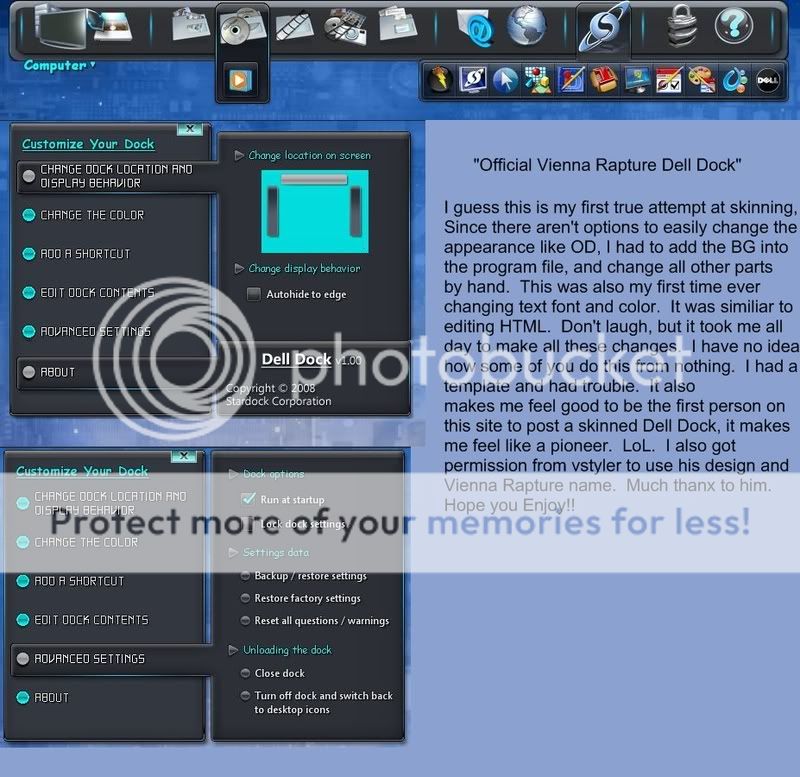
I was the one who posted the DellDock, while I used exsisting graphics (The actual Dock) with permission from the artist, I did a little customizing myself on the menu. I'm still very novice in the design area, working and hoping to be able to make something original someday soon. Here is the shot I posted though, and I am working on an Avanti DellDock right now. Going to change the menu and all. Just a question if anyone knows the answer, I was able to change the height of the dock, font type and colors, but couldn't find out the right code to move the icons down a little so they would line up in the middle of the dock. I'd like it if they weren't so close to the top edge of the screen.
messiah1
Reply #3 Monday, August 4, 2008 8:47 PM

Reply #3 Monday, August 4, 2008 8:47 PM
Yeah, you were the one. I couldn't find the thread that was in...anyway
I found it pretty easy to skin it, and html coding isn't a problem for me. Just frustrating how I can't see the modified graphics in the actual folders in Explorer.
while I used exsisting graphics (The actual Dock) with permission from the artist
I found it pretty easy to skin it, and html coding isn't a problem for me. Just frustrating how I can't see the modified graphics in the actual folders in Explorer.




messiah1
Reply #6 Tuesday, August 5, 2008 3:35 PM
I had to upgrade to a bigger hard drive so I bought an external drive, moved all my stuff off of one of the internals and thought "What the hey, I'll dust off the Vista DVD and give it a spin". I have to say, it was a pretty painless install and so far so good. 'Cept that I can't have per pixel frames and transparency on WindowBlinds because my gaming graphics score is 1. Which brings the entire score to 1. I need a better video card.
I still have XP I'm just dual booting, but yesterday...I didn't even use XP...scary.
Reply #6 Tuesday, August 5, 2008 3:35 PM
Have you made the leap over to Veesta, messiah1
I had to upgrade to a bigger hard drive so I bought an external drive, moved all my stuff off of one of the internals and thought "What the hey, I'll dust off the Vista DVD and give it a spin". I have to say, it was a pretty painless install and so far so good. 'Cept that I can't have per pixel frames and transparency on WindowBlinds because my gaming graphics score is 1. Which brings the entire score to 1. I need a better video card.
I still have XP I'm just dual booting, but yesterday...I didn't even use XP...scary.
vStyler
Reply #7 Tuesday, August 5, 2008 4:32 PM
Ok, thats it Mister... go stand in the corner
 Dock looks great

Reply #7 Tuesday, August 5, 2008 4:32 PM
'Cept that I can't have per pixel frames and transparency on WindowBlinds
Ok, thats it Mister... go stand in the corner

 Dock looks great
Mirsguy
Reply #8 Tuesday, August 5, 2008 5:57 PM
Glad you decided to come on over to the dark side!
Reply #8 Tuesday, August 5, 2008 5:57 PM
I'll dust off the Vista DVD and give it a spin
Glad you decided to come on over to the dark side!

Please login to comment and/or vote for this skin.
Welcome Guest! Please take the time to register with us.
There are many great features available to you once you register, including:
- Richer content, access to many features that are disabled for guests like commenting on the forums and downloading skins.
- Access to a great community, with a massive database of many, many areas of interest.
- Access to contests & subscription offers like exclusive emails.
- It's simple, and FREE!
Reply #1 Monday, August 4, 2008 8:35 PM