





































HUGE Vista Wallpaper bug
can't believe no one has mentioned this yet.
Saturday, July 12, 2008 by vStyler | Discussion: Wallpapers
Well, I first noticed this while making the Aero Executive wallpapers, If ANYone can rememdy it I'd love to see\hear it.. But I think I have pretty much found a major flaw in Vista customization.
The image speaks for itself... but obviously I'm taking about how faded , bland, lack of quality the image is. 
Its not as noticable on Vista type scenic walls but most certainly is in this kind.
To test it on ur system..download the Aero Exec walls.. from https://www.wincustomize.com/skins.aspx?skinid=35315&libid=8 and test the original in an imageviewer, PS or XP and then set it as ur wallpaper in Vista... huge difference 
Any ideas anyone?

 |
|
Page 2 of 2 | |
|
|---|

Reply #22 Sunday, July 13, 2008 10:59 PM

Reply #23 Sunday, July 13, 2008 11:04 PM
No you can add your wallpaper folders through the wallpaper config.


Reply #25 Monday, July 14, 2008 11:41 AM


Reply #26 Monday, July 14, 2008 12:03 PM
Reply #27 Monday, October 12, 2009 11:03 PM
I am running ATI Radeon Graphics @ 1440x900. I noticed that there is an unbelievable reduction in quality when I set an image as the wallpaper. Take a look:
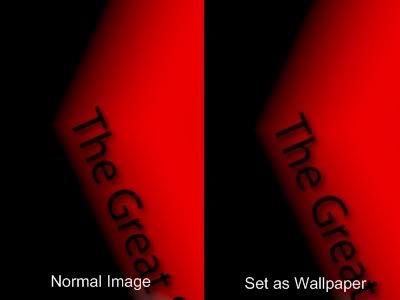
See how blurry the image is when set as wallpaper?

Reply #28 Thursday, October 22, 2009 6:13 AM
oh i wondered why my .dreams looked so nice on my media player and yet are suddenly lighter when i use as wallpaper - spoils the effect

Reply #29 Thursday, October 22, 2009 8:09 AM
Right click on your desktop and choose the control panel for your videocard and set the video gamma down a little until it's to your liking.

Reply #30 Thursday, October 22, 2009 8:39 AM
I have never used that method to set a wallpaper....they're always altered to jpg format if so done. [not just in Vista].
windows\web\wallpaper\ is where you [should] put all your walls....made full-size to your screen res...and in BMP format.
Always done it that way....probably always will...

Reply #31 Thursday, October 22, 2009 8:56 AM
I always apply thru the Personalization Window...BUT I set mine up different....it's worked well over the years having had several different display sizes. I also save the files in the same format I rec'd them or if i resize/change I go lossless.
MyWallpapers----->
>Fullscreen ---->1024x768, 1152x864, 1280x960, 1600x1200, Others
>Widescreen--->1280x800, 1440,900, 1680x1050, 1920x1200, Others
>Abortions----->1280x1024, Others
>Dualscreen
>Tiles
currently at 2,720 files
Please login to comment and/or vote for this skin.
Welcome Guest! Please take the time to register with us.
There are many great features available to you once you register, including:
- Richer content, access to many features that are disabled for guests like commenting on the forums and downloading skins.
- Access to a great community, with a massive database of many, many areas of interest.
- Access to contests & subscription offers like exclusive emails.
- It's simple, and FREE!
|
|
Page 2 of 2 | |
|
|---|
Reply #21 Sunday, July 13, 2008 10:57 PM
So, I guess we must deduct.. right click > Set as Background.. doesnt work worth a crap in Vista.
No Vista here; what results do you get changing walls with WB config, it is suppose to be better than thru Windows settings.