






































"My computer icon"
Saturday, May 31, 2008 by nico33bx | Discussion: Stardock Support General
Hello,
The "my computer" icon doesn't work correctly : I can't have the poperties of it. If I do a right click on it, I have the properties of the shorcut instead of the properties of my computer.
How fix it ?
thanks
The "my computer" icon doesn't work correctly : I can't have the poperties of it. If I do a right click on it, I have the properties of the shorcut instead of the properties of my computer.
How fix it ?
thanks
Bichur
Reply #3 Sunday, June 1, 2008 1:25 PM
As in:
ObjectBar? trial or paid?
or
ObjectDock? free or plus?
or
Bar created with DesktopX? trial or paid?

Reply #3 Sunday, June 1, 2008 1:25 PM
On the stardock bar
As in:
ObjectBar? trial or paid?
or
ObjectDock? free or plus?
or
Bar created with DesktopX? trial or paid?
Bichur
Reply #5 Sunday, June 1, 2008 10:30 PM
Reply #5 Sunday, June 1, 2008 10:30 PM
I'm using the freeloader version...
I dragged my off the dock... and created another 2 ways:
1st by right click the dock and adding a new shortcut, then in the window next to link, used the drop down and chose 'My Computer'
2nd by dragging 'My Computer off the start menu onto the dock
either way the end result was: right clicking the icon then choosing properties (not dock entry properties) = worked fine
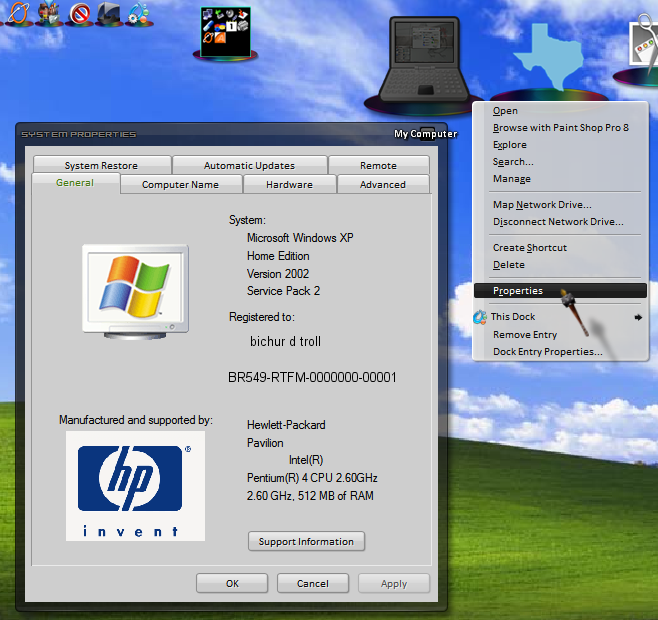
I dragged my off the dock... and created another 2 ways:
1st by right click the dock and adding a new shortcut, then in the window next to link, used the drop down and chose 'My Computer'
2nd by dragging 'My Computer off the start menu onto the dock
either way the end result was: right clicking the icon then choosing properties (not dock entry properties) = worked fine
nico33bx
Reply #6 Monday, June 2, 2008 7:35 AM
Reply #6 Monday, June 2, 2008 7:35 AM
Hello,
Thank you for your help, but it doesn't works on mine.
I have only the 3 last commands, that you can see in the bottom of the context menu.
I think I already have this problem but I don't remember how to fix it.
Or maybe is due to the SP3 of windows ?
I don't know...
Nicolas
Thank you for your help, but it doesn't works on mine.
I have only the 3 last commands, that you can see in the bottom of the context menu.
I think I already have this problem but I don't remember how to fix it.
Or maybe is due to the SP3 of windows ?
I don't know...
Nicolas
Bichur
Reply #7 Monday, June 2, 2008 6:40 PM
Reply #7 Monday, June 2, 2008 6:40 PM
limited account or admin account?
maybe, I don't know. I'm on rural dialup and the auto windows update won't be done until next year sometime.
Or maybe is due to the SP3 of windows ?
maybe, I don't know. I'm on rural dialup and the auto windows update won't be done until next year sometime.
Cavan1
Reply #8 Monday, June 2, 2008 8:12 PM
SP3 here, no problems with My Computer. OD Plus.
I would suggest an uninstall/reinstall of OD.
That sounds like a docklet.

Reply #8 Monday, June 2, 2008 8:12 PM
Or maybe is due to the SP3 of windows ?
SP3 here, no problems with My Computer. OD Plus.
I would suggest an uninstall/reinstall of OD.
I have only the 3 last commands, that you can see in the bottom of the context menu.
That sounds like a docklet.
Bichur
Reply #10 Tuesday, June 3, 2008 9:58 PM
hmmm
how did you add the shortcut?
Reply #10 Tuesday, June 3, 2008 9:58 PM
That sounds like a docklet.
hmmm
how did you add the shortcut?
messiah1
Reply #12 Wednesday, June 4, 2008 4:04 PM


Reply #12 Wednesday, June 4, 2008 4:04 PM
I'm on rural dialup and the auto windows update won't be done until next year sometime.

vStyler
Reply #13 Wednesday, June 4, 2008 7:23 PM
Is that slower than Metro dial up?
Nice WB Bichur

Reply #13 Wednesday, June 4, 2008 7:23 PM
rural dialup
Is that slower than Metro dial up?

Nice WB Bichur

Bichur
Reply #14 Wednesday, June 4, 2008 9:04 PM
Drag it all the way off the dock and let go.
right click the dock and add a new shortcut, in the links dropdown choose 'my computer
or
drag it off the startmenu onto the dock
see if that works
Yes it is
Reply #14 Wednesday, June 4, 2008 9:04 PM
After reinstall, it's already here.
Drag it all the way off the dock and let go.
right click the dock and add a new shortcut, in the links dropdown choose 'my computer
or
drag it off the startmenu onto the dock
see if that works
Nice WB Bichur
Yes it is

Bichur
Reply #15 Wednesday, June 4, 2008 9:06 PM
dude, I'm one step up from a party line with a connection speed of either 26.4kbps or 24.0kbps
on the other hand, takes at least 3 days to get a virus
Reply #15 Wednesday, June 4, 2008 9:06 PM
Is that slower than Metro dial up?
dude, I'm one step up from a party line with a connection speed of either 26.4kbps or 24.0kbps
on the other hand, takes at least 3 days to get a virus

Please login to comment and/or vote for this skin.
Welcome Guest! Please take the time to register with us.
There are many great features available to you once you register, including:
- Richer content, access to many features that are disabled for guests like commenting on the forums and downloading skins.
- Access to a great community, with a massive database of many, many areas of interest.
- Access to contests & subscription offers like exclusive emails.
- It's simple, and FREE!
Reply #1 Saturday, May 31, 2008 1:50 PM