






































Icon Packager messes up icons for file types
Saturday, April 26, 2008 by vogliadicane | Discussion: Object Desktop
Each time I updated icon packager the icons for file types are completely messed up (e.g. jpg icon for configuration settings (.ini)). Almost no icon is still correct. This has happened for the third time now. Anybody experiencing this too?
Bichur
Reply #2 Thursday, May 1, 2008 5:01 PM

Reply #2 Thursday, May 1, 2008 5:01 PM
set the icons back to default in setting and see if those are okay
if so, then try changing them again
have your tried the repair option? rebuild option?
if so, then try changing them again
have your tried the repair option? rebuild option?
CobraA1
Reply #3 Thursday, May 1, 2008 5:52 PM

Reply #3 Thursday, May 1, 2008 5:52 PM
Same here - except that since I'm running 64 bit Vista, I can't get into IP at all to do all of the rebuild stuff  . Help?!
 . Help?!
CobraA1
Reply #4 Thursday, May 1, 2008 6:08 PM
Reply #4 Thursday, May 1, 2008 6:08 PM
Found where the icon cache is (.AppData) and ran SFC. A restart later, I'm doing great. Seriously - check the program for compatibility before installing it, and check any system files you change for compatibility before replacing them.
vogliadicane
Reply #5 Friday, May 2, 2008 6:04 AM

Reply #5 Friday, May 2, 2008 6:04 AM
thanks bichur for suggestions. set to default was ok, repair and rebuild didn´t do anything. Tried to start from scratch and there (I guess) I found the reason.
I´m always starting with the Aero Iconset of Josephs. I deleted it, downloaded it again from the site here and installed it again. And that´s what came out:
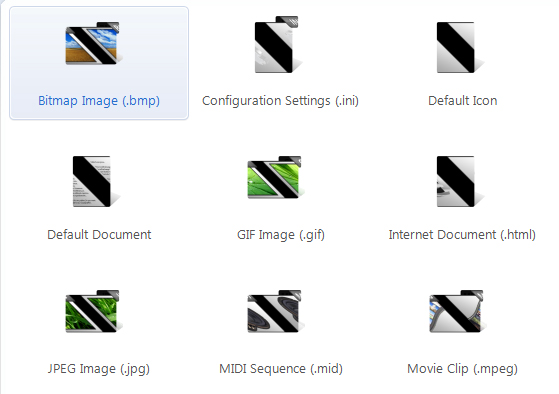
The shapes seem to be ok but the content is somehow Z-shaped distorted (every icon). I had that problem before (after some update of Iconpackager) but after another update it was ok again. So now I guess the iconpack is corrupt somehow, but it could also be that two independent problems come together.
For me to sort out where it comes from, could someone check this iconpack if it works for him? I would MUCH appreciate any help!
You find it here:
WWW Link
I´m always starting with the Aero Iconset of Josephs. I deleted it, downloaded it again from the site here and installed it again. And that´s what came out:
The shapes seem to be ok but the content is somehow Z-shaped distorted (every icon). I had that problem before (after some update of Iconpackager) but after another update it was ok again. So now I guess the iconpack is corrupt somehow, but it could also be that two independent problems come together.
For me to sort out where it comes from, could someone check this iconpack if it works for him? I would MUCH appreciate any help!
You find it here:
WWW Link
vogliadicane
Reply #6 Friday, May 2, 2008 6:10 AM
could you solve to get IP running again or also the problem of wrong file icons?
Reply #6 Friday, May 2, 2008 6:10 AM
Found where the icon cache is (.AppData) and ran SFC. A restart later, I'm doing great....
could you solve to get IP running again or also the problem of wrong file icons?
milksama
Reply #8 Friday, May 2, 2008 5:29 PM

Reply #8 Friday, May 2, 2008 5:29 PM
vogliadicane: That is quite a unique issue. Seems to be reproducable though as I'm seeing the same thing here on my vista 32-bit ultimate pc.
I am contacting the developers about this.
Mike
kromiumsun
Reply #10 Sunday, July 27, 2008 3:09 PM

Reply #10 Sunday, July 27, 2008 3:09 PM
Ran into a similar issue with one of my icon sets on Vista, only a few were 'corrupted' in the same way - I opened the set up in package builder and went to the selected icons and opened from there in Icon Developer and found the Vista 256px. icon size reported as 255x255 pixels (?!). May be a bug from having made the icon set on my other PC running XP, anyhow I deleted the icon and made a new Vista compatible icon from Icon Developer on Vista, and that seemed to solve the problem.
vogliadicane
Reply #11 Thursday, July 31, 2008 3:10 PM
Reply #11 Thursday, July 31, 2008 3:10 PM
the messing up of icons is still there, btw. I did everything mentioned here, uninstalled-reinstalled-started with default vista icon pack...
I´m working on some iconpack now but each time I save it some more icons are wrong, so I better stop working on it right now- no chance.
Do I have to delete certain files manually after uninstall?
I´m working on some iconpack now but each time I save it some more icons are wrong, so I better stop working on it right now- no chance.
Do I have to delete certain files manually after uninstall?
Please login to comment and/or vote for this skin.
Welcome Guest! Please take the time to register with us.
There are many great features available to you once you register, including:
- Richer content, access to many features that are disabled for guests like commenting on the forums and downloading skins.
- Access to a great community, with a massive database of many, many areas of interest.
- Access to contests & subscription offers like exclusive emails.
- It's simple, and FREE!
Reply #1 Saturday, April 26, 2008 4:32 AM