




































Pirate theme issue...
Thursday, April 24, 2008 by Moteo | Discussion: Stardock Support General
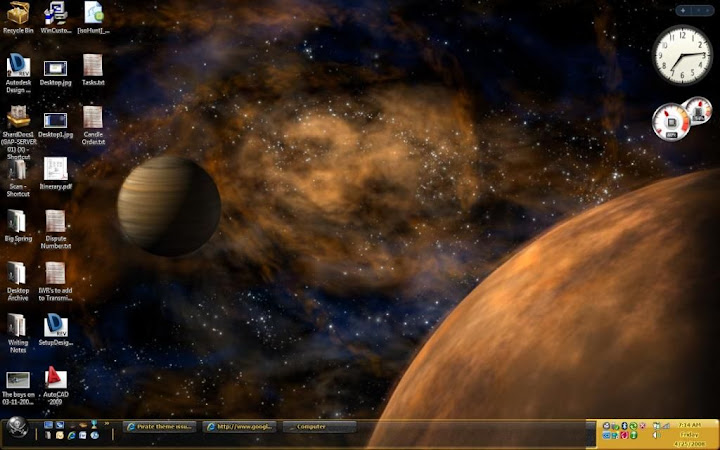
I like the pirate theme. However, the bottom-right section of the taskbar, the section that tells the date and holds the notification icons, is not transparent like the rest of the taskbar. I've tried to look past it, but the sharp difference in color is becoming too much. Is there an update to the theme? I only bought it a couple days ago. The other themes seem to work okay.
Thanks,
Paul
Moteo
Reply #2 Friday, April 25, 2008 8:29 AM
Reply #2 Friday, April 25, 2008 8:29 AM
Mine is transparent in the middle and left sections. I'm running Vista Ultimate, and I applied it through Theme Manager.
Thanks for your help,
-Paul
Thanks for your help,
-Paul
PixelPirate
Reply #4 Friday, April 25, 2008 9:04 AM

Reply #4 Friday, April 25, 2008 9:04 AM
It's not even supposed to be transparent at default, so my guess is your doing that through WindowBlinds and the system tray isn't affected or something else is messed up.
ZubaZ
Reply #5 Friday, April 25, 2008 9:05 AM

Reply #5 Friday, April 25, 2008 9:05 AM
Are you running any other customizations?
Do you run Windowblinds and had selected teh Vista-tize option?
Do you run Windowblinds and had selected teh Vista-tize option?
Lantec
Reply #6 Friday, April 25, 2008 9:06 AM

Reply #6 Friday, April 25, 2008 9:06 AM
You must have Windowblinds set to use transparent taskbar. The skin is not supposed to have a transparent taskbar.
Check..... Windowblinds Config> Transparency & Blur> I want to change how the taskbar looks> Set to Skin DeFault
edit: typed too slow
Check..... Windowblinds Config> Transparency & Blur> I want to change how the taskbar looks> Set to Skin DeFault
edit: typed too slow
Moteo
Reply #7 Friday, April 25, 2008 10:39 AM
Reply #7 Friday, April 25, 2008 10:39 AM
I don't have any other custimizations except for the dream scene running in the background. Also, the Pirate theme isn't showing up in Windowblinds. I'm thoroughly confused.
-Paul
-Paul
Lantec
Reply #8 Friday, April 25, 2008 11:15 AM
This is a universal setting.........even if the Pirate Theme is not showing check the setting.
Reply #8 Friday, April 25, 2008 11:15 AM
Check..... Windowblinds Config> Transparency & Blur> I want to change how the taskbar looks> Set to Skin DeFault
This is a universal setting.........even if the Pirate Theme is not showing check the setting.
canmandeco
Reply #9 Friday, April 25, 2008 11:46 AM
Then re-apply the Pirate theme through Theme Manager.

Reply #9 Friday, April 25, 2008 11:46 AM
This is a universal setting.........even if the Pirate Theme is not showing check the setting.
Then re-apply the Pirate theme through Theme Manager.
Moteo
Reply #10 Friday, April 25, 2008 12:00 PM
Reply #10 Friday, April 25, 2008 12:00 PM
I just received an email from stardock about re-downloading the theme through My Colors. Once I did that and re-applied the theme, it fixed itself. The bar is completely solid along the bottom. Thank you all for your help in getting that fixed. Now, if we can just convince stardock to make the bar transparent to add to the cool factor...
Also, someone should make a dream so that the supplied Pirate's Flag wallpaper blows in the wind. That would be sweet. Also, they should make the water in the other supplied wallpaper shimmer. Man, I wish I knew how to make those dreams; I would like to give it a shot myself.
Thanks again,
Paul
Also, someone should make a dream so that the supplied Pirate's Flag wallpaper blows in the wind. That would be sweet. Also, they should make the water in the other supplied wallpaper shimmer. Man, I wish I knew how to make those dreams; I would like to give it a shot myself.
Thanks again,
Paul
DorkCoffeez
Reply #11 Tuesday, April 29, 2008 11:28 PM

Reply #11 Tuesday, April 29, 2008 11:28 PM
Anytime! However I do recall some fantasic artist DID make a flag dream for this.... Hrm....I'll look into it.
Likely you had a predated theme manager that was casuing the trouble. However for anyone else reading this in the WindowBlinds settings (that can now affect MyColors) there is a transparent tool bar tool in your settings menu. If this is run after the MyColors is applied it will affect the settings.
Likely you had a predated theme manager that was casuing the trouble. However for anyone else reading this in the WindowBlinds settings (that can now affect MyColors) there is a transparent tool bar tool in your settings menu. If this is run after the MyColors is applied it will affect the settings.
Please login to comment and/or vote for this skin.
Welcome Guest! Please take the time to register with us.
There are many great features available to you once you register, including:
- Richer content, access to many features that are disabled for guests like commenting on the forums and downloading skins.
- Access to a great community, with a massive database of many, many areas of interest.
- Access to contests & subscription offers like exclusive emails.
- It's simple, and FREE!
Reply #1 Thursday, April 24, 2008 2:22 PM
Applying through MyColors?
I didn't think there was transparency in that taskbar.
Screenshots here:
https://www.stardock.com/products/mycolors/gallery.asp?p=pirate
Vista:
Can you post your screenshot?