




































Help with Icon alinement
Systray wrong movement
Friday, March 21, 2008 by aceuk | Discussion: Object Desktop
H i
i
I am having a problem with the sys tray not displaying icons and its black and icons not sitting correctly on the taskbar.
Please see the pics and look at the area bottom left :-
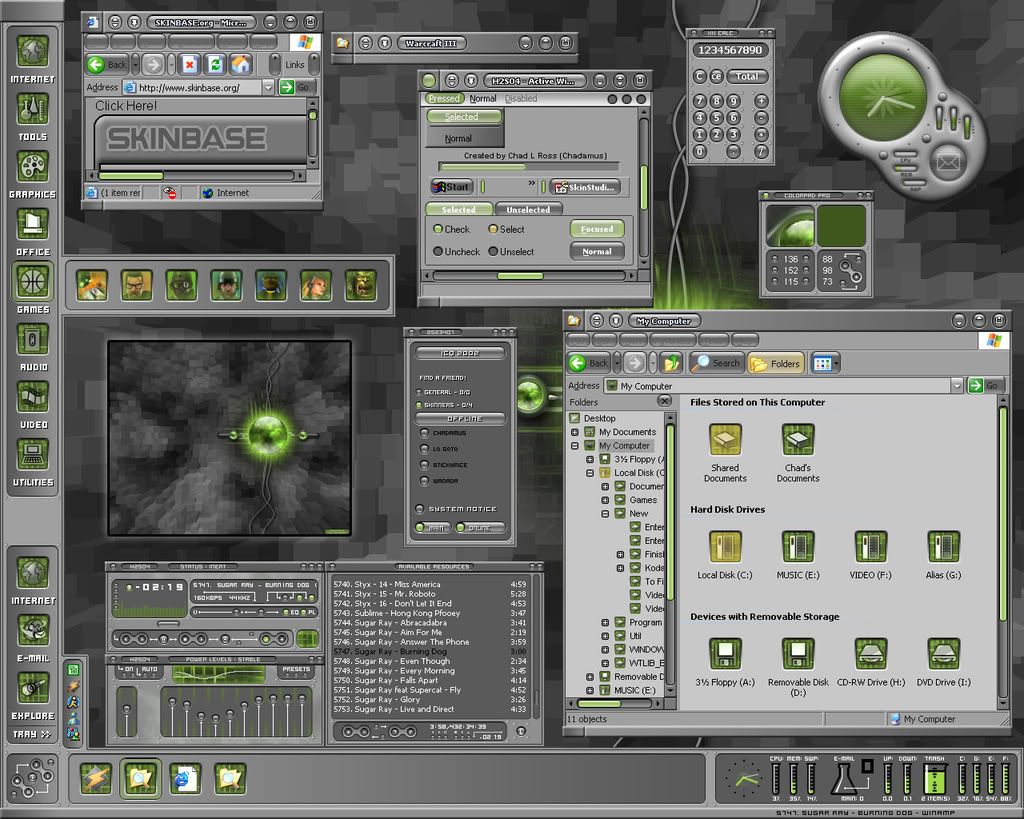
My Screen above.
As it should be.
Can anyone help.
Thanx
Bichur
Reply #3 Tuesday, March 25, 2008 8:49 PM

Reply #3 Tuesday, March 25, 2008 8:49 PM
SDMCP.EXE is what pulls the systray info from the systray and lets DesktopX show it
check under processess in TaskManager
or if you're using StarDock Central browser (aka SDC) open it,
tools > settings > then in the left pane: Settings > general = then on the right under general: check 'enable mcp notification area support'
and... what's your operating system? xp? vista? x32? x64?
check under processess in TaskManager
or if you're using StarDock Central browser (aka SDC) open it,
tools > settings > then in the left pane: Settings > general = then on the right under general: check 'enable mcp notification area support'
and... what's your operating system? xp? vista? x32? x64?
Bichur
Reply #5 Friday, March 28, 2008 2:34 PM
where?
SDC? and is it checked?
Taskmanager?
Reply #5 Friday, March 28, 2008 2:34 PM
Sdmcp is there.I have XP-32
where?
SDC? and is it checked?
Taskmanager?
Bichur
Reply #6 Friday, March 28, 2008 8:45 PM
Reply #6 Friday, March 28, 2008 8:45 PM
I think I found it...
switch to builder mode - right click the tray - properties
click the 'change' button in general tab - set the icon offset between 0-5
switch to builder mode - right click the tray - properties
click the 'change' button in general tab - set the icon offset between 0-5
aceuk
Reply #7 Saturday, March 29, 2008 1:08 PM
Reply #7 Saturday, March 29, 2008 1:08 PM
Progress has been made.The icons are now on show.
If i exit a program so the icon disapears the tray reduces in size but from the bottom up .How do I get the bottom in a fixed possition and the top to move.
Why is the background black ,it's like they have been pasted on the tray.
And if you look at the pics (pink circle) see how it blends in and on mine it does'nt.
Thanx for your time and effort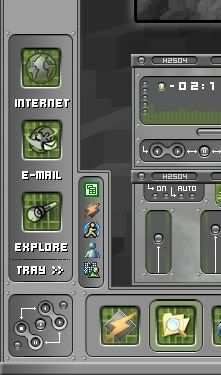
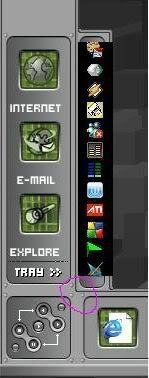
The pic with pink circle is mine and not how it should be
If i exit a program so the icon disapears the tray reduces in size but from the bottom up .How do I get the bottom in a fixed possition and the top to move.
Why is the background black ,it's like they have been pasted on the tray.
And if you look at the pics (pink circle) see how it blends in and on mine it does'nt.
Thanx for your time and effort
The pic with pink circle is mine and not how it should be
Bichur
Reply #8 Saturday, March 29, 2008 1:13 PM
Reply #8 Saturday, March 29, 2008 1:13 PM
give me a minute - gotta run it again (and it's at the wrong resolution for me - I'm locked at 1024x768)
Bichur
Reply #10 Saturday, March 29, 2008 2:09 PM
Reply #10 Saturday, March 29, 2008 2:09 PM
states tab
advanced
set horiz & vert to stretch
vertical margins - set top and bottom to about 15
use ctrl+mouse drag to set it where you want it to appear
advanced
set horiz & vert to stretch
vertical margins - set top and bottom to about 15
use ctrl+mouse drag to set it where you want it to appear

Bichur
Reply #12 Saturday, March 29, 2008 2:17 PM
crap... I'll probably crash again... be patient.. notice the time from #9 to #10
Reply #12 Saturday, March 29, 2008 2:17 PM
If i exit a program so the icon disapears the tray reduces in size but from the bottom up
crap... I'll probably crash again... be patient.. notice the time from #9 to #10
Bichur
Reply #13 Saturday, March 29, 2008 3:09 PM
Reply #13 Saturday, March 29, 2008 3:09 PM
I can no longer find the direction options
used to be an option for direction expansion
one possible way I find, it to rotate 180 (gotta redo the bmp and flip it 180 1st) - only trouble is icons get blurry and they're upside down
you're gonna have to wait for a dtx skinner to come along for this one
used to be an option for direction expansion
one possible way I find, it to rotate 180 (gotta redo the bmp and flip it 180 1st) - only trouble is icons get blurry and they're upside down
you're gonna have to wait for a dtx skinner to come along for this one
aceuk
Reply #14 Sunday, March 30, 2008 4:54 AM
Reply #14 Sunday, March 30, 2008 4:54 AM
Hi
What a difference a few numbers make .
Vert margins were on 13/12 changed to 15 and the black background is gone.
Do you know how I can make the icons appear central in the bar as they are closer to one side.
Also any ideas on how to solve the problem shown in the pink circle .Systray corner over lapping and not blending in.
What a difference a few numbers make .
Vert margins were on 13/12 changed to 15 and the black background is gone.
Do you know how I can make the icons appear central in the bar as they are closer to one side.
Also any ideas on how to solve the problem shown in the pink circle .Systray corner over lapping and not blending in.
aceuk
Reply #15 Sunday, March 30, 2008 5:19 AM
Reply #15 Sunday, March 30, 2008 5:19 AM
I have managed to solve the problem in the pink circle.It all blends together now.
The main issue is if i open a program and it adds a icon to the tray it expands from the bottom going down where it should expand from the top going up.Same thing happens if i exit a program the trat shrinks from the bottom and not the top.
The main issue is if i open a program and it adds a icon to the tray it expands from the bottom going down where it should expand from the top going up.Same thing happens if i exit a program the trat shrinks from the bottom and not the top.
Bichur
Reply #16 Sunday, March 30, 2008 10:56 AM
...
general tab...click 'change'= icon offset = set at 0
yes
OR
general tab - change - put a check in 'fixed size'
then = in summary tab = set height to about 150 (or what works for you){just click on the 'value' already set and you can put what you want} == that will lock the height and when you have too many icons to fit you will get up and down scroll arrowss
Reply #16 Sunday, March 30, 2008 10:56 AM
...
Do you know how I can make the icons appear central in the bar as they are closer to one side.
general tab...click 'change'= icon offset = set at 0
The main issue is if i open a program and it adds a icon to the tray it expands from the bottom going down where it should expand from the top going up.Same thing happens if i exit a program the trat shrinks from the bottom and not the top.
yes
I can no longer find the direction options
used to be an option for direction expansion
one possible way I find, it to rotate 180 (gotta redo the bmp and flip it 180 1st) - only trouble is icons get blurry and they're upside down
you're gonna have to wait for a dtx skinner to come along for this one
used to be an option for direction expansion
one possible way I find, it to rotate 180 (gotta redo the bmp and flip it 180 1st) - only trouble is icons get blurry and they're upside down
you're gonna have to wait for a dtx skinner to come along for this one
OR
general tab - change - put a check in 'fixed size'
then = in summary tab = set height to about 150 (or what works for you){just click on the 'value' already set and you can put what you want} == that will lock the height and when you have too many icons to fit you will get up and down scroll arrowss

Please login to comment and/or vote for this skin.
Welcome Guest! Please take the time to register with us.
There are many great features available to you once you register, including:
- Richer content, access to many features that are disabled for guests like commenting on the forums and downloading skins.
- Access to a great community, with a massive database of many, many areas of interest.
- Access to contests & subscription offers like exclusive emails.
- It's simple, and FREE!
Reply #1 Friday, March 21, 2008 9:02 PM