































Looking for Free FTP site
To complete Live Writer/Joe User combo
Saturday, March 1, 2008 by Alternate Setting | Discussion: Internet
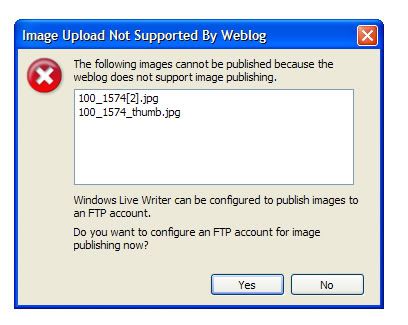
Apparently this is needed in order to upload images to Joe User, when using Windows Live Writer.
Thanks for any leads.

Reply #2 Saturday, March 1, 2008 11:27 AM



Reply #4 Saturday, March 1, 2008 12:04 PM
As far as I know from my brief experience, it only indicates using the FTP protocol to upload images to Joe User. Happy to be shown otherwise though.
Took a quick look at Photobucket and I would apparently need the pro version to access FTP. With ImageShack I think I would need to buy credits of some form to access their FTP service.
@ zakai - As it's the same site it would effectively be a double post. I have taken that route on an affiliated site though - so appreciate the thought, thanks.
(slaps self as realises this doubled up on forums.joeuser... oops.)
Keep 'em coming folks...

Reply #5 Saturday, March 1, 2008 12:24 PM

Reply #6 Saturday, March 1, 2008 12:31 PM
Just for background - screenshot from Live Writer re uploading images to Joe User.

Reply #7 Saturday, March 1, 2008 1:41 PM
Actually you don't need that to insert pictures. You can still add them with URLs from the web.
When you click on Insert>picture There's another tab up there that says "Insert Picture From the Web" click that, paste your URL and you're good to go.
So you can still host your personal photos on imageshack and photobucket...or one would assume.
~Zoo
Reply #8 Saturday, March 1, 2008 2:55 PM
Also another nod to Philly who was also on this track.
It's fetching the preview to the local draft - so it looks as if it should work (it does in Windows Live). Unfortunately with or without the image in the draft, Live Writer is presenting a server error at the moment when working with Joe User - so I can't test it out.
In theory this error should amend itself when changing from one ID to another - but it isn't correcting as it should.
Server Error 0 Occurred Object reference not set to an instance of an object.
N.B. I'd checked out the price of FTP on Photobucket and a Pro account is dirt cheap, so I'll set that up anyway and post back tomorrow.
Thanks all for your help.

Reply #9 Sunday, March 2, 2008 2:24 AM
FTP set up through Photobucket (Pro acct needed).
I still can't use draft facility with JoeUser, but can publish.
Using FTP upload of local images seems to work fine.
It's the 'direct' uploading of local images that requires the FTP protocol when working with JoeUser. It's just about streamlining the process - not a necessity. Using the 'Insert Picture from Web' button worked fine with JoeUser.
Note this isn't required with Window's Live Space account. With that you can upload local images without FTP or the use of the 'Insert Picture from Web' button.

Reply #10 Sunday, March 2, 2008 9:12 AM
JoeUser does not support direct uploading of images to the server. You'll need your own external site to host images on you want to insert into your blogs. At the moment we don't want to get into the job of hosting misc user images for blogs.
Alternatively, as Zoo pointed out you can "insert from web" and supply the direct URL to an image you want to use.
Reply #11 Sunday, March 2, 2008 12:05 PM
While Photobucket hosts the image(s) - once configured, there are no intermediate steps for the user. Local images may be inserted into Live Writer and then submitted along with any text for publishing. There is no need to be aware of the URL of any images submitted in this way.
Edit: I'd placed this all in the context of this thread being based on the use of an external image host - for use with the FTP facility.

Reply #12 Friday, March 7, 2008 2:55 PM
Please login to comment and/or vote for this skin.
Welcome Guest! Please take the time to register with us.
There are many great features available to you once you register, including:
- Richer content, access to many features that are disabled for guests like commenting on the forums and downloading skins.
- Access to a great community, with a massive database of many, many areas of interest.
- Access to contests & subscription offers like exclusive emails.
- It's simple, and FREE!
Reply #1 Saturday, March 1, 2008 10:56 AM
Apparently this is needed in order to upload images to Joe User, when using Windows Live Writer.
Thanks for any leads.
Ditto that request