





































Explorer Backgrounds
Sunday, February 17, 2008 by Frankief | Discussion: WindowBlinds
 |
|
Page 2 of 4 | |
|
|---|

Reply #22 Monday, February 18, 2008 8:55 PM
"One feature we particularly enjoyed from Windows 98 ™ on up was the ability to change the wallpaper of a folder as well as the text color of the icons in that folder. This would help make each folder easier to identify and would bring a personal touch to my PC.
As Windows XP ™ Home/Pro was released, many have realized that Microsoft had removed our ability to change wallpaper of our folders! Shortly after we realized the trouble on our machines, we got to work on a solution. We've found that Microsoft™ did not remove the ability to change the background and text color but instead hid the interface.
It's fairly simple for anyone to add wallpaper to a Windows XP ™ folder; however, it can get very tedious if done repeatedly. We've created a small freeware utility which handles all the hard work for you: Windowpaper XP!"
It's freeware, clean, no ads, no spy ware, been using it for years. Works great on XP.
Found here: WWW Link
Hopefully Windowblinds will someday have that feature for us XP die hards!

Reply #23 Monday, February 18, 2008 8:58 PM
Edit: was busy doing other things and had not refreshed the page to see that this had already been answered.

Reply #24 Thursday, February 21, 2008 10:03 AM
 Running just fine on XPPRO/SP2
Reply #25 Thursday, February 21, 2008 10:22 AM


Reply #27 Thursday, February 21, 2008 1:47 PM
Am using the opacity as I wright this on XP

This used to be a feature in WB back before Vista was a gleam in MS eye. Im glad to see it back
Reply #28 Sunday, February 24, 2008 11:31 AM
Reply #29 Sunday, February 24, 2008 11:56 AM
This is not designed to be a per folder setting though I believe if you have set a per folder background then it may override WB as WB does not use that method.
Unlike the WindowPaper app, the WB feature supports emulated transparency and applies to all folders.

Reply #30 Sunday, February 24, 2008 12:02 PM

Reply #31 Sunday, February 24, 2008 12:39 PM
Reply #32 Sunday, February 24, 2008 12:48 PM
When I use this setting and apply an explorer background then open up My Pictures (thumbnail view) everything looks ok. Then I close the folder, re-open the folder and half of my thumbnails look like they have an opaque screen over them. Go into WB6, reset defaults, go back to the open My Pics folder and the images still look screwed up until I close then re-open the pics folder.
I can readily reproduce this so if anyone else can I'll post it on the WB6.1 Beta Thread here
WINXP/PRO/SP2
WB6.1 Beta Thread
Cheers, f
Reply #33 Sunday, February 24, 2008 12:56 PM
Check if your My Pics folder thumbnails look like there is an opaque screen on them after aplying this setting. Have to open and close the folder to see the glitch.
1. apply explorer backgrond in wb61 beta
2. open my pics folder with thumbnail view
2. looks like half the images have opaque screens on them blurring the images
3. set explorer background back to default
4. close and reopen My Pics folder. back to normal
I can readily reproduce this so I'll post it here WB6.1 Beta Thread.
Have a great day! Cheers, f
Reply #34 Sunday, February 24, 2008 1:01 PM
Reply #35 Sunday, February 24, 2008 1:03 PM
Reply #36 Sunday, February 24, 2008 1:09 PM

Reply #37 Sunday, February 24, 2008 1:14 PM
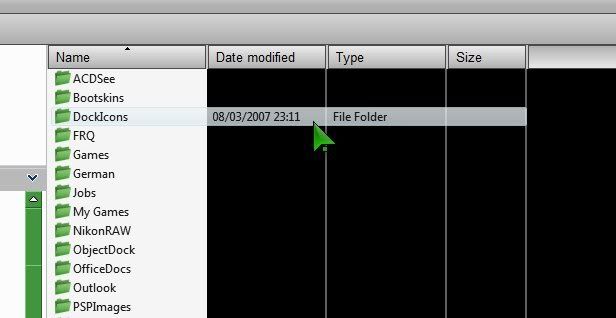
Example of what it looks like (cropped image)...

Reply #38 Sunday, February 24, 2008 1:15 PM


Reply #39 Sunday, February 24, 2008 4:49 PM
Reply #40 Sunday, February 24, 2008 5:52 PM
No preview pane, and dwm is running.
If I open up Explorer 'small', I get transparency (but not in all folders), but maximising the window turns the background black. I can drag the window to full size and transparency is there.
If I drag the cursor across the black, transparency appears in the selected area.
Please login to comment and/or vote for this skin.
Welcome Guest! Please take the time to register with us.
There are many great features available to you once you register, including:
- Richer content, access to many features that are disabled for guests like commenting on the forums and downloading skins.
- Access to a great community, with a massive database of many, many areas of interest.
- Access to contests & subscription offers like exclusive emails.
- It's simple, and FREE!
|
|
Page 2 of 4 | |
|
|---|
Reply #21 Monday, February 18, 2008 8:40 PM
I guess XP users will be reaping the benefits of Vista development soon.