































Logons not working
Help
Monday, January 21, 2008 by booberry2765 | Discussion: LogonStudio
I'm new at this stuff,,,and I can't get my logons to work. I have tried everything I read in the forums with other people with the same problem.I click on the file and logon studio opens but the new file is not showing in the list...Even Boss's don't work..The files are logonxp,I tried to change to zip and they won,t unzip????Help please
Philly0381
Reply #2 Thursday, February 7, 2008 2:06 PM

Reply #2 Thursday, February 7, 2008 2:06 PM
What OS are you using booberry2765 and Zackraa? I'm on XP and have no problem, I know that's not an answer to your problems. How are you downloading? I have a WC subscription so I use the WC browser.
EDIT: Just to make sure everything was working okay I just downloaded a logon skin. Worked fine using WC Browser, showed up in LogonStudio.
EDIT: Just to make sure everything was working okay I just downloaded a logon skin. Worked fine using WC Browser, showed up in LogonStudio.
Zackraa
Reply #3 Thursday, February 7, 2008 2:21 PM
Reply #3 Thursday, February 7, 2008 2:21 PM
I'm on Windows XP SP2 and I'm downloading them through firefox but that can't be the problem because saving them straight to my hard drive then loading them from there into the program doesn't work either
Philly0381
Reply #4 Thursday, February 7, 2008 2:24 PM
Reply #4 Thursday, February 7, 2008 2:24 PM
Zackraa have you tried sending them to the desktop, right clicking and opening with LogonStudio? I've never used FF or IE in fact to download anything from the WC site.
Zackraa
Reply #5 Thursday, February 7, 2008 2:36 PM
Reply #5 Thursday, February 7, 2008 2:36 PM
yes I mentioned that in my above post attempting to load them using the program itself
Philly0381
Reply #6 Thursday, February 7, 2008 2:41 PM
Reply #6 Thursday, February 7, 2008 2:41 PM
Well there has to be an easy answer to this. I know I'm in the minority by using the WC Browser, so folks using FF and IE have figured this out.
I'm going to try and download a logon with IE. I'll post back.
EDIT: Okay just used IE, don't have FF, and downloaded a logon skin. I selected open, it downloaded and LogonStudio opened, and it was there. Maybe FF is the problem, not sure.
I'm going to try and download a logon with IE. I'll post back.
EDIT: Okay just used IE, don't have FF, and downloaded a logon skin. I selected open, it downloaded and LogonStudio opened, and it was there. Maybe FF is the problem, not sure.
Zackraa
Reply #7 Thursday, February 7, 2008 3:00 PM
Reply #7 Thursday, February 7, 2008 3:00 PM
I've done said this
1. tried through FF it failed
2. opened from my desktop it failed
3. selected load in log on studio and it still failed
logon studio is corrupt I've reinstalled etc. not to mention downloading it brand new from here
I'm pretty sure its completely free so it couldn't have expired =\
1. tried through FF it failed
2. opened from my desktop it failed
3. selected load in log on studio and it still failed
logon studio is corrupt I've reinstalled etc. not to mention downloading it brand new from here
I'm pretty sure its completely free so it couldn't have expired =\
Philly0381
Reply #8 Thursday, February 7, 2008 3:07 PM
Reply #8 Thursday, February 7, 2008 3:07 PM
Zackraa, have you given IE a try? Could there be setting in FF that need to be changed?
Sorry, can't agree with you that LogonStudio is corrupt, but having said that, how did you download LogonStudio? FF or are you using Stardock Central? Maybe FF is doing something to corrupt the download of LogonStudio.
Yes, LogonStudio is free.
Sorry, can't agree with you that LogonStudio is corrupt, but having said that, how did you download LogonStudio? FF or are you using Stardock Central? Maybe FF is doing something to corrupt the download of LogonStudio.
Yes, LogonStudio is free.
Zackraa
Reply #9 Thursday, February 7, 2008 3:24 PM
Reply #9 Thursday, February 7, 2008 3:24 PM
well it was working to begin with I loaded three logons into it and I left my logon the same for a very long time but recently when I went to load a new one it failed
my logon xp is corrupt it became corrupt at some point and I do not know why or how to fix it
and no IE doesn't work either I've seen 4 or 5 people on here with the same poblem everyone either ignores them or they say "uninstall reinstall"
my logon xp is corrupt it became corrupt at some point and I do not know why or how to fix it
and no IE doesn't work either I've seen 4 or 5 people on here with the same poblem everyone either ignores them or they say "uninstall reinstall"

Philly0381
Reply #11 Thursday, February 7, 2008 3:38 PM
Reply #11 Thursday, February 7, 2008 3:38 PM
Well I tried to help, WC Browser does work, IE7 does work. Not every computer is the same, I know you know that. People will load other programs that will interfer but will fail to mention that. Things like browser addons can cause problems also. Why does LogonStudio work for some and not others, don't know.
If you haven't I would send an email to [email protected] and start a ticket.
Now that is a new wrinkle that you didn't mention before.
If and when you email support try to include every piece of information. It will go along way in helping them solve you problem. I hope you get an answer that corrects you problem.
If you haven't I would send an email to [email protected] and start a ticket.
my logon xp is corrupt it became corrupt at some point and I do not know why or how to fix it
Now that is a new wrinkle that you didn't mention before.
If and when you email support try to include every piece of information. It will go along way in helping them solve you problem. I hope you get an answer that corrects you problem.
misterpariah
Reply #12 Friday, March 7, 2008 10:41 AM
Reply #12 Friday, March 7, 2008 10:41 AM
I seem to be have the same (or similar) problem. I have 3 options for my logon screen and I can't add any new ones. I've downloaded a few...all extensions are .logonxp. I've tried loading them with Logonstudio, double clicking the .logonxp file and right clicking the logonxp file and opening with Logonstudio. None of these methods seem to work.
I tried that and this is what I got...
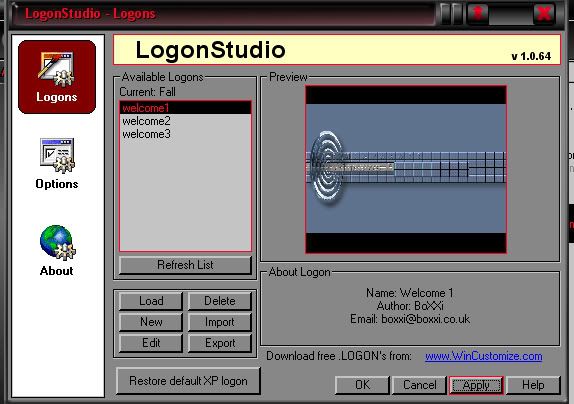
Every time I try to load a new file it is shown as "Current" but when I hit apply I end up with "welcome1"
I've tried refreshing the list, clicking OK etc. but I'm stuck with the 3 original welcome logons (which all work by the way).
WWW Linktry this one just downloaded with FF double click loaded direct into Logonstudio
I tried that and this is what I got...
Every time I try to load a new file it is shown as "Current" but when I hit apply I end up with "welcome1"
I've tried refreshing the list, clicking OK etc. but I'm stuck with the 3 original welcome logons (which all work by the way).
Philly0381
Reply #13 Friday, March 7, 2008 10:46 AM
Reply #13 Friday, March 7, 2008 10:46 AM
If you can try another browser. I use SDC and it's web browser and have no problems. 

Please login to comment and/or vote for this skin.
Welcome Guest! Please take the time to register with us.
There are many great features available to you once you register, including:
- Richer content, access to many features that are disabled for guests like commenting on the forums and downloading skins.
- Access to a great community, with a massive database of many, many areas of interest.
- Access to contests & subscription offers like exclusive emails.
- It's simple, and FREE!
Reply #1 Thursday, February 7, 2008 2:00 PM
I've uninstalled and... reinstalled this is getting annoying I want a new log on please someone respond with a logical answer