






































Make your desktop never be blocked by messy icons
Freeware: 8start Launcher
Friday, January 18, 2008 by Andygoh | Discussion: Customization Software
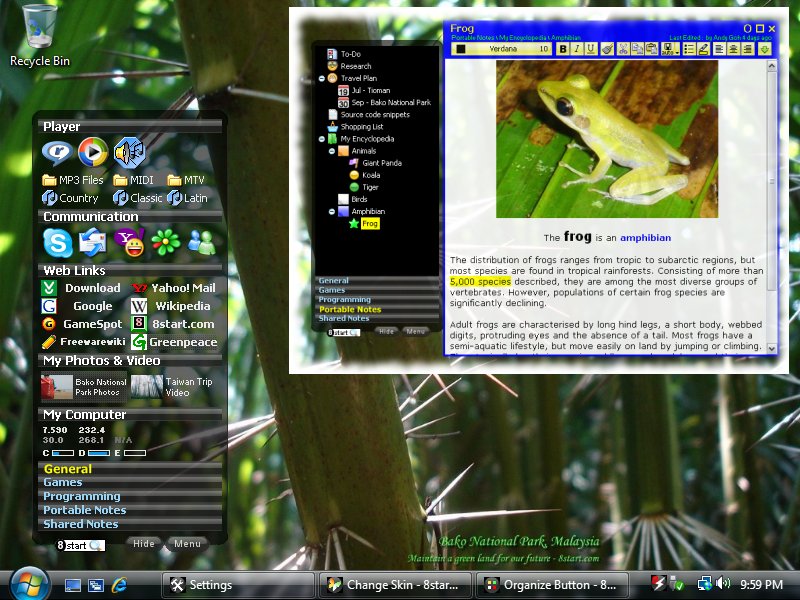
I like to have beautiful and customize desktop also, but too many icons make my desktop look messy, and block my beautiful wallpaper..
My little contribution to make the desktop clean and launch the application fast and easy....

Skinable, portable, customizable and free. Share with you
Any suggestions and comments are welcome!
WWW Link
Andygoh
Reply #2 Saturday, January 19, 2008 3:42 AM
Reply #2 Saturday, January 19, 2008 3:42 AM
8start Launcher is a little different, as it have 2 level of categories, and can customize the look of individual shortcut like label, font, use png picture as shortcut icon...and most important, it launch your application fast..
Bebi Bulma
Reply #3 Saturday, January 19, 2008 3:45 AM

Reply #3 Saturday, January 19, 2008 3:45 AM
ObjectDock can do that too, plus a lot more (tabs, docklets, flyouts, etc). 
HG_Eliminator
Reply #4 Saturday, January 19, 2008 9:36 AM

Reply #4 Saturday, January 19, 2008 9:36 AM
I must say a nifty looking prog and a kind offering to the community.
Welcome to WC.
Welcome to WC.
BoXXi
Reply #5 Saturday, January 19, 2008 10:29 AM
Reply #5 Saturday, January 19, 2008 10:29 AM
I think it looks very cool. It's always good to have more skinnable apps, not everyone likes Object Dock..... I never use it personally.
Good work Andygoh, thank you for sharing your hard work with us!!
Good work Andygoh, thank you for sharing your hard work with us!!
Andygoh
Reply #6 Saturday, January 19, 2008 6:56 PM
Reply #6 Saturday, January 19, 2008 6:56 PM
HG Eliminator and BoXXi, thanks for your kind comments. I will keep on improve 8start Launcher... 
Not because I am author of 8start Launcher, I still fell that 8start Launcher is useful and efficient compare with others...

Not because I am author of 8start Launcher, I still fell that 8start Launcher is useful and efficient compare with others...
vStyler
Reply #7 Saturday, January 19, 2008 7:37 PM

Reply #7 Saturday, January 19, 2008 7:37 PM
I probably wont use it but thankyou for your efforts regardless and welcome.
Philly0381
Reply #8 Saturday, January 19, 2008 7:43 PM

Reply #8 Saturday, January 19, 2008 7:43 PM
I agree with the others, appreciate you letting us see it, but I already us ObjectDock and I am getting ready to start using RightClick.
GhoS
Reply #9 Monday, January 28, 2008 11:41 AM

Reply #9 Monday, January 28, 2008 11:41 AM
I have an easier way not to have icons on the desktop, don't have install programs put them there. And if you can't stop them you delete them right afterwords. I never use icons on my desktop, to me it is one of the strangest habits people get into on a pc. You can't access them very easily when you are working. Sure there is the show desktop button but to me its awkward.
This program may be a good way for some to get organized though just not me. I keep my Start Menu clean, always reorganizing after installing programs so it doesn't get unwieldy. I create my own folder names so can group similar programs. Other than that I use Objectdock.
Of course I'm also in the minority I think in putting my start menu at the top of the screen but that's off topic.
This program may be a good way for some to get organized though just not me. I keep my Start Menu clean, always reorganizing after installing programs so it doesn't get unwieldy. I create my own folder names so can group similar programs. Other than that I use Objectdock.
Of course I'm also in the minority I think in putting my start menu at the top of the screen but that's off topic.

Andygoh
Reply #11 Thursday, March 27, 2008 6:30 PM
Reply #11 Thursday, March 27, 2008 6:30 PM
Version 1.6 is now available, with Tree Notes feature!
Please login to comment and/or vote for this skin.
Welcome Guest! Please take the time to register with us.
There are many great features available to you once you register, including:
- Richer content, access to many features that are disabled for guests like commenting on the forums and downloading skins.
- Access to a great community, with a massive database of many, many areas of interest.
- Access to contests & subscription offers like exclusive emails.
- It's simple, and FREE!
Reply #1 Friday, January 18, 2008 7:45 PM