





































$$ MONEY $$ For anyone who can make me a skin...
Monday, July 16, 2007 by FinalCause | Discussion: OS Customization
Hey guys
Im willing to pay for someone to make me a skin...i can find one anywhere and im angry haha
I use VISTA (not XP...VISTA!!! i keep getting xp skins)....so yea, thats VISTA!!
I want someone to skin VISTA and make it look like OS X!
I used to have an osx skin when i was running XP but thats no good now is it...
Im serious about paying too...i'll even pay you if u direct me to an existing OSx skin for vista...
Please help...
[email protected]
Thank you
PEACE!
Im willing to pay for someone to make me a skin...i can find one anywhere and im angry haha
I use VISTA (not XP...VISTA!!! i keep getting xp skins)....so yea, thats VISTA!!

I want someone to skin VISTA and make it look like OS X!
I used to have an osx skin when i was running XP but thats no good now is it...
Im serious about paying too...i'll even pay you if u direct me to an existing OSx skin for vista...
Please help...
[email protected]
Thank you
PEACE!
 |
|
Page 1 of 2 | |
|
|---|
Lantec
Reply #2 Monday, July 16, 2007 7:40 AM

Reply #2 Monday, July 16, 2007 7:40 AM
Let's see....$60/hr for design services and a minimum of 40 hours to get a basic Windowblind together.......OK, I could probably get going for $2,400.00 up front 

Hankers
Reply #3 Monday, July 16, 2007 8:08 AM
May be cheaper to buy a Mac

Reply #3 Monday, July 16, 2007 8:08 AM
I want someone to skin VISTA and make it look like OS X!
OK, I could probably get going for $2,400.00 up front
May be cheaper to buy a Mac
vStyler
Reply #4 Monday, July 16, 2007 8:44 AM

Reply #4 Monday, July 16, 2007 8:44 AM
How much is a fully Vistafied OSX clone worth to you is the question?
Jafo
Reply #5 Monday, July 16, 2007 9:13 AM

Reply #5 Monday, July 16, 2007 9:13 AM
Let's see....$60/hr for design services and a minimum of 40 hours to get a basic Windowblind together.......OK, I could probably get going for $2,400.00 up front
The cold hard light of day tends to put a dampener on it all....but that's probably not too far off 'the money'.
Genuine commercial enterprises [commissions] can put a sizeable hole in your bank manager's 'bon homme' ['scuse the French....probably wobbly]...
FinalCause
Reply #6 Monday, July 16, 2007 10:10 AM
Reply #6 Monday, July 16, 2007 10:10 AM
im a childcare worker...so considering my wage, probably at least AU$100


Astyanax
Reply #8 Monday, July 16, 2007 10:33 AM

Reply #8 Monday, July 16, 2007 10:33 AM
That has to be the ugliest Vista shot I've ever seen. YOU NEED SHADOWS.
Island Dog
Reply #9 Monday, July 16, 2007 11:49 AM
Hmmm.....maybe you haven't looked hard enough.
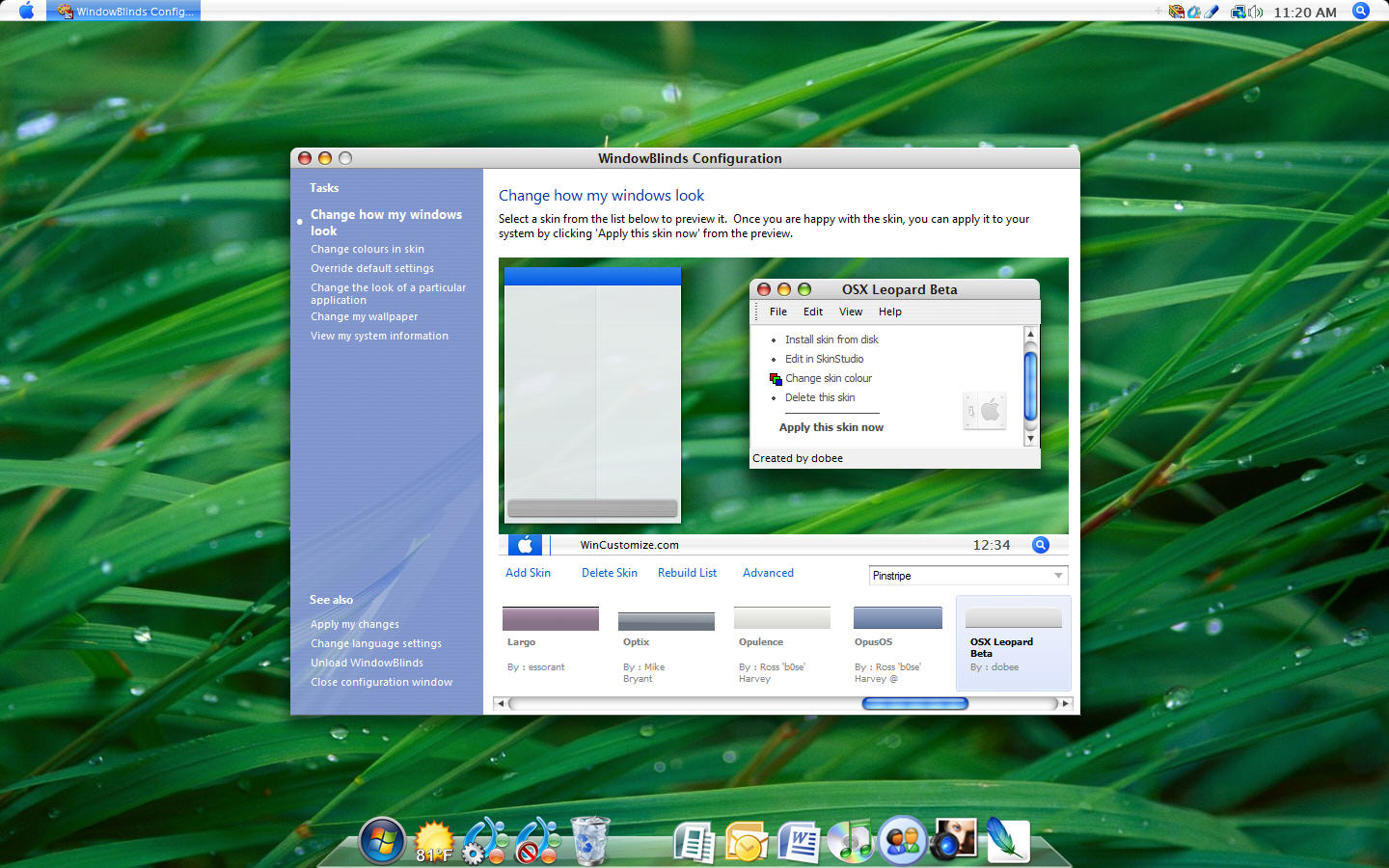
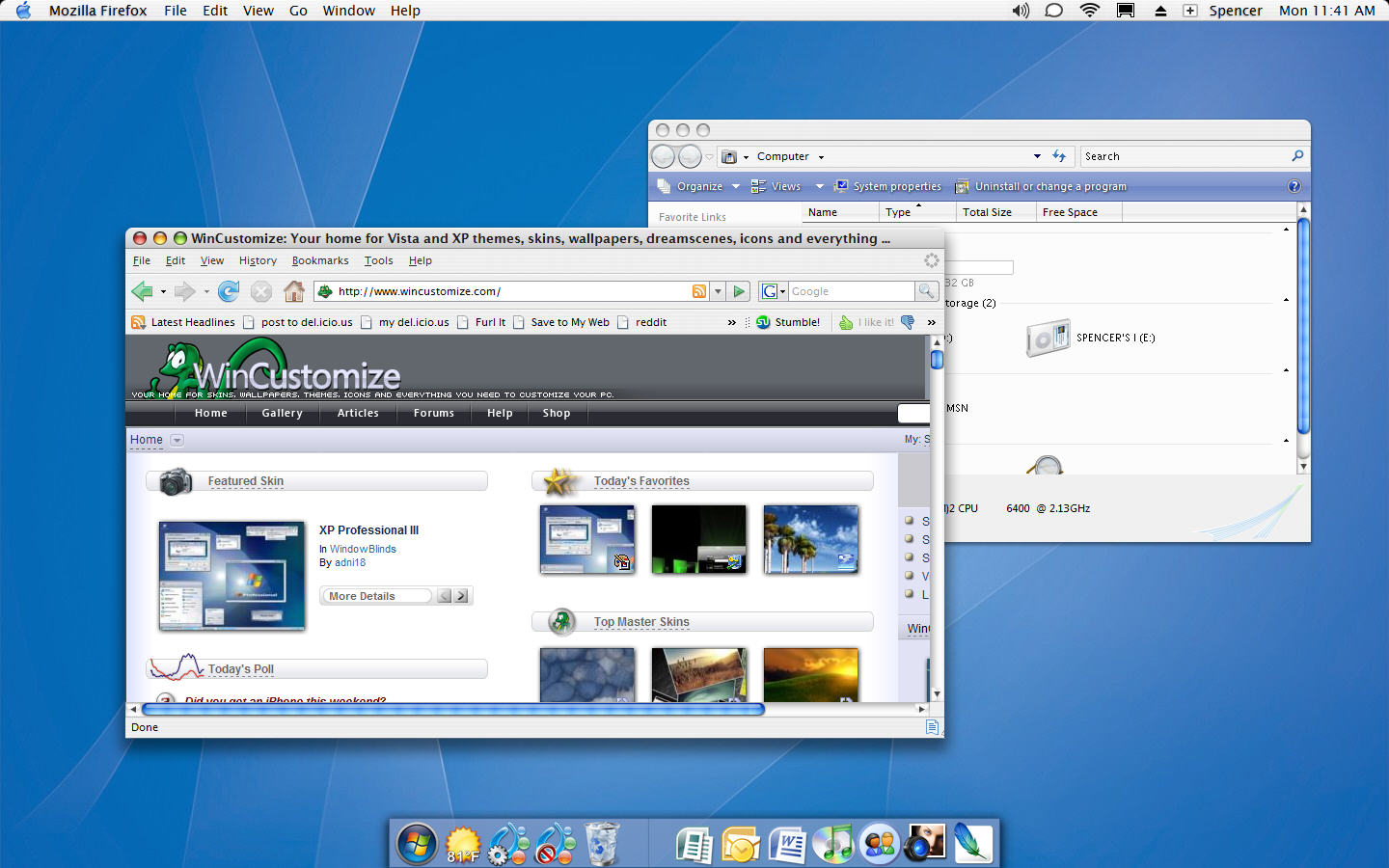
Anyways, here is a couple of shots I just put together as that one is quite outdated as was pointed out. The first shot is just WindowBlinds on Vista with a "Leopard" skin and ObjectDock at the bottom. The second shot is using a Mac Objectbar theme as well.
Reply #9 Monday, July 16, 2007 11:49 AM
That has to be the ugliest Vista shot I've ever seen. YOU NEED SHADOWS.
Hmmm.....maybe you haven't looked hard enough.

Anyways, here is a couple of shots I just put together as that one is quite outdated as was pointed out. The first shot is just WindowBlinds on Vista with a "Leopard" skin and ObjectDock at the bottom. The second shot is using a Mac Objectbar theme as well.
FinalCause
Reply #10 Monday, July 16, 2007 4:16 PM
Reply #10 Monday, July 16, 2007 4:16 PM
oh ok, that looks mad as...
i guess my problem has been windowsblinds from the start ay...what it does is whenever i select ANY custom skin, it reverts the appearance back to the windowss classic look...how am i able to get it to APPLY the skins PROPERLY??
I am using Windowsblinds 5.5 enhanced
i guess my problem has been windowsblinds from the start ay...what it does is whenever i select ANY custom skin, it reverts the appearance back to the windowss classic look...how am i able to get it to APPLY the skins PROPERLY??
I am using Windowsblinds 5.5 enhanced
vStyler
Reply #11 Monday, July 16, 2007 4:25 PM
Reply #11 Monday, July 16, 2007 4:25 PM
Well, as much as I understand how hard money is to come by these days a hundred dollars might buy you a start menu and taskbar from any competent professional artist.
What you may try is finding the closest to what you want in a Mac theme and asking someone to alter it \ vistafy it for you.
Making a quality wb in most cases is weeks of work, Perhaps you could pick up a copy of Skinstudio, take your time and adjust the areas u want modified..bit by bit at your own leisure.

What you may try is finding the closest to what you want in a Mac theme and asking someone to alter it \ vistafy it for you.
Making a quality wb in most cases is weeks of work, Perhaps you could pick up a copy of Skinstudio, take your time and adjust the areas u want modified..bit by bit at your own leisure.

Island Dog
Reply #12 Monday, July 16, 2007 4:26 PM
Is this the purchased version? If so you should first make sure you have the latest update by using Stardock Central. It would also help to post your WB system information from the configuration screen.
Reply #12 Monday, July 16, 2007 4:26 PM
I am using Windowsblinds 5.5 enhanced
Is this the purchased version? If so you should first make sure you have the latest update by using Stardock Central. It would also help to post your WB system information from the configuration screen.
Astyanax
Reply #13 Monday, July 16, 2007 5:08 PM
Reply #13 Monday, July 16, 2007 5:08 PM
@ Island Dog: Bah, they didnt show any shadows on your first shot. Besides I only see the normal variant there, wheres finder?
Hankers
Reply #14 Monday, July 16, 2007 5:12 PM
Reply #14 Monday, July 16, 2007 5:12 PM
FinalCause -
Open the WindowBlinds Configuration screen and click on View my system information. Copy/paste that info here.
Open the WindowBlinds Configuration screen and click on View my system information. Copy/paste that info here.
FinalCause
Reply #15 Tuesday, July 17, 2007 1:20 AM
Reply #15 Tuesday, July 17, 2007 1:20 AM
Your computer has a Windows Experience Index base score of 3.3
Your Windows Graphics Experience score is 3.7
WindowBlinds version : WindowBlinds 5 (5.50 (build 100 x86 - Vista Edition))
WindowBlinds is installed correctly on this PC
WindowBlinds appears to be activated on this PC
(Generic PnP Monitor) 1 is attached to NVIDIA GeForce Go 7400
Wblind.dll 2007/02/21 17:07:20
Wbsrv.dll 2007/02/21 17:08:05
Wbconfig.exe 2007/02/21 16:06:33
Wbload.exe 2006/09/30 14:59:14
Wbhelp.dll 2004/09/18 16:37:07
Tray.dll 2006/04/28 19:27:49
Wbload.dll 2007/01/23 19:48:56
Your Windows Graphics Experience score is 3.7
WindowBlinds version : WindowBlinds 5 (5.50 (build 100 x86 - Vista Edition))
WindowBlinds is installed correctly on this PC
WindowBlinds appears to be activated on this PC
(Generic PnP Monitor) 1 is attached to NVIDIA GeForce Go 7400
Wblind.dll 2007/02/21 17:07:20
Wbsrv.dll 2007/02/21 17:08:05
Wbconfig.exe 2007/02/21 16:06:33
Wbload.exe 2006/09/30 14:59:14
Wbhelp.dll 2004/09/18 16:37:07
Tray.dll 2006/04/28 19:27:49
Wbload.dll 2007/01/23 19:48:56
Vampothika
Reply #16 Tuesday, July 17, 2007 1:55 AM
Reply #16 Tuesday, July 17, 2007 1:55 AM
Id do it for free, just cause i love skinning so much, but cause i dont even have vista on my pc ..gues im OUT.....blah
Hankers
Reply #17 Tuesday, July 17, 2007 8:31 AM
Reply #17 Tuesday, July 17, 2007 8:31 AM
FinalCause -
Where did you obtain this copy of WindowBlinds? You should have better results if you remove this copy, reboot and install either the 'trial' version or purchase the full version at - https://www.stardock.com/products/windowblinds/
Where did you obtain this copy of WindowBlinds? You should have better results if you remove this copy, reboot and install either the 'trial' version or purchase the full version at - https://www.stardock.com/products/windowblinds/
Lantec
Reply #18 Tuesday, July 17, 2007 8:35 AM
You neglected to mention running a virus scan, malware & spyware scans, trojan scans......etc.
You didn't REALLY think it was free with no strings (or bugs) attached did you?
Reply #18 Tuesday, July 17, 2007 8:35 AM
remove this copy, reboot and install either the 'trial' version or purchase the full version
You neglected to mention running a virus scan, malware & spyware scans, trojan scans......etc.
You didn't REALLY think it was free with no strings (or bugs) attached did you?


Yoni5002
Reply #20 Sunday, July 29, 2007 8:44 PM
Reply #20 Sunday, July 29, 2007 8:44 PM
I've been looking for a decent OSX skin for WB 5.5 (Vista) with no luck...
I'm using one of those XP skins which Ermmm... well they aren't too bad...
Hope someone releases an OSX skin for Vista soon...
By the way Windows Blinds 5.5 is a little buggy under Vista... Every time after rebooting my PC it shuts down (DWM) so I have to unload Windows Blinds, Enable Aero again and reload Windows Blinds... Kind of a little frustrating but I have already paid for my copy... Hope to get WB6.0 update when it comes out...

I'm using one of those XP skins which Ermmm... well they aren't too bad...
Hope someone releases an OSX skin for Vista soon...
By the way Windows Blinds 5.5 is a little buggy under Vista... Every time after rebooting my PC it shuts down (DWM) so I have to unload Windows Blinds, Enable Aero again and reload Windows Blinds... Kind of a little frustrating but I have already paid for my copy... Hope to get WB6.0 update when it comes out...

Please login to comment and/or vote for this skin.
Welcome Guest! Please take the time to register with us.
There are many great features available to you once you register, including:
- Richer content, access to many features that are disabled for guests like commenting on the forums and downloading skins.
- Access to a great community, with a massive database of many, many areas of interest.
- Access to contests & subscription offers like exclusive emails.
- It's simple, and FREE!
|
|
Page 1 of 2 | |
|
|---|
Reply #1 Monday, July 16, 2007 4:10 AM
I'm not sure if that is for Vista, I cant try it, I dont have Vista
Hope that helps