





































Can Someone Help A Wanna-Be Skinner PLEASE ???
I Need Help With Skin Studio
Monday, March 5, 2007 by DjiRate | Discussion: Beginners
Hey My name is Joe and I Really need help with skin studio....I had the program for a year at one point and never touched it. I have the program again and I really want to be able to make skins. I have so mant ideas that i haven't seen yet and I wanna make skins and submit them like everyone else...lol. The problem is that I am a visual learner and the tutorial for skinstudio that i have doesn't have pictures of what its describing to me like in the tutorial by:Island Dog at this link: (http://islanddog.wincustomize.com/articles.aspx?aid=135107). If someone knows of a better tutorial or can help me in some way I would be ever so grateful and would contribute to the skinning community greatly. I have alot of paint programs and 3-d programs to do the art which I need a little help with also...lol...this sounds like so much to ask and I feel bad but I wanna Skinn Damn it!!!
Thanx Joe
Thanx Joe
 |
|
Page 1 of 2 | |
|
|---|
I.R. Brainiac
Reply #2 Tuesday, March 6, 2007 1:51 AM

Reply #2 Tuesday, March 6, 2007 1:51 AM

Fairyy~
Reply #3 Tuesday, March 6, 2007 10:55 AM
Didn't I see you post awhile back that you might make a windowblind for others
to ' Pimp ' ( re-skin ) to get familar with Skin studio ? Do you still have that in future plans ?

Reply #3 Tuesday, March 6, 2007 10:55 AM
This post might help a little...its got some pictures.
Didn't I see you post awhile back that you might make a windowblind for others
to ' Pimp ' ( re-skin ) to get familar with Skin studio ? Do you still have that in future plans ?
I.R. Brainiac
Reply #4 Tuesday, March 6, 2007 10:59 AM
Reply #4 Tuesday, March 6, 2007 10:59 AM
I did the logon version first to test the waters...not one person used it...but I did put the start menu .psd in the graphics section. 

Fairyy~
Reply #5 Tuesday, March 6, 2007 11:10 AM
I don't use Logons - Im the only user of this computer so its not necessary for me - I really think a WB might get more attention. But, I understand its a lot of bother for just a few - unless you can add it to the tutorial section for WB skinning. Might make a few that are put off by the complicated procedure of making a blind from start to finish test their skills.
Reply #5 Tuesday, March 6, 2007 11:10 AM
I did the logon version first to test the waters...not one person used it...but I did put the start menu .psd in the graphics section.
I don't use Logons - Im the only user of this computer so its not necessary for me - I really think a WB might get more attention. But, I understand its a lot of bother for just a few - unless you can add it to the tutorial section for WB skinning. Might make a few that are put off by the complicated procedure of making a blind from start to finish test their skills.
DjiRate
Reply #6 Tuesday, March 6, 2007 12:22 PM

Reply #6 Tuesday, March 6, 2007 12:22 PM
well thanx alot Po' and I.R. ...the sites really helped alot and i'm giong to watch the tutorials and whatnot and after a short while you should se some posting by me going on...once again thanx for all your help.
PoSmedley
Reply #7 Tuesday, March 6, 2007 3:29 PM

Reply #7 Tuesday, March 6, 2007 3:29 PM
Good Luck! Looking forward to seeing some new talent!
Bichur
Reply #9 Wednesday, March 7, 2007 1:01 AM
don't rush me... i'll screw up.

Reply #9 Wednesday, March 7, 2007 1:01 AM
..not one person used it..
don't rush me... i'll screw up.

vStyler
Reply #10 Sunday, March 11, 2007 8:24 PM

Reply #10 Sunday, March 11, 2007 8:24 PM
Best advice I can give you is to sit down, and dig in for the long haul.
Skinning windows is a fairly long and complicated process and although tutorials can be helpful its no substitute for just trial and erroring your way through it.
It may be the long way around but its the best way and much more fulfilling when it all starts to come together.
Keep on skinning !!!
Skinning windows is a fairly long and complicated process and although tutorials can be helpful its no substitute for just trial and erroring your way through it.
It may be the long way around but its the best way and much more fulfilling when it all starts to come together.
Keep on skinning !!!
DjiRate
Reply #11 Saturday, May 17, 2008 10:48 PM
Reply #11 Saturday, May 17, 2008 10:48 PM
ok folk this is the problem after relenless trys at try to fix these things...i'd alway wanted to just finish one so i know i can do another afterwards but i cant even get past this and i used a mock up from the start panel of anther WB....Please someone help...i would like to realese this skin before i turn 30...lol.....thanx in advance for any help.......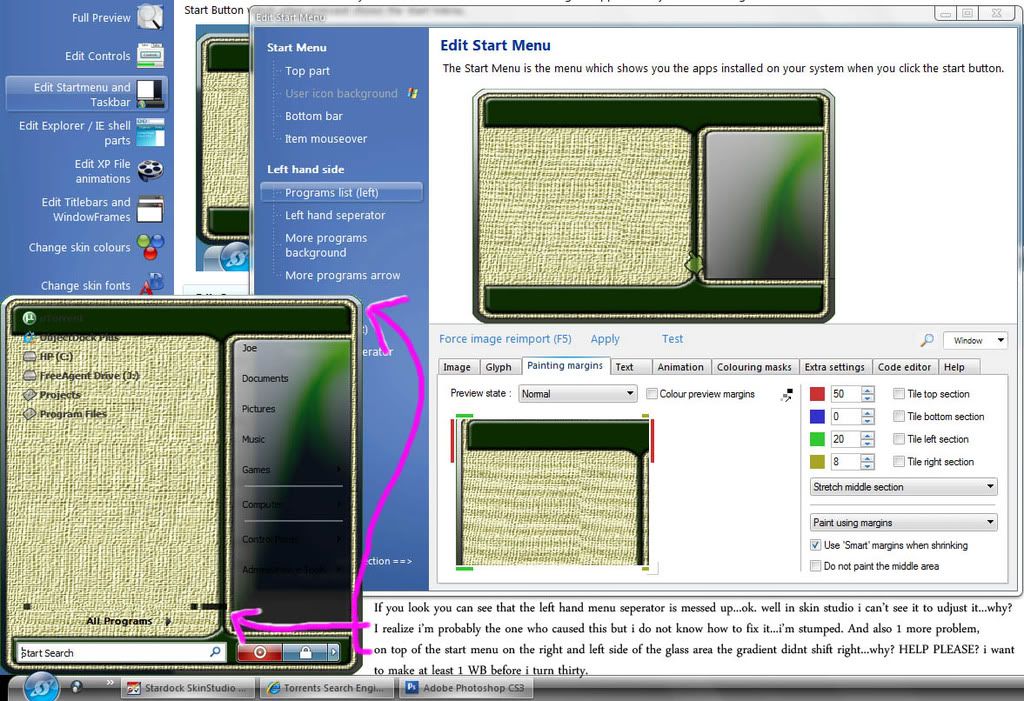
DjiRate
Reply #12 Saturday, May 17, 2008 10:50 PM
Reply #12 Saturday, May 17, 2008 10:50 PM
oh yeah and i forgot to metion...how do i fix the programs on the left side from going way up where i can't see them fully....and i'm using skin studio 6 Pro in case you can't see that....thanx again
I.R. Brainiac
Reply #13 Saturday, May 17, 2008 11:57 PM
Thats content margins for that image.(top content)...a higher number will push them down.
Seperator prob is probably due to painting margins.The gradient issue I couldnt really say without seeing the blind in SKS.
If you like,send it to irbrainiac at yahoo.com and I can take a look.
Reply #13 Saturday, May 17, 2008 11:57 PM
how do i fix the programs on the left side from going way up
Thats content margins for that image.(top content)...a higher number will push them down.
Seperator prob is probably due to painting margins.The gradient issue I couldnt really say without seeing the blind in SKS.
If you like,send it to irbrainiac at yahoo.com and I can take a look.


HG_Eliminator
Reply #15 Sunday, May 18, 2008 7:59 AM

Reply #15 Sunday, May 18, 2008 7:59 AM
We have many talented skinners here offering help and tutorials. Again.. this community never ceases to be one of the best. It's nice to see folks helping the new members out 


I.R. Brainiac
Reply #18 Monday, May 19, 2008 4:33 AM
Reply #18 Monday, May 19, 2008 4:33 AM
OK...yes,its a mess. 
At first glance...the gradient issue...you have a setting in the user pane called pre-multiplied alpha...delete it.Its messing up your translucency.
Your sizes for all the images are different from your actual graphic sizes(as in userpane is set at 9 picels tall and the image is 11 pixels tall)This causes images to get distorted.Height setting should ideally match graphic height.(unless you have some real reason for an image to be stretched or squished)
Width settings are trickier unless you draw the start menu exactly as wide as you really want it.I cant tell if you wanted it wider than drawn or you needed it to grow width wise.If you wanted it wider you have to cut the whole start menu image judiciously so that you have proper control over where each section is tiled or stretched.
Content margins are off...and all sections were set to stretch even tho the image has lots of textures...usually textures are tiled.(the exception here being the places image which currently needs to do both...you need to recut the whole menu with attention paid to ease of tiling and stretching
For the places side,you may need to tile edges and strech center part.
By not using the actual image sizes for your size settings you have made a start menu that is nearly impossible to make all the pieces fit properly.

At first glance...the gradient issue...you have a setting in the user pane called pre-multiplied alpha...delete it.Its messing up your translucency.
Your sizes for all the images are different from your actual graphic sizes(as in userpane is set at 9 picels tall and the image is 11 pixels tall)This causes images to get distorted.Height setting should ideally match graphic height.(unless you have some real reason for an image to be stretched or squished)
Width settings are trickier unless you draw the start menu exactly as wide as you really want it.I cant tell if you wanted it wider than drawn or you needed it to grow width wise.If you wanted it wider you have to cut the whole start menu image judiciously so that you have proper control over where each section is tiled or stretched.
Content margins are off...and all sections were set to stretch even tho the image has lots of textures...usually textures are tiled.(the exception here being the places image which currently needs to do both...you need to recut the whole menu with attention paid to ease of tiling and stretching
For the places side,you may need to tile edges and strech center part.
By not using the actual image sizes for your size settings you have made a start menu that is nearly impossible to make all the pieces fit properly.
I.R. Brainiac
Reply #19 Monday, May 19, 2008 4:38 AM
Reply #19 Monday, May 19, 2008 4:38 AM
Your progs side divider needs to be redesigned...it has part of the places side image in it.
It also has to work in more than one position vertically so lose the textured part and only keep the stuff you need.
Its alignment horizontally is determined by the content margins of the progs graphic.
It also has to work in more than one position vertically so lose the textured part and only keep the stuff you need.
Its alignment horizontally is determined by the content margins of the progs graphic.
I.R. Brainiac
Reply #20 Monday, May 19, 2008 4:41 AM
Reply #20 Monday, May 19, 2008 4:41 AM
Why you cut the user pane just off the top I cant say...the design looks like you should have included the top green area.(especially since you dont want icons going up in there.
My advice in cutting is to use the natural cutting lines in your image as a whole...exact bottom of the userpane,exact top of the logoff area,exact center or 1 edge between the progs/places vertical seperator.
Something to remember...an image can be set to stretch while its edges within the sizing margins can be tiled if needed.
You need to pay cloer attention to your sizing margins...lots of alignment issues are being caused by parts of the images being distorted because the havnt been included within the margins.
My advice in cutting is to use the natural cutting lines in your image as a whole...exact bottom of the userpane,exact top of the logoff area,exact center or 1 edge between the progs/places vertical seperator.
Something to remember...an image can be set to stretch while its edges within the sizing margins can be tiled if needed.
You need to pay cloer attention to your sizing margins...lots of alignment issues are being caused by parts of the images being distorted because the havnt been included within the margins.
Please login to comment and/or vote for this skin.
Welcome Guest! Please take the time to register with us.
There are many great features available to you once you register, including:
- Richer content, access to many features that are disabled for guests like commenting on the forums and downloading skins.
- Access to a great community, with a massive database of many, many areas of interest.
- Access to contests & subscription offers like exclusive emails.
- It's simple, and FREE!
|
|
Page 1 of 2 | |
|
|---|
Reply #1 Monday, March 5, 2007 11:44 PM
The tutorials can be downloaded and are done in separate steps, taking you through each agonizing, frustrating little step. lol. There is also a skin you can download and work off of, to aid with the visual assist.