









































Wallpaper problem in DesktopX
Monday, January 1, 2007 by ackland | Discussion: DesktopX
I am also running a windowsblinds theme with the same wallpaper selected. However...every time I reboot, the wallpaper is replaced by the same flat grey colour.
I have tried clearing the cache...I have the same wallpaper selected in Control Panel.Display, as well.
What am I doing wrong?
Many thanks in advance.
BTW In DesktopX Builder I open the wallpaper option & choose my wallpaper, I get a message saying the file has been copied to my current theme, but when I hit "Apply" nothing happens...still that drab grey colour!
Reply #2 Saturday, February 3, 2007 4:10 PM
Reply #3 Saturday, June 2, 2007 7:57 PM
This may not be a common problem because I have searched several forums with no luck. If someone has any suggestions I would love to try them!
PLEASE help, I will try any and all suggestions. Some of the DesktopX themes are of no value without their default wallpaper.
OS System XPpro. MOBO MSI 7220 AMD Athlon X2 Dual.

Reply #4 Sunday, June 3, 2007 5:41 AM
1°) in dxbuilder select an object in his properties go to Summary "custom files" and add the wallpaper you want; save the theme then go to configureDX(right click under the systray icon)->Desktop->Wallpaper->and set the wallpaper you want who can be find now here
C:\Documents and Settings\%username%\Local Settings\Application Data\Stardock\DesktopX\CurrentTheme
2°) an other thing if it's a problem of refresh click on desktop (screen) and press F5 or lock/unlock the taskbar.
Reply #5 Sunday, June 3, 2007 6:07 AM
be sure to select the radio button "background" and save the theme after any change.

Reply #6 Sunday, June 3, 2007 8:29 AM
Try clicking on OK after you click apply. I have had this same problem and usually this works for me. Also as Quentin said you need to save the theme after you make the change.

Reply #7 Tuesday, June 12, 2007 8:25 PM
Just another thought.

Reply #8 Wednesday, June 13, 2007 12:59 AM
you know, I hide the icons and when I use ND the walls don't change = hadn't thought to put the 2 together until you posted.
when I knew it was time to change and it didn't - right click desktop, props, desktop and it would be shown as active - click the one above, click back apply
now it seems to have disassociated the wall from WB skins
wonder if it's also an issue with differeent apps that load walls (wb, dtx, nd) conflicting as dtx and iconx did?
Reply #9 Thursday, June 14, 2007 7:22 AM
I only found this out when Natural Desktop was not working at all. I spent about a week working on this, trying to figure it out, then someone at SD asked me if i have my icons turned off.. that was it.
Im not sure what other programs do this same thing. But i was told how it "turns off" the icons is to take the current wallpaper and place a COPY of it over TOP of the icons, thats how it turns them "OFF". Sooo.. thats why, if i went in and changed the wallpaper it would change, but not when a program made a change in the reg to the wallpaper. The dialog box that does the change, can tell (i guess) when you have the icons hidden, and it makes that duplicate. LOVE windows.. dont ya?
Reply #10 Thursday, June 14, 2007 7:33 AM
But Before DX wallchanger runs well now not
Reply #11 Tuesday, March 24, 2009 6:52 PM
Fences also interferes with wallchanging abilities, I had a time discovering why certain tools which worked before wouldn't work anymore. Go back to the last few applications installed and voila! I hope someone can find a solution to making Fences work with Desktop X.

Reply #12 Wednesday, July 15, 2009 7:17 PM
So has anyone really sorted this and applied a reliable solution? I've tried the above suggestions with no luck - I still get the dull grey background. Is there anything else than can be done to correct this? Just the same, I find it strange because I can load some desktops with their wallpapers and some I cannot. And so in this case, I figure that "if" another application was blocking the wallpaper from showing, then it would do the same for all desktops... but that's not the case... some load - some don't...
So where do we go from here...?!
Can anybody help me with this?
thx
Reply #13 Wednesday, July 15, 2009 10:38 PM
possible causes
desktop didn't come with a wall
desktop didn't have the wall properly associated
Reply #14 Monday, July 20, 2009 7:00 PM
I think I have found the solution (at least for me and I hope for others as well)...
I was busy making tests with Windows and other applications that control the icon display on the desktop - but - I overlooked the real place to look...! Right there inside DesktopX, is the OPTION to turn on/off desktop icons - just above the "wallpaper" selection - to the left. When I "untick" the HIDE DESKTOP ICONS selection, the wallpaper appears.
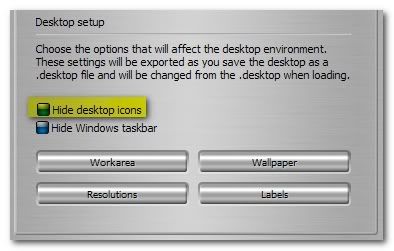
Now, I can't explain why this happens... I guess it's called a "bug"!
Nonetheless, now it works just fine. I hope this will help others also...
Reply #15 Monday, July 20, 2009 10:51 PM
'hiding' or using the desktop right click option to not 'show' the icons doesn't really 'hide' or 'not show' - the hide/not show basically (as I understand it) overlays everything on the desktop with a copy of the wall inside a borderless window - so that window stays there while your wall is actually changing underneath

Please login to comment and/or vote for this skin.
Welcome Guest! Please take the time to register with us.
There are many great features available to you once you register, including:
- Richer content, access to many features that are disabled for guests like commenting on the forums and downloading skins.
- Access to a great community, with a massive database of many, many areas of interest.
- Access to contests & subscription offers like exclusive emails.
- It's simple, and FREE!
Reply #1 Friday, January 26, 2007 7:36 AM