






































Tips for making small icons
Tuesday, July 25, 2006 by retiredmaster | Discussion: Icons
Maybe some of you expert fellas could help me on this.
I'm putting together my first icon pack and I created my designs in a vector art package. I resized the vectors from the original (which I made at 128x128) down through the various sizes to 16x16. In the vector prog they still look fine at that size, but my exported 16x16 pngs look decidedly jaggy.
What techniques could I use to make sure that my smallest icons look legible?

I'm putting together my first icon pack and I created my designs in a vector art package. I resized the vectors from the original (which I made at 128x128) down through the various sizes to 16x16. In the vector prog they still look fine at that size, but my exported 16x16 pngs look decidedly jaggy.
What techniques could I use to make sure that my smallest icons look legible?

retiredmaster
Reply #2 Tuesday, July 25, 2006 7:41 AM

Reply #2 Tuesday, July 25, 2006 7:41 AM
I'll give that a try and see how it compares to making individual sized pngs.
My method has been to make a vector image at each of the 8 different sizes, then export them each to 24-bit png with an alpha channel, then create the icon from the pngs.
Thanks Boxxi
My method has been to make a vector image at each of the 8 different sizes, then export them each to 24-bit png with an alpha channel, then create the icon from the pngs.
Thanks Boxxi

retiredmaster
Reply #3 Tuesday, July 25, 2006 10:52 AM
Reply #3 Tuesday, July 25, 2006 10:52 AM
That seem to give better results. Good idea Boxxi - it'll same a lot of time. I'm going to use the 96x96 png to base the smaller icons on. Nice. Looks like my package might be ready earlier than I expected!
Island Dog
Reply #4 Tuesday, July 25, 2006 1:03 PM

Reply #4 Tuesday, July 25, 2006 1:03 PM
Looks great so far. Can't wait to see it finished.
vlastimilmiler
Reply #5 Tuesday, August 1, 2006 6:21 PM
Reply #5 Tuesday, August 1, 2006 6:21 PM
small icons are tricky. It might be a good idea to simplify the original image for the small version. Another thing that could help with the edges is a drop shadow effect. And finally, a resampling algorithm that respect gamma correction would give you better results.
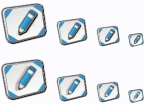
This image demonstrates some of these techniques, but the quality is not 100%, cause it was only based on the small image above.
One more thing - use the entire 16x16 space, do not waste those precious pixels .
.
---> RealWorld Icon Editor can help you with many of these tricks.
This image demonstrates some of these techniques, but the quality is not 100%, cause it was only based on the small image above.
One more thing - use the entire 16x16 space, do not waste those precious pixels
 .
.---> RealWorld Icon Editor can help you with many of these tricks.
Bichur
Reply #6 Tuesday, August 1, 2006 6:54 PM

Reply #6 Tuesday, August 1, 2006 6:54 PM
One of Brad's articles a long while back had a discussion with a guy who did vector.
He said one of the things he did was zoom out, then use Irfanview (or other) to take a screenshot then crop it out
He said one of the things he did was zoom out, then use Irfanview (or other) to take a screenshot then crop it out
crunkcory
Reply #7 Monday, September 18, 2006 3:29 PM
Reply #7 Monday, September 18, 2006 3:29 PM
Ive got a question, i created an icon i wanted to use for "my pictures" its sized at 255 x 255 and when i create the icon in icon developer it comes out crappy looking and isnt clear like the ones i download off of here, any suggestions?
Please login to comment and/or vote for this skin.
Welcome Guest! Please take the time to register with us.
There are many great features available to you once you register, including:
- Richer content, access to many features that are disabled for guests like commenting on the forums and downloading skins.
- Access to a great community, with a massive database of many, many areas of interest.
- Access to contests & subscription offers like exclusive emails.
- It's simple, and FREE!
Reply #1 Tuesday, July 25, 2006 7:03 AM
(File>Batch Processing>Create icons from images in a folder) then you can open the folder with the finished icons in it and drag and drop them into IconPackager. That's the best I can offer Tim, hope it helps. And the icons look great!!