





































June Desktop Screenshots
Thursday, June 1, 2006 by Island Dog | Discussion: WinCustomize Talk
Don't have a screenshot yet. Just wanted to start this thread.

 |
|
Page 3 of 4 | |
|
|---|



Falkon7
Reply #44 Friday, June 16, 2006 3:43 PM

Reply #44 Friday, June 16, 2006 3:43 PM
My desktop 
Weatger gadget
and
tray clock - alarm clock - calendar http://www.drive-software.com/atomicalarmclock.html


Weatger gadget
and
tray clock - alarm clock - calendar http://www.drive-software.com/atomicalarmclock.html

Matches_Malone
Reply #45 Friday, June 16, 2006 6:44 PM
This message is for Journeyman' Diafragma- Wow! Nice shot and blind! That is ridiculously awesome,
can you send me the link to the blind or something once it gets released?
I would appreciate it alot

Reply #45 Friday, June 16, 2006 6:44 PM
can you send me the link to the blind or something once it gets released?
I would appreciate it alot
Matches_Malone
Reply #46 Friday, June 16, 2006 7:00 PM
Reply #46 Friday, June 16, 2006 7:00 PM
Well, as you may know from my previous uploads I was on a contiuous search for the ultimate
bat-desktop. I thought my search ended from my last upload but the bat is always at work
so my search continues...Here's my latest.
bat-desktop. I thought my search ended from my last upload but the bat is always at work
so my search continues...Here's my latest.

WebGizmos
Reply #47 Friday, June 16, 2006 11:03 PM

Reply #47 Friday, June 16, 2006 11:03 PM
Jinny Robot Monster....Where may I ask did you find the Xmen skin? I made some docks for this a long time ago but can't find this skin anywhere anymore. I was hoping it would have been on the Xmen site but I haven't seen it. 

dragonmage
Reply #48 Friday, June 16, 2006 11:47 PM
Reply #48 Friday, June 16, 2006 11:47 PM
@ Falkon7 that tray clock seems to be virtually a clone of Chameleon Clock, minus a few features.
I may have to try it out. You wouldnt happen to know if it can read iCal files would you?
I may have to try it out. You wouldnt happen to know if it can read iCal files would you?
Falkon7
Reply #49 Saturday, June 17, 2006 5:02 AM
Reply #49 Saturday, June 17, 2006 5:02 AM
@ dragonmage
Sorry, i do not know about Ical files
Minus? I disagree.
+ Skinnable calendar
+ Longhorn style clock
+ Gradient for clock
+ more skins
+ show uptime
+ show timezone (in tray clock)
+ Backup system
+ Make taskbar transparent
+ support double height taskbar!
nice clock
Screenshot from homepage:
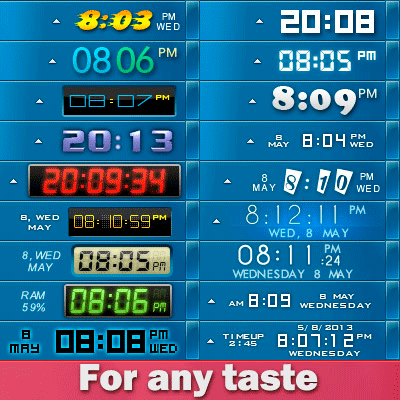
Sorry, i do not know about Ical files
Minus? I disagree.
+ Skinnable calendar
+ Longhorn style clock
+ Gradient for clock
+ more skins
+ show uptime
+ show timezone (in tray clock)
+ Backup system
+ Make taskbar transparent
+ support double height taskbar!
nice clock
Screenshot from homepage:
Garion2K
Reply #50 Saturday, June 17, 2006 8:06 AM
Reply #50 Saturday, June 17, 2006 8:06 AM
Hus - nice wallpaper... I've probably been living under a rock, but I haven't seen that one before. Do you have a link? Thx!


dragonmage
Reply #52 Sunday, June 18, 2006 12:45 AM
Reply #52 Sunday, June 18, 2006 12:45 AM
@ Falkon7
Maybe we should each try the other clock for a week or two, and write a review.
Maybe we should each try the other clock for a week or two, and write a review.
Falkon7
Reply #53 Sunday, June 18, 2006 10:49 AM
Reply #53 Sunday, June 18, 2006 10:49 AM
@dragonmage
I used Cham Clock and my choice Atomic Alarm Clock
I used Cham Clock and my choice Atomic Alarm Clock


PurrBall
Reply #56 Sunday, June 25, 2006 9:09 AM
Reply #56 Sunday, June 25, 2006 9:09 AM
Meowy doesn't get why discussion of which alarm clock to use is in here
pinele
Reply #57 Sunday, June 25, 2006 11:46 AM
Hy diafragma... where i can find this Apple wall??
Please
Reply #57 Sunday, June 25, 2006 11:46 AM
Hy diafragma... where i can find this Apple wall??
Please

Please login to comment and/or vote for this skin.
Welcome Guest! Please take the time to register with us.
There are many great features available to you once you register, including:
- Richer content, access to many features that are disabled for guests like commenting on the forums and downloading skins.
- Access to a great community, with a massive database of many, many areas of interest.
- Access to contests & subscription offers like exclusive emails.
- It's simple, and FREE!
|
|
Page 3 of 4 | |
|
|---|
Reply #41 Sunday, June 11, 2006 3:19 PM
Been using most of this setup since early May.
Wallpaper: b+w wallpaper 2 Link
Windowblind: Chance Link
Icons: Next OS Black Link
Rainlendar: Pixelarmy.org (modified) Link
WMP: G-tunes Link
CursorXP: Black Ops Link
Trillian: Glitch Link
ObjectBar: Killer Link (not seen) It uses the current WB skin
Sysmetrix: TOpus Link (personal modification still in progress)
The tray clock, if anyone is wondering is a program called Chameleon Clock Link ,using the 98 Amp skin. It can be used as a tray clock or a desktop clock, and has the best alarm features of all the clocks I've tried. I use the free trial version.
I definitely recommend trying it out. If I could integrate it with Rainlendar I'd spring for the full version.