







































DX Tutorial #3: Let's Create a Right-Click Menu
RomanDA's DX Tutorial Series
Wednesday, May 24, 2006 by RomanDA | Discussion: DesktopX Tutorials
RomanDA's DesktopX Tutorials:
My goal is to make a set
of tutorials for DesktopX. If you have ideas on what you would like to
see, please email me at
[email protected]
| Lets make a RIGHT-CLICK menu | |
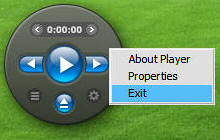 |
Would you like to have a right-click menu that isn't the "standard" one that DX supplies when you export a widget? Ok, Read on...
The code for this isn't really all that hard. |
|
'--- Function to handle the RIGHT-Click
Function
Object_OnRButtonUpEx(obj,x,y,dragged) '--- Right Click Menu Creation Function ------- Sub CreateSectionMenu()
'-- Function to handle the results of the right-click menu action Sub
ExecuteSectionMenu(result,snum) |
There are a lot of things that can be done with this, things like SUB menus, etc. Maybe I will look into that at a later date. Its just a simple example
This script needs to be attached
to any object that you want to have the right-menu active.
This code is part mine, mostly
VAD_M's who is
quickly becoming the GOD of DX scripts!
 |
Enjoy, RomanDA AKA: David A. Roman http://romanda.wincustomize.com http://www.romanda.org [email protected] |


Reply #3 Friday, May 26, 2006 7:00 AM

Reply #4 Friday, May 26, 2006 10:16 AM
Please keep doing the tutorials


Reply #5 Friday, May 26, 2006 3:45 PM
| By posting the code here I am essentially giving everyone the rights to use the code, if I didn’t do that the tutorials would be useless. |
^^That's what I figured. Still, I thought it was worth asking.^^
Thanks all!
PC

Reply #6 Thursday, June 1, 2006 4:07 PM


Reply #7 Friday, June 2, 2006 12:13 AM
But a question as that isn't in the official tutorials also : Is it possible to assign an icon to the menu entries ? I couldn't figure that one out.
Reply #8 Friday, June 2, 2006 6:32 AM

Reply #9 Friday, June 2, 2006 8:30 AM
If any Stardockians are following this thread, may I suggest that these tutorials be included or linked in the on-line documentation for DX in the tutorials section (with permissions and props of course): https://www.stardock.com/products/desktopx/documentation/index.html


Reply #10 Tuesday, January 9, 2007 3:23 AM
Sprinkle
Reply #11 Tuesday, January 9, 2007 5:30 AM
Im very glad they have been of help to you. I look forward to seeing your objects.

Reply #12 Tuesday, January 9, 2007 6:19 AM
| By posting the code here I am essentially giving everyone the rights to use the code, if I didn’t do that the tutorials would be useless. |
I appreciate your sharing your codes, people like myself that have no knowledge of vb script wouldn't be able to make a thing. Looking forward to more of your Tutorials.
Thankyou.

Reply #13 Tuesday, January 9, 2007 6:32 AM
Please login to comment and/or vote for this skin.
Welcome Guest! Please take the time to register with us.
There are many great features available to you once you register, including:
- Richer content, access to many features that are disabled for guests like commenting on the forums and downloading skins.
- Access to a great community, with a massive database of many, many areas of interest.
- Access to contests & subscription offers like exclusive emails.
- It's simple, and FREE!
Reply #1 Friday, May 26, 2006 2:05 AM
I hope that the others who gain from your knowledge will post their gratitude.
Personally, I think tutorials as good as these should either be "stickied" or, have their own link all together.
One concern I have is, can a person use "your" script without permission? In my mind, art is art. Knowledge is an art within itself. Without your knowledge, there is no script. I may be over-complicating the issue, but I thought it worth asking.
A clearly defined "newbie" link for DX language would only benefit this community. Your tutorial skips ahead of where I am.
Either way, what you have done by posting your tutorials is as close to unselfish as it gets. I look forward to using the printed version of your wisdom in the future! I will gladly share my efforts as you have. Good 4 U!