





































 |
|
Page 2 of 3 | |
|
|---|

snowhawk77c
Comment #24 Sunday, January 22, 2006 10:52 AM
i think theres a way to take the cursor from the game and use it on the dsktop....not sure how though
Comment #24 Sunday, January 22, 2006 10:52 AM
| cool skin. can anyone recommend a cursor? |
i think theres a way to take the cursor from the game and use it on the dsktop....not sure how though
snowhawk77c
Comment #25 Sunday, January 22, 2006 11:06 AM
Comment #25 Sunday, January 22, 2006 11:06 AM
Ok found out how If you have BF2 go into Program files/EA games/Battlefield2/mods/BF2/menue/external/cursors
than bring up the control panel and go to mouses and click on pointers browse for the bf2 cursors and load them on to the correct cursor icons EG: Busy = Cursor_busy
Hope you found this helpful
than bring up the control panel and go to mouses and click on pointers browse for the bf2 cursors and load them on to the correct cursor icons EG: Busy = Cursor_busy
Hope you found this helpful

lgspence
Comment #26 Sunday, January 22, 2006 11:26 AM
Comment #26 Sunday, January 22, 2006 11:26 AM
Could someone please make a sysmetrix to go with this theme.Or maybe recommend one to use.?
lgspence
Comment #30 Sunday, January 22, 2006 2:09 PM
Comment #30 Sunday, January 22, 2006 2:09 PM
I found one that is good...YELLOW-X...CHECK IT OUT
twobadmice
Comment #32 Sunday, January 22, 2006 5:37 PM

Comment #32 Sunday, January 22, 2006 5:37 PM
Wicked, skin mate well in. Now if anyone fancies doing a Half Life2 theme I will be chuffed to buggery.
BogoJoker
Comment #33 Sunday, January 22, 2006 6:22 PM
Comment #33 Sunday, January 22, 2006 6:22 PM
Excellent Josephs
You were the first artist I put on my watch list. Glad I did.
You always have the coolest screen shots too.
Note: The screenshot for this says bootskin. I know you meant window blind
You were the first artist I put on my watch list. Glad I did.
You always have the coolest screen shots too.
Note: The screenshot for this says bootskin. I know you meant window blind

Matches_Malone
Comment #35 Monday, January 23, 2006 1:21 AM

Comment #35 Monday, January 23, 2006 1:21 AM
This is a spectacular skin, this is what I've been waiting for. Totally unique in every aspect, loved the rainlendar.  Keep it up! Love the dark themes!
 Keep it up! Love the dark themes!
blazeaway
Comment #36 Monday, January 23, 2006 4:10 AM

Comment #36 Monday, January 23, 2006 4:10 AM
-- Kinda looks like you tried to do a "Multipass" with this. Instead of blue though you used ( ? ).Whatever.--- I'll take the Blue.
RedmondS
Comment #37 Monday, January 23, 2006 9:41 AM
Comment #37 Monday, January 23, 2006 9:41 AM
I love it, thank u.
I'm having problem with per app setting though,Excel Ive tried to exclude it just for this skin but no go, Any ideas ? thank's agin for a great skin.............
I'm having problem with per app setting though,Excel Ive tried to exclude it just for this skin but no go, Any ideas ? thank's agin for a great skin.............
Josephs
Comment #38 Monday, January 23, 2006 10:35 AM

Comment #38 Monday, January 23, 2006 10:35 AM
Ok, thanks for all your kind and honest comments.
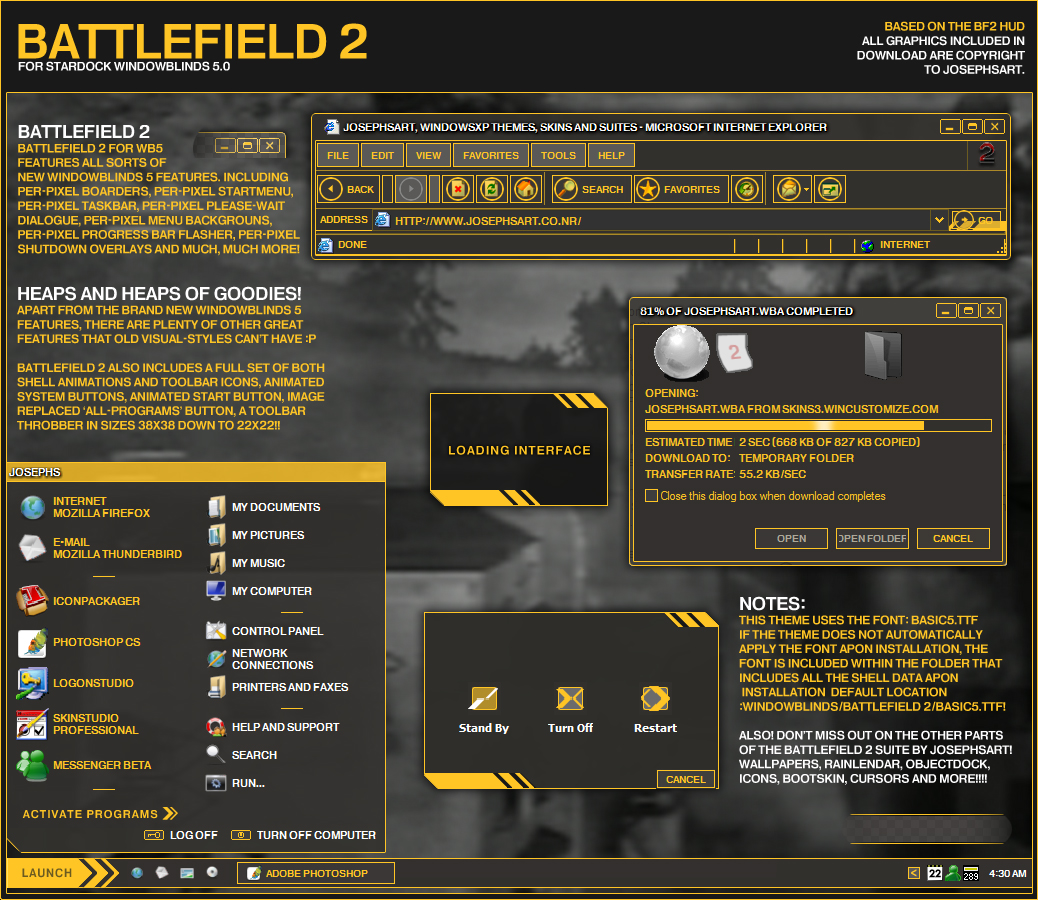
For those who are having trouble with Per-Application settings and Toolbar icons (Throbber) its a WindowBlinds fault. Usually a restart, or a different skin resets this. I plan to release another update shortly. I'm not sure if anyone else had a similar problem, but a friend was commenting on how he had magic pink in his taskbar and Shortcut Tray seperator. I have fixed this, and It works for him now, but I may not upload this version if noone else has this problem. Also, The titlebar buttons should work effectivly now. This version is working fine on WindowBlinds 5.00 (build 54 x86). But that aside, I hope you guys are enjoying it!!
One more thing, Wallpaper!! http://www.deviantart.com/deviation/28067246/
For those who are having trouble with Per-Application settings and Toolbar icons (Throbber) its a WindowBlinds fault. Usually a restart, or a different skin resets this. I plan to release another update shortly. I'm not sure if anyone else had a similar problem, but a friend was commenting on how he had magic pink in his taskbar and Shortcut Tray seperator. I have fixed this, and It works for him now, but I may not upload this version if noone else has this problem. Also, The titlebar buttons should work effectivly now. This version is working fine on WindowBlinds 5.00 (build 54 x86). But that aside, I hope you guys are enjoying it!!
One more thing, Wallpaper!! http://www.deviantart.com/deviation/28067246/
Leon the Professional
Comment #39 Tuesday, January 24, 2006 2:10 PM
Comment #39 Tuesday, January 24, 2006 2:10 PM
I'm having the same problem with the Minimize button. I'm wondering if it's because of what version people use. I'm using version 4 I think because I have the full version of it. It's not the worst thing in the world but I'll probably go back to another skin unless it magically works soon. 

kingairball
Comment #40 Wednesday, January 25, 2006 1:07 AM
Comment #40 Wednesday, January 25, 2006 1:07 AM
Very cool idea, but the black background in the text box, yellow main font color, and minimize button problems make it somewhat of a pain in the ass to use. But it looks AWESOME!!! PLEASE update, you have something great here!
Please login to comment and/or vote for this skin.
Welcome Guest! Please take the time to register with us.
There are many great features available to you once you register, including:
- Richer content, access to many features that are disabled for guests like commenting on the forums and downloading files.
- Access to a great community, with a massive database of many, many areas of interest.
- Access to contests & subscription offers like exclusive emails.
- It's simple, and FREE!
|
|
Page 2 of 3 | |
|
|---|




Comment #21 Sunday, January 22, 2006 1:15 AM
Eltonfan .... I thought there was an undertaking to be more respectful with commenting.
If I'm mistaken.....pretend I'm NOT.
Thanks.