






































candicolette
Comment #2 Thursday, April 17, 2003 11:15 PM
Comment #2 Thursday, April 17, 2003 11:15 PM
Love it. I'm having a prob though. I installed Midnight Wonder but it doesn't show up in the list. Do you happen to know why? I have WB4 full version (

crissy14
Comment #3 Thursday, April 17, 2003 11:23 PM

Comment #3 Thursday, April 17, 2003 11:23 PM
candicollete
Look for just"midnight" in your WB list
Look for just"midnight" in your WB list

ptrcstn
Comment #4 Friday, April 18, 2003 1:19 AM
Comment #4 Friday, April 18, 2003 1:19 AM
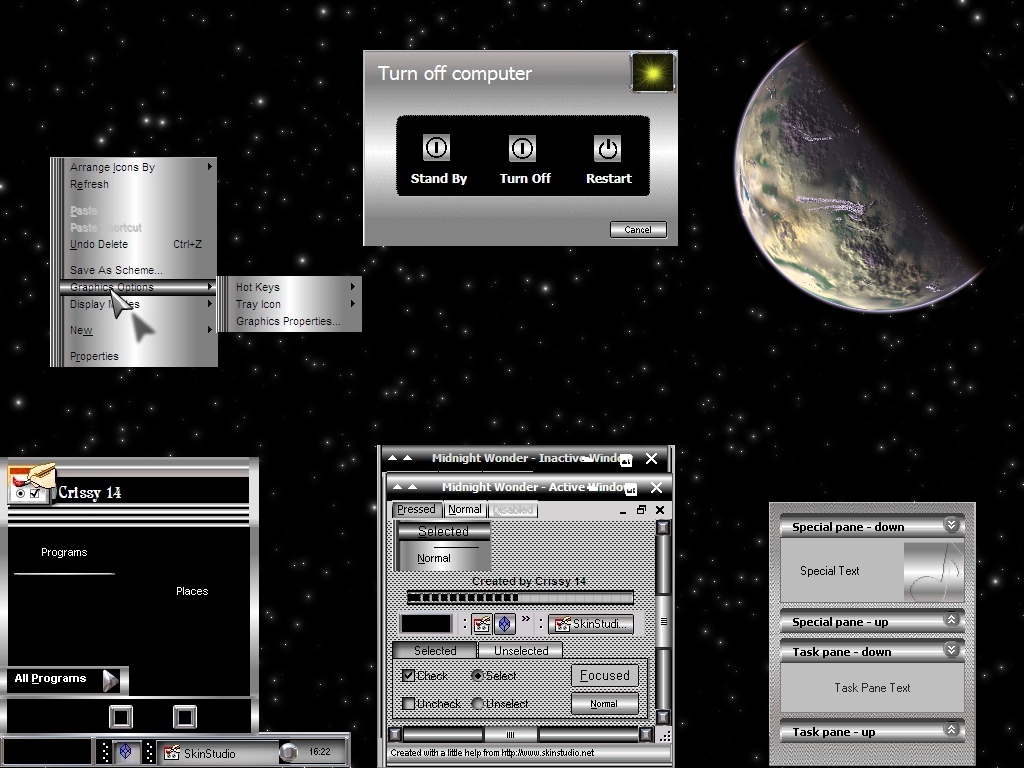
very nice skin Crissy14 howevery there is a vertical line that goes right across the titles on the all programs menu, I believe it was not intended to be there... keep up the good work 

Styl-X Design
Comment #5 Friday, April 18, 2003 3:00 AM

Comment #5 Friday, April 18, 2003 3:00 AM
Fun, keep up ehm comming, only 1 note, it isn't skinshot but screenshot
MadIce
Comment #6 Friday, April 18, 2003 5:01 AM

Comment #6 Friday, April 18, 2003 5:01 AM
MadIce is always a fan of dark sins. Nice to see another one
You probably forgot to set the color of the tooltip text. A previous skin set it to light blue. Now that I have aplied that I cannot read any tooltips, because it will use the color of the previous one. Also, you forgot to set the color of selected items correctly. That is very unhandy in lists. For an example in the Explorer address bar I cannot select text or see what selection I make in the combo box.
There are a lot of settings to worry about when skinning WB. If you use SkinStudio then try to set all color settings. It is hard to find out what they are for, I know. Takes hours to get right
You probably forgot to set the color of the tooltip text. A previous skin set it to light blue. Now that I have aplied that I cannot read any tooltips, because it will use the color of the previous one. Also, you forgot to set the color of selected items correctly. That is very unhandy in lists. For an example in the Explorer address bar I cannot select text or see what selection I make in the combo box.
There are a lot of settings to worry about when skinning WB. If you use SkinStudio then try to set all color settings. It is hard to find out what they are for, I know. Takes hours to get right

DolceStella
Comment #7 Friday, April 18, 2003 7:57 PM
Comment #7 Friday, April 18, 2003 7:57 PM
Really Nice Skin, i like the sounds and the darkness 


SeA_BasS
Comment #9 Monday, April 28, 2003 4:34 PM
Comment #9 Monday, April 28, 2003 4:34 PM
Extremely nice skin... great work crissy14... only prob.. id sure love to have the background file that shows up on the preview... but it aint in the package
Well anyways.. Amazing work once again
Well anyways.. Amazing work once again
crissy14
Comment #10 Monday, April 28, 2003 10:08 PM
Comment #10 Monday, April 28, 2003 10:08 PM
SeA_BasS
The background file is in the skin package. Its just called "wallpaper". Look in your prog. files/objectdesktop/windowblinds/midnight folder. Or just apply it through WB config. Hope you find it. Thank you so much for your wonderful comments. LOL
The background file is in the skin package. Its just called "wallpaper". Look in your prog. files/objectdesktop/windowblinds/midnight folder. Or just apply it through WB config. Hope you find it. Thank you so much for your wonderful comments. LOL
David Jordan
Comment #11 Monday, July 28, 2003 11:57 PM
Comment #11 Monday, July 28, 2003 11:57 PM
A Very tasteful assembage! Good on ya, mate!

Please login to comment and/or vote for this skin.
Welcome Guest! Please take the time to register with us.
There are many great features available to you once you register, including:
- Richer content, access to many features that are disabled for guests like commenting on the forums and downloading files.
- Access to a great community, with a massive database of many, many areas of interest.
- Access to contests & subscription offers like exclusive emails.
- It's simple, and FREE!







Comment #1 Thursday, April 17, 2003 5:15 PM