








































ernie leo
Comment #3 Wednesday, May 18, 2005 7:07 PM

Comment #3 Wednesday, May 18, 2005 7:07 PM
Smoke & Mirrors
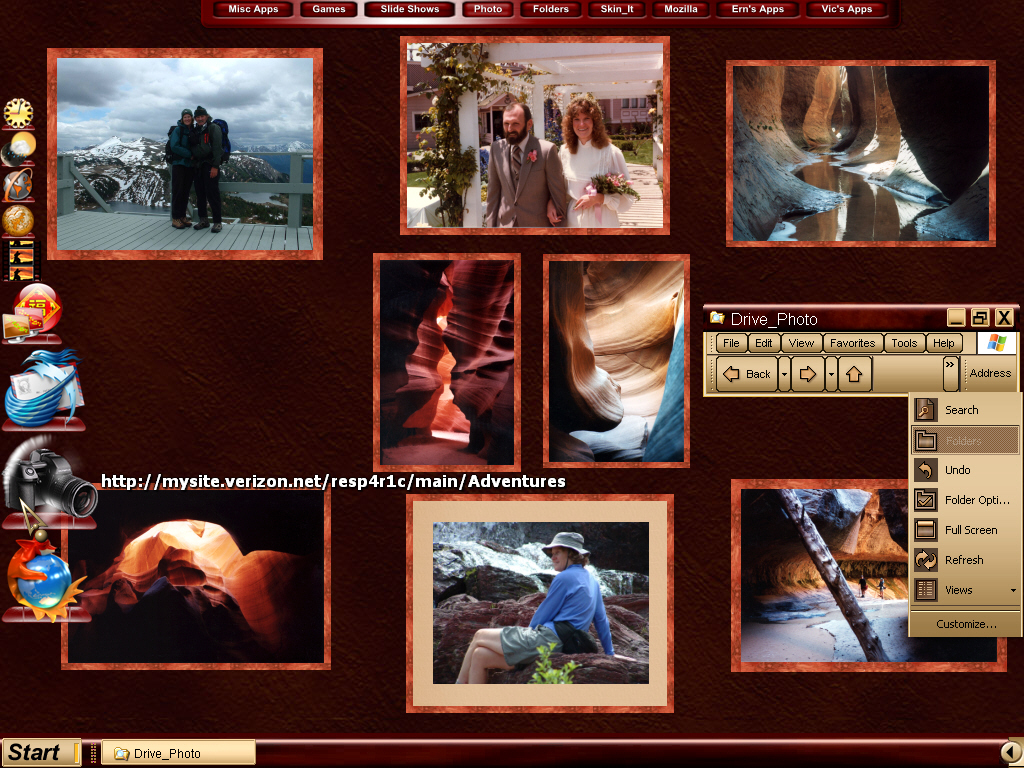
Each framed photo is a stand alone exe file created with DesktopX Builder and their only function is to
hang around on the desktop, although you could use them as shortcuts or links ect. The photo and the frame
are one image in this case a png file. I used 'Create Screen Savers Q & E' software which will allow you to
have 10 images per frame and you can move them up, down, left or right one pixel at a time. I cropped the frame
image from somewere on a horz plane and saved it as a bmp file(horz.bmp), then rotated it and did a save as a
(vert.bmp) file. Resized my photo and imported into 'Create Screen Savers Q & E', imported my horz & vert image 2ea
and moved them around till I had my framed photo, screen capture, crop and save as png file. Create widget!!
Each framed photo is a stand alone exe file created with DesktopX Builder and their only function is to
hang around on the desktop, although you could use them as shortcuts or links ect. The photo and the frame
are one image in this case a png file. I used 'Create Screen Savers Q & E' software which will allow you to
have 10 images per frame and you can move them up, down, left or right one pixel at a time. I cropped the frame
image from somewere on a horz plane and saved it as a bmp file(horz.bmp), then rotated it and did a save as a
(vert.bmp) file. Resized my photo and imported into 'Create Screen Savers Q & E', imported my horz & vert image 2ea
and moved them around till I had my framed photo, screen capture, crop and save as png file. Create widget!!
Fairyy~
Comment #4 Wednesday, May 18, 2005 9:00 PM
~Oh....
I'm in trouble here....
Give me a few weeks to understand this.
I do understand half of what you did. Good idea too.

Comment #4 Wednesday, May 18, 2005 9:00 PM
| Smoke & Mirrors Each framed photo is a stand alone exe file created with DesktopX Builder and their only function is to hang around on the desktop, although you could use them as shortcuts or links ect. The photo and the frame are one image in this case a png file. I used 'Create Screen Savers Q & E' software which will allow you to have 10 images per frame and you can move them up, down, left or right one pixel at a time. I cropped the frame image from somewere on a horz plane and saved it as a bmp file(horz.bmp), then rotated it and did a save as a (vert.bmp) file. Resized my photo and imported into 'Create Screen Savers Q & E', imported my horz & vert image 2ea and moved them around till I had my framed photo, screen capture, crop and save as png file. Create widget!! |
~Oh....
I'm in trouble here....
Give me a few weeks to understand this.
I do understand half of what you did. Good idea too.
Please login to comment and/or vote for this skin.
Welcome Guest! Please take the time to register with us.
There are many great features available to you once you register, including:
- Richer content, access to many features that are disabled for guests like commenting on the forums and downloading files.
- Access to a great community, with a massive database of many, many areas of interest.
- Access to contests & subscription offers like exclusive emails.
- It's simple, and FREE!


![Aero11 (Vista Edition) [Theme Preview]](https://skins17.wincustomize.com/40/19/4019518/13/28337/preview-13-28337-100x75.jpg?d=1677593646.38)

Comment #1 Wednesday, May 18, 2005 2:35 AM