










































cplair
Comment #3 Wednesday, May 27, 2009 4:19 PM

Comment #3 Wednesday, May 27, 2009 4:19 PM
� �Dammit WinStar, vStyler is suppose to be holding a Screen Shooting contest, do me a favor and don't show up!�
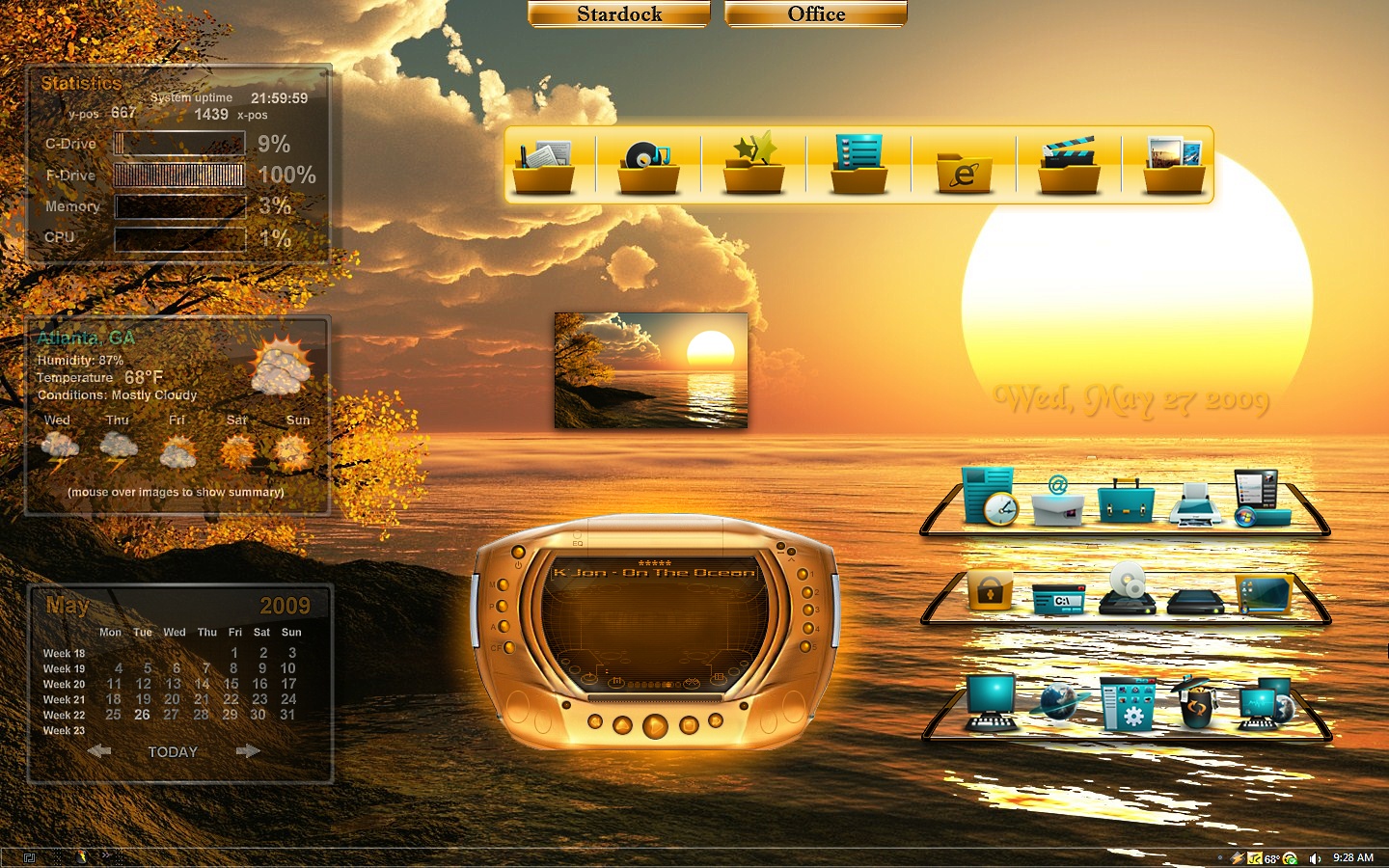
 �Man, Richter's blinds and Philmar's wall with a touch of WinStar's World Class integrating skills equals heaven! I have this wall and I am so glad that I didn't do anything with it! This is what I can only describe as absolutely divine! Five Stars aren't enough! Cp �
 ���������
 �Dammit WinStar, vStyler is suppose to be holding a Screen Shooting contest, do me a favor and don't show up!�
 �Man, Richter's blinds and Philmar's wall with a touch of WinStar's World Class integrating skills equals heaven! I have this wall and I am so glad that I didn't do anything with it! This is what I can only describe as absolutely divine! Five Stars aren't enough! Cp �
 ���������
winstar4
Comment #4 Wednesday, May 27, 2009 6:08 PM
Comment #4 Wednesday, May 27, 2009 6:08 PM
Mirsguy, butch123, and cplair, thanks for the nice comments � �
�
 �
�
winstar4
Comment #5 Wednesday, May 27, 2009 6:13 PM
Comment #5 Wednesday, May 27, 2009 6:13 PM
it looks like you have the "stretch background proportionally" box unchecked on those LightMark docks
Mirsguy thanks for the heads-up about the ODP setting. I have looked for it but I am unable to locate that particular setting. Would you be so kind as to point me to it, so I won't make that mistake again. Thanks in advance.
HarSubagh
Comment #7 Wednesday, May 27, 2009 10:16 PM

Comment #7 Wednesday, May 27, 2009 10:16 PM
full of beautiful color, very nice screenshot, salud! ("dock properties" "Appearance" tab under "background")
winstar4
Comment #8 Wednesday, May 27, 2009 10:32 PM
Comment #8 Wednesday, May 27, 2009 10:32 PM
writingtree thanks for the nice comment, and the dock info. I checked again, I do not have "dock properties", I have "dock settings". I think we are talking about the same thing there. However, I do not have "background" settings, and hence I do not see an appearance tab under background. This is puzzling to me that both Mirsguy and you have that, and I either do not have it or cannot find it. I have version 1.90 plus, build 535u. Any further info would be appreciated.
amitsaran
Comment #9 Wednesday, May 27, 2009 10:38 PM
Comment #9 Wednesday, May 27, 2009 10:38 PM
fabulous job you've done with this, nice lookin' setup my friend.
job you've done with this, nice lookin' setup my friend.
Mirsguy
Comment #10 Wednesday, May 27, 2009 11:10 PM

Comment #10 Wednesday, May 27, 2009 11:10 PM
Go to dock settings, like you have been. Then see screeny below. 

winstar4
Comment #11 Thursday, May 28, 2009 12:39 AM
Comment #11 Thursday, May 28, 2009 12:39 AM
Mirsguy thanks for you response and the screenshot. We have different versions of ODP. I do not have that option listed. I do not know how to post a shot of mine on here, but I will tell you my list of options that are where you are showing me in the SS above. Where your Appearance tab is, mine is Positioning tab. Where you Positioning tab is, mine is Size and Appearance tab. Where your Effects tab is, mine is Tabs and Styles tab. Where your Dock Contents tab is, mine is Content Settings. Which is the latest version, yours or mine? I have version 1.90 plus, build 535u.. Once again thanks for your help.
Mirsguy
Comment #12 Thursday, May 28, 2009 11:15 AM
Comment #12 Thursday, May 28, 2009 11:15 AM
I really don't know what to tell you. I'm confused that our config screens are different. I have the same version/build as you. How do you change docks if you don't have an appearance tab?
winstar4
Comment #13 Thursday, May 28, 2009 11:53 AM
Comment #13 Thursday, May 28, 2009 11:53 AM
Mirsguy thanks for the quick response. This is interesting to say the least, same builds, different config screens. I change docks under the "Tabs and Styles" tab. Under that tab I have the option of naming the tab, changing the color of the tab/dock, changing the font, and changing the dock itself. I notice on your screeny you have two options that I do not have. I do not have the "stretch background proportionally" option, and I also do not have the option to change transparency. It would be nice if all options were included in both of our different versions, that are labeled with the same version/build. If you tell me how to post a screeny of mine I will gladly do so, so as to allow you and others to see and compare your's and mine.
Thuglifejunior
Comment #14 Thursday, May 28, 2009 12:12 PM

Comment #14 Thursday, May 28, 2009 12:12 PM
Winstar, this is a beautiful shot my friend, your dockwork is always something special, you are the master at that, no two ways about it, your combinations and executions of what you portray are priceless, you just have a unique way of shooting, which is pretty pricless my friend, top gun sniping once again, well and truly aced my friend ......P.S You know this dock setting you are looking for, you are looking in the wrong place, you are going into the tabbed dock "Configure Objectdock" Interface, to get to the settings Mirsguy pointed out , you need to go to the objectdock rows you have on the screen, not the tabbed version, like if you look at my screenshots, I always have two in the middle, and a tabbed dock at the side, if I look at the "Configure Objectdock" in the tabbed dock at the side, I get the settings you are talking about, but if I go to the middle desktop docks and go to "Configure Objectdock", I get Mirsguys settings, see if this helps any....cheers my friend
......P.S You know this dock setting you are looking for, you are looking in the wrong place, you are going into the tabbed dock "Configure Objectdock" Interface, to get to the settings Mirsguy pointed out , you need to go to the objectdock rows you have on the screen, not the tabbed version, like if you look at my screenshots, I always have two in the middle, and a tabbed dock at the side, if I look at the "Configure Objectdock" in the tabbed dock at the side, I get the settings you are talking about, but if I go to the middle desktop docks and go to "Configure Objectdock", I get Mirsguys settings, see if this helps any....cheers my friend
winstar4
Comment #15 Thursday, May 28, 2009 12:57 PM
Comment #15 Thursday, May 28, 2009 12:57 PM
TLJ thanks for the nice comments and support. Also, bingo! that was the answer. I was looking at settings under a tabbed dock. The settings in Mirsguy's screeny is for a non-tabbed dock. Whew, that was really puzzling me. I hardly every use non-tabbed docks, but now I might have to, just to use those mystery settings that I have never noticed before. � � ��
� ��
 � ��
� ��
winstar4
Comment #16 Thursday, May 28, 2009 1:05 PM
Comment #16 Thursday, May 28, 2009 1:05 PM
cloudst and amitsaran, sorry, I got so focused on the ODP issue I forgot to thank the two of you, thanks for your nice comments ��
�

philmar83
Comment #19 Thursday, May 28, 2009 2:10 PM

Comment #19 Thursday, May 28, 2009 2:10 PM
very nice winstar.you did better set up I did with. thanks for using my stuff
thanks for using my stuff
winstar4
Comment #20 Thursday, May 28, 2009 3:52 PM
Comment #20 Thursday, May 28, 2009 3:52 PM
philmar83 thanks for the nice comment, and thanks for providing such a beautiful WP to use! ��
�Please login to comment and/or vote for this skin.
Welcome Guest! Please take the time to register with us.
There are many great features available to you once you register, including:
- Richer content, access to many features that are disabled for guests like commenting on the forums and downloading files.
- Access to a great community, with a massive database of many, many areas of interest.
- Access to contests & subscription offers like exclusive emails.
- It's simple, and FREE!


![Aero11 (Vista Edition) [Theme Preview]](https://skins17.wincustomize.com/40/19/4019518/13/28337/preview-13-28337-100x75.jpg?d=1677593646.38)

Comment #1 Wednesday, May 27, 2009 1:12 PM