






































encomix
Comment #2 Monday, December 31, 2007 7:45 PM
Comment #2 Monday, December 31, 2007 7:45 PM
I tried this and it didn't work as well as you would want.
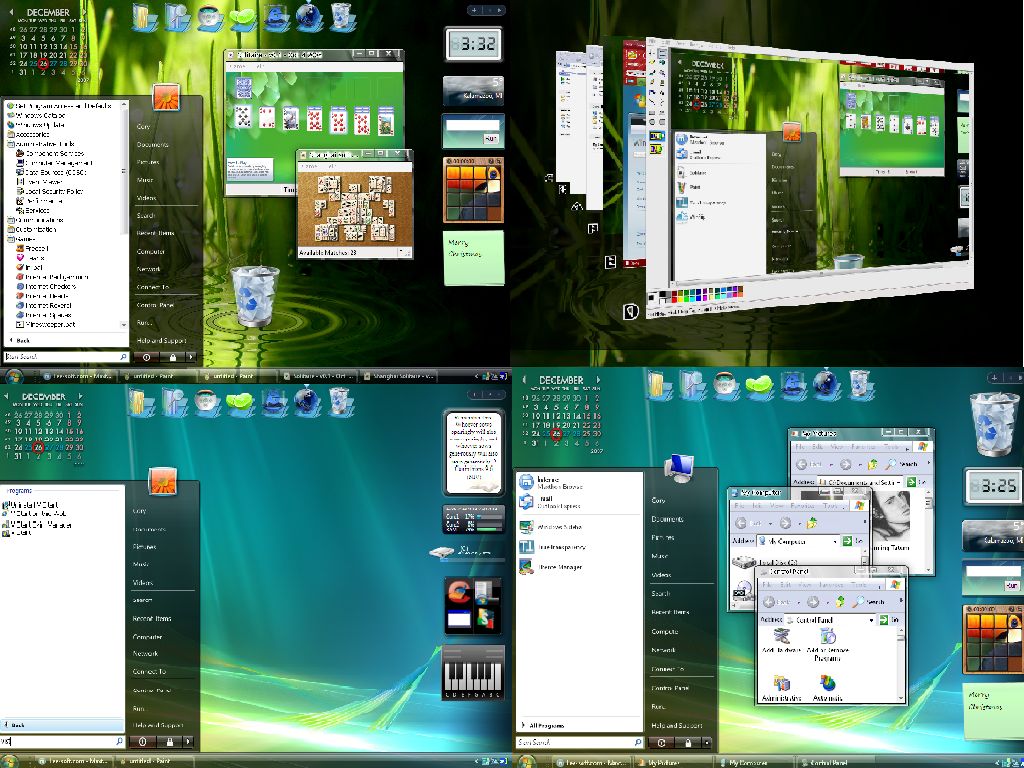
On the install you may get a warning about some files being over written. This looks great in the images provided. But I would just stick to something like windowblinds because it doesn't mess with any of the Window files that run your computer.
On the install you may get a warning about some files being over written. This looks great in the images provided. But I would just stick to something like windowblinds because it doesn't mess with any of the Window files that run your computer.
RobJK
Comment #3 Tuesday, January 1, 2008 3:35 PM

Comment #3 Tuesday, January 1, 2008 3:35 PM
You dont get a warning but windows file protection notices the change in the file and askes you to insert the windows cd to fix it. this file is just the file that only allows microsoft themes to be applied on windows. And anyone who does this does it at there own risk. There is a risk with any windows skinning applications even windows blinds so says the people at techsupportforums.com? I do have one problem and that is that when i open a folder or window sometimes parts of the window dont show up till i minimize and then resore again. ITS ANNOYING! I dont know if i am going to keep the file patched but know that the process can always be reversed if you run windows file protection utility.
Please login to comment and/or vote for this skin.
Welcome Guest! Please take the time to register with us.
There are many great features available to you once you register, including:
- Richer content, access to many features that are disabled for guests like commenting on the forums and downloading files.
- Access to a great community, with a massive database of many, many areas of interest.
- Access to contests & subscription offers like exclusive emails.
- It's simple, and FREE!



![Aero11 (Vista Edition) [Theme Preview]](https://skins17.wincustomize.com/40/19/4019518/13/28337/preview-13-28337-100x75.jpg?d=1677593646.38)


Comment #1 Wednesday, December 26, 2007 12:04 PM