































DX Tutorial #7: Microsoft Access DB in DX
How to access your access data from inside DX
Wednesday, October 18, 2006 by RomanDA | Discussion: DesktopX Tutorials
RomanDA's
DekstopX Tutorials:
My goal is to make a set
of tutorials for DekstopX. If you have ideas on what you would like to
see, please email me at
[email protected]
Database Access
- PART 7:
I am working on something
that will require access to a local (on the hard drive) database.
I do a LOT of ASP work on web sites, and was hoping that there would be some
carry over.
I believe the DX code is about 3-4 lines different than the ASP (web page)
code.
This will be a VERY short
tutorial, its more like an article but I want this to be around for future
people.
I will add more later if I can.
| Text object / DB Access: | |
| Local database is on my D
drive under TEMP, i want to access the TABLE in it called "Hooked Up"
Be aware this is a TEST I pulled a db from a web site i have running just to verify this works. I'm not uploading anything for this, its just some code examples |
|
|
Creating the Objects: |
||
| We will make a
TEXT object and put the DB access code into the On Start. LOAD DekstopX and go into the CREATE mode: * if you do not have DekstopX (builder) you will need to download it. |
||
| TEST OBJECT: | ||
| Create the BASE object by | ||
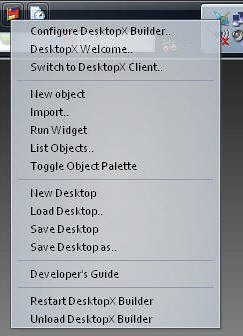 |
RIGHT-CLICK on the DekstopX Icon in the system tray. Select "New object" <-- See this for more info |
|
 |
The Object Properties Dialog will show up. Click the "States" Tab Change to "TEXT" Type in something for the text Set the font to whatever you want. hit APPLY |
|
 |
Click the "Summary" tab Set the width to 400-500 it keeps the text from going off the edge of the screen. Hit Apply |
|
 |
Click on the "GENERAL" tab. Click on "NEW" for the script the window like this will load. |
|
|
The Script: |
||||||||||||
| The Code for this little bit we are doing is VERY simple. | ||||||||||||
Click the "File" menu item, then "Save and Close editor", then click "OK" in the properties dialog box. That's it, the db will be read when you save this and the info displayed in the object. |
||||||||||||
Again, this is just a "Proof of concept" that shows that you can access a Microsoft DB with DX, and actually VERY easily too!!
I assume no comments means no one is finding these useful. If this is the case, I can stop a lot easier then I can continue. This one tutorial alone has taken me around 3 hrs to type up and setup.
 |
Enjoy, RomanDA AKA: David A. Roman http://romanda.wincustomize.com http://www.romanda.org [email protected] |

Reply #2 Wednesday, October 18, 2006 5:13 PM

But I bookmark your stuff for future reference.

Thanks.


Reply #3 Wednesday, October 18, 2006 10:23 PM
You comment your code beautifully.

Reply #4 Thursday, October 19, 2006 3:24 AM

Reply #5 Thursday, October 19, 2006 6:49 AM
Just email me, im open for working out better tutorials.
All,
I updated the code above to show ALL the Records in the table, in a more simple way.
Enjoy.
The next widget will be a DB Access widget. It will prompt you for a DB and Table, then show the info in a form, and allow you to edit/update/delete/add. *if i can make all this work.

Reply #6 Thursday, October 19, 2006 8:03 AM
If you are making widgets for small business use, Access might be OK. But mySQL and MS SQL are going to be where the power users are.
Good luck, and thanks.
Reply #7 Thursday, October 19, 2006 8:48 AM

Reply #8 Thursday, October 19, 2006 9:28 AM

http://www.w3schools.com/ado/ado_examples.asp

Reply #9 Thursday, October 19, 2006 2:04 PM
| I work for a huge company and am greedy about gadgets that work for me. |
Well, Hire me to make them...
Reply #10 Friday, October 20, 2006 12:55 AM

Reply #11 Monday, October 23, 2006 5:59 PM


I just got back to snivilisation and was thinking about something along these lines myself for a project coming up! Was wondering if this was possible, but I was thinking about using "server.mappath" for the db! Not sure if it would be the best practice though?
Thanks for the heads up!

Rand

Reply #12 Wednesday, October 25, 2006 7:58 PM
Hey, do you know how to convert numbers to a bar graph? I have been wanting to do that for a long time. I just can't see to figure it out. Just an idea if you are needing a topic for a new tutorial. Cheers.

Reply #15 Thursday, October 26, 2006 1:24 PM
i give up.. next time ill just keep my info to myself.
Reply #17 Friday, October 27, 2006 6:05 PM


Please login to comment and/or vote for this skin.
Welcome Guest! Please take the time to register with us.
There are many great features available to you once you register, including:
- Richer content, access to many features that are disabled for guests like commenting on the forums and downloading skins.
- Access to a great community, with a massive database of many, many areas of interest.
- Access to contests & subscription offers like exclusive emails.
- It's simple, and FREE!
Reply #1 Wednesday, October 18, 2006 4:00 PM
Now to set up some queries. . .