








































Opera is now free!
Though not free as in beer
Tuesday, September 20, 2005 by Hengest | Discussion: Internet
The Opera web browser is now completely free for anyone without any annoying ad. banners at the top.
So, if you haven't tried it out yet, give it a go. Opera offers many of the same features as Firefox (security, tabs, skins, etc), although it does seem to, generally, use-up less system resources than Firefox.
| Why we're going free Opera has removed the banners, found within our browser, and the licensing fee. Opera’s growth, due to tremendous worldwide customer support, has made today’s milestone an achievable goal. Premium support is available. |
So, if you haven't tried it out yet, give it a go. Opera offers many of the same features as Firefox (security, tabs, skins, etc), although it does seem to, generally, use-up less system resources than Firefox.
 |
|
Page 2 of 3 | |
|
|---|
Hengest
Reply #22 Wednesday, September 21, 2005 2:44 AM
Where can I get that from?
I Googled about a bit, and had a quick look at the Opera site; however, there didn't seem to be anything relating to a Java plug-in. Version 1.5 of the Sun Java Runtime Environment is installed on my computer, which it also says in the 'About Opera' page.

Reply #22 Wednesday, September 21, 2005 2:44 AM
| Have you downloaded the Java Plug-In from the Opera website? |
Where can I get that from?
I Googled about a bit, and had a quick look at the Opera site; however, there didn't seem to be anything relating to a Java plug-in. Version 1.5 of the Sun Java Runtime Environment is installed on my computer, which it also says in the 'About Opera' page.
Island Dog
Reply #23 Wednesday, September 21, 2005 4:40 AM

Reply #23 Wednesday, September 21, 2005 4:40 AM
| I Googled about a bit, and had a quick look at the Opera site; however, there didn't seem to be anything relating to a Java plug-in. Version 1.5 of the Sun Java Runtime Environment is installed on my computer, which it also says in the 'About Opera' page. |
That's all you need I believe.

aimzzz
Reply #24 Wednesday, September 21, 2005 5:20 AM

Reply #24 Wednesday, September 21, 2005 5:20 AM
re error msg @ #12
I have used Opera for a few weeks - not long, I know - but I haven't had any problems with the WC site
I have used Opera for a few weeks - not long, I know - but I haven't had any problems with the WC site

Chris
Reply #25 Wednesday, September 21, 2005 5:33 AM
I have this problem with the Wincustomize forums as well. In fact, I had to make this post using FireFox.
The progress bar in the addresses to 100% as the page loads, then it starts back at 0% and starts to climb back to 100% and the page reloads itself again. And again. And Again.. I have to close the tab in order for it to stop. So far, I've encountered this problem only with Wincustomize forums. Opera seems fine everywhere else.
Reply #25 Wednesday, September 21, 2005 5:33 AM
| when I look at a post in the forums the page seems to continuously "reload". |
I have this problem with the Wincustomize forums as well. In fact, I had to make this post using FireFox.
The progress bar in the addresses to 100% as the page loads, then it starts back at 0% and starts to climb back to 100% and the page reloads itself again. And again. And Again.. I have to close the tab in order for it to stop. So far, I've encountered this problem only with Wincustomize forums. Opera seems fine everywhere else.
Lantec
Reply #26 Wednesday, September 21, 2005 7:40 AM

Reply #26 Wednesday, September 21, 2005 7:40 AM
Island Dog & Chris, on the advanced tab under Network, do you have the browser identified as Opera?
Lantec
Reply #27 Wednesday, September 21, 2005 7:42 AM
Hengst,
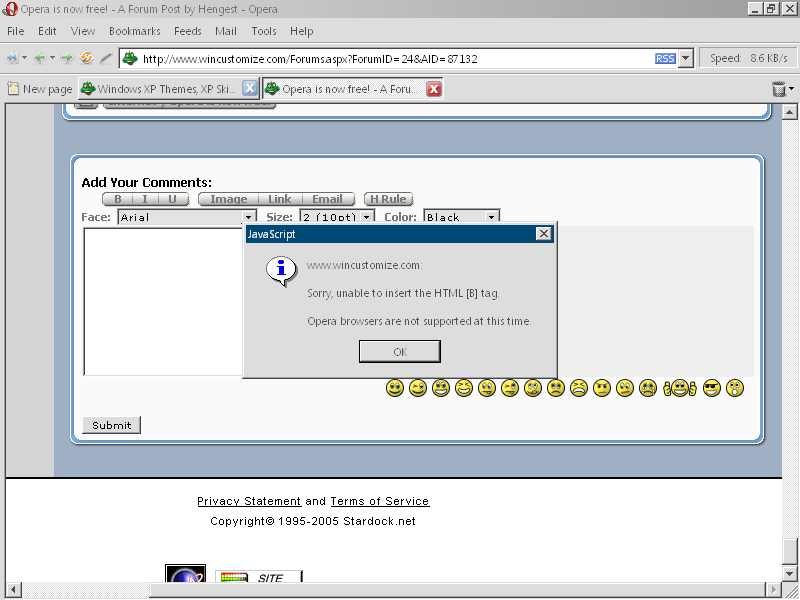
You have it. What were you trying to do when WC said it did not support Opera?
Reply #27 Wednesday, September 21, 2005 7:42 AM
| . Version 1.5 of the Sun Java Runtime Environment |
Hengst,
You have it. What were you trying to do when WC said it did not support Opera?
Solosturm
Reply #29 Wednesday, September 21, 2005 9:18 AM

Reply #29 Wednesday, September 21, 2005 9:18 AM
I tried out opera back when it was a simple MDI app, way back in '96 or '97, before skinning was even added it. I remember it fondly because it was the "floppy disk web browser", as in, the only webbrowser that you could download the install to a floppy and it would fit.
Majic7
Reply #30 Wednesday, September 21, 2005 5:55 PM

Reply #30 Wednesday, September 21, 2005 5:55 PM
Just downloaded and no problems with WC or the forums so far. I was wrong. When I submitted the post thru Opera I got the continuing reload. Had
Firefox open at same time and it was posted but Opera is still cycling.
Firefox open at same time and it was posted but Opera is still cycling.
Chris
Reply #31 Wednesday, September 21, 2005 6:18 PM
Setting it to Opera / Mozilla / IE makes no difference. This thread page continuously reloads over and over again. Using Opera 8.5 BTW
Reply #31 Wednesday, September 21, 2005 6:18 PM
| sland Dog & Chris, on the advanced tab under Network, do you have the browser identified as Opera? |
Setting it to Opera / Mozilla / IE makes no difference. This thread page continuously reloads over and over again. Using Opera 8.5 BTW
Chris
Reply #32 Wednesday, September 21, 2005 6:22 PM
Reply #32 Wednesday, September 21, 2005 6:22 PM
Here's something interesting. The continuous reload only occurs when I'm logged in to the wincustomize site. If I load this thread page when I'm not logged in, everything is fine.
Lantec
Reply #33 Wednesday, September 21, 2005 7:26 PM
Reply #33 Wednesday, September 21, 2005 7:26 PM
I'm on version 8.02
I always wait a few days before upgrading to see if any problems arise from the upgrade. I'd say that there's one this time. I think it's going to have to be addressed on the WC end because I haven't seen it reported on other sites.
I always have mine identified as opera due to some strange results when ID'd as IE
I always wait a few days before upgrading to see if any problems arise from the upgrade. I'd say that there's one this time. I think it's going to have to be addressed on the WC end because I haven't seen it reported on other sites.
I always have mine identified as opera due to some strange results when ID'd as IE
aimzzz
Reply #34 Wednesday, September 21, 2005 9:11 PM
Reply #34 Wednesday, September 21, 2005 9:11 PM
I'm having the reload problem now, but didn't have it before upgrading to 8.5. A few minutes ago I made a post about it on the Opera forum. Will let you know if I find out anything more
aimzzz
Reply #35 Wednesday, September 21, 2005 9:34 PM
Reply #35 Wednesday, September 21, 2005 9:34 PM
re #32: I just tried logging out & had the same result-- the reloads don't happen if I'm logged out. I was using Opera 8.2 & never had this problem until yesterday evening after upgrading to 8.5. (didn't change any settings before noticing the reload issue.)
Lanetec is right about upgrades!
Lanetec is right about upgrades!
T-Man
Reply #36 Thursday, September 22, 2005 2:58 PM

Reply #36 Thursday, September 22, 2005 2:58 PM
| I haven't seen that error message here. However, when I look at a post in the forums the page seems to continuously "reload". |
They broke the newest version of Opera. We use location.href = .../Forums.aspx?ForumID=24&AID=87132#671959 to jump to the last comment that was read. It appears that Opera is now ignoring the # anchor tag thus the above line causes Opera to continually to reload the page. So we had to chop that option out for Opera.
aimzzz
Reply #37 Thursday, September 22, 2005 3:23 PM
Reply #37 Thursday, September 22, 2005 3:23 PM
Thanks, T_Man. I will post your comment on the Opera forum in hopes of getting it fixed. 
Some WC users added posts to my thread about the same problem. Will let them know you took care of it.
Some WC users added posts to my thread about the same problem. Will let them know you took care of it.
Lantec
Reply #39 Thursday, September 22, 2005 6:32 PM
Reply #39 Thursday, September 22, 2005 6:32 PM
Glad I read this. I just logged on a little while ago and noticed I wasn't going to the last read post. I was just about to post a bug thread.
Hengest
Reply #40 Friday, September 23, 2005 6:30 PM
I was clicking the 'B' to insert the bold tags.
Edit: I'm also running version 8.50 of Opera on Windows 2000 with Service Pack 4.
Reply #40 Friday, September 23, 2005 6:30 PM
| Hengst, You have it. What were you trying to do when WC said it did not support Opera? |
I was clicking the 'B' to insert the bold tags.
Edit: I'm also running version 8.50 of Opera on Windows 2000 with Service Pack 4.
Please login to comment and/or vote for this skin.
Welcome Guest! Please take the time to register with us.
There are many great features available to you once you register, including:
- Richer content, access to many features that are disabled for guests like commenting on the forums and downloading skins.
- Access to a great community, with a massive database of many, many areas of interest.
- Access to contests & subscription offers like exclusive emails.
- It's simple, and FREE!
|
|
Page 2 of 3 | |
|
|---|
Reply #21 Tuesday, September 20, 2005 11:32 PM