





































One Piece At A Time : Windowblind Tutorial Part II
Design: Title Bars & Window Frames
Friday, January 20, 2012 by PoSmedley | Discussion: WindowBlinds Tutorials

Welcome to Part II of the 'One Piece At A Time' tutorial. This thread will be concentrating on the design of the Title Bars & Window Frames for the Roan Windowblind. Several skinners are helping me through these threads in an effort to understand and learn how to build Windowblinds. (And they would be Vampothika, neone6, and 2of3) Along with a lot of other talented skinners, artists, etc, who have participated with this so far, we're hoping these threads will also help other would be or existing skinners as well. We also have gmc2 sorting through all of the info posted for hte Wincustomize Wiki.
EXAMPLE:

For these first few parts, we'll be working on the design of the Roan Windowblinds elements and then bringing them all together and exploring SKS (Skin Studio) where we'll take everything and put it together.
If you're looking for Part I, II, III you can find them here:
One Piece At A Time : Windowblind Tutorial Part I
Design : Start Menu and Taskbar
One Piece At A Time : Windowblind Tutorial Part II
Design: Title Bars & Window Frames
One Piece At A Time : Windowblind Tutorial Part II
Design: Edit Controls
PLEASE :
- I am open to suggestions but may not use any of them. Please, don't be offended if I don't use yours.
- Keep the image posting to the skin(s)
- If you want to make a skin to go with this, PM me for the files. My PSD's tend to be a mess, but I save everything and will be happy to share. I am uploading the actual files to the Graphics Gallery here on Wincustomize.
- We'll be skinning for Windows7, maybe Vista. If someone wants to do XP, PM me and I will get you what you need.
- Any files you request will come as I complete them. I won't be jumping ahead. Please be patient.
-----------------------------------------------------------------------------------------------------------------------------------------
The PSD files for the previous threads are in the Graphics Gallery.
Roan WB Title Bars and Window Frames
Roan WB Taskbar Buttons
Roan WB Title Bars and Window Frames
Roan WB Taskbar Buttons
 |
|
Page 4 of 11 | |
|
|---|


Reply #63 Sunday, January 22, 2012 10:01 AM
I redid them again. My question is, when I make the png (because of this particular skin) do I want a transparent background or do I want to include the window frame?


Reply #64 Sunday, January 22, 2012 10:23 AM
You could draw the part that "overlaps" the title bar on the frame itself and then leave the buttons with a transparent background. Remember the buttons have different states depending on the dialog/window properties.
Reply #65 Sunday, January 22, 2012 10:28 AM
This is also the point where I might be tempted to mirror the look of those buttons in the shutdown buttons on the startpanel. I at least feel that even though one has "finished" the design of other parts of the skin, it`s not cut in stone until you upload it!
Up to you, though.....just thought I`d put it out there 
Reply #66 Sunday, January 22, 2012 10:42 AM
I followed SKS on that and have all 8 (?) states shown in the shot above. (4 active and 4 inactive- according to sks)
I like them the way neone6 showed me for the window frame. They look more like 'rings' to me , wrapped around the leather. I don't know how I could make that work in the SPanel. I'm afraid they'll look to much like buttons and take away from the ones on the frame. I'll mess with it and see.
*should say Tool Window


Reply #67 Sunday, January 22, 2012 11:08 AM
Use these. Right click and you´ll see they´re in PNG right here ready for use. FIXED your pixelspace, it was 5 px between them Now it´s 6 Must have dividable number cause space on the sides gotta be half. Now it´s 3px. 



Reply #69 Sunday, January 22, 2012 11:22 AM

*I spent a total of about 2 1/2 hours trying to duplicate your freaking buttons and you see where this is going. I'll have to redo the 'All Programs' and the 'Mouse Overs', Are your ears burning yet???? 
Reply #71 Sunday, January 22, 2012 11:31 AM
Taskbar buttons ready 4 use.
States: Normal, Pressed, Disabled, Highlighted, Activated, Activated & Highlighted. 

Reply #72 Sunday, January 22, 2012 11:35 AM
If I remember right, you can have a 'normal state' (?) for the mouse overs (right and left panel) on the start menu in XP.
IF I did remember right, can you do the same in Vista and 7?
Reply #74 Sunday, January 22, 2012 11:50 AM
Edited the TB buttons again, should be alright now just in case.
Reply #75 Sunday, January 22, 2012 12:07 PM

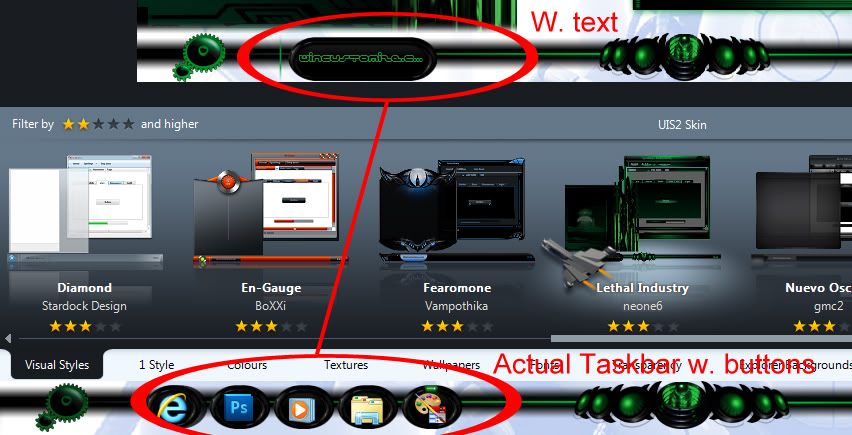
But how are these going to look in Vista with text?
Reply #77 Sunday, January 22, 2012 12:23 PM
This is what will happen when applied w.text..... Painting margins are CR U C I A L here ! Perfect example 


Please login to comment and/or vote for this skin.
Welcome Guest! Please take the time to register with us.
There are many great features available to you once you register, including:
- Richer content, access to many features that are disabled for guests like commenting on the forums and downloading skins.
- Access to a great community, with a massive database of many, many areas of interest.
- Access to contests & subscription offers like exclusive emails.
- It's simple, and FREE!
|
|
Page 4 of 11 | |
|
|---|
Reply #61 Saturday, January 21, 2012 6:23 PM
They are different. I like different. Go with them!