






































explorer.exe is rising...rising...rising
Thursday, October 2, 2003 by Zodiaq~ | Discussion: Stardock Software
Over the last week I have noticed that the explorer process has steadily been climbing...I mean as high as 222,000K... 
What could be going on?
If I restart, it is about 25,000...then it starts to slowly ascend...after about 3-4 days it reaches 150,000-200,000K.
btw...No viruses, spyware or anything like that.

What could be going on?
If I restart, it is about 25,000...then it starts to slowly ascend...after about 3-4 days it reaches 150,000-200,000K.

btw...No viruses, spyware or anything like that.
 |
|
Page 2 of 5 | |
|
|---|
yrag
Reply #22 Thursday, October 2, 2003 12:57 PM

Reply #22 Thursday, October 2, 2003 12:57 PM
hummmmm...it could be stuck on 'run'...check your processes and make sure nothing 'strange' is running


Zodiaq~
Reply #23 Thursday, October 2, 2003 1:03 PM
Reply #23 Thursday, October 2, 2003 1:03 PM
I always monitor my processes...Nothing running that shouldn't be...
After about 15 minutes the mem program finished but all I had was the flashing cursor at the bottom left corner of the screen
After about 15 minutes the mem program finished but all I had was the flashing cursor at the bottom left corner of the screen
yrag
Reply #24 Thursday, October 2, 2003 1:05 PM
Reply #24 Thursday, October 2, 2003 1:05 PM
That means it passed on one pass....all's fine there. Now if we could only figure out this explorer thingy...... 

yrag
Reply #25 Thursday, October 2, 2003 1:08 PM
Reply #25 Thursday, October 2, 2003 1:08 PM
is this machine doing anything else funny...no changes in anything else (restarts, shutdowns etc)?
Zodiaq~
Reply #26 Thursday, October 2, 2003 1:11 PM
Reply #26 Thursday, October 2, 2003 1:11 PM
Muuhhhaaaa...Maybe this is the one to stump you yrag...hehe...
Better not let China find out...You'll never here the end of it.
Better not let China find out...You'll never here the end of it.

Zodiaq~
Reply #27 Thursday, October 2, 2003 1:12 PM
Nope...Runs perfectly
Reply #27 Thursday, October 2, 2003 1:12 PM
| #25 by yrag - 10/2/2003 1:08:07 PM is this machine doing anything else funny...no changes in anything else (restarts, shutdowns etc)? |
Nope...Runs perfectly

yrag
Reply #28 Thursday, October 2, 2003 1:18 PM
Reply #28 Thursday, October 2, 2003 1:18 PM
I think you might be right...here's the bottom line. If everything is working fine then let it go. That's easier said then done 'cause I would keep after it until the cows came home (character flaw). I will find an answer, but need to do a little research. In the meantime just keep 'putering until you or the machine stops working
BTW: you're right about China....yrag can see this one coming
[Message Edited]
BTW: you're right about China....yrag can see this one coming
[Message Edited]
Zodiaq~
Reply #29 Thursday, October 2, 2003 1:23 PM
Reply #29 Thursday, October 2, 2003 1:23 PM
Thanks yrag...If you find out anything please let me know
I really do appreciate your help on this
Strange it's been doing this for only the last week or so
I'm going to do a little research and see if I can dig up something.
I really do appreciate your help on this

Strange it's been doing this for only the last week or so
I'm going to do a little research and see if I can dig up something.
yrag
Reply #30 Thursday, October 2, 2003 3:00 PM
Reply #30 Thursday, October 2, 2003 3:00 PM
Gary - have you changed anything in your shell (taskbar, desktop, icons etc) since last week when this started?
[Message Edited]
[Message Edited]
Zodiaq~
Reply #31 Thursday, October 2, 2003 3:14 PM
Reply #31 Thursday, October 2, 2003 3:14 PM
Gary...Actually yeah...I am always changing those things.
The only new program I have installed in the last week is ObjectDock...I don't know if that could effect it???
The only new program I have installed in the last week is ObjectDock...I don't know if that could effect it???
yrag
Reply #32 Thursday, October 2, 2003 3:23 PM
Reply #32 Thursday, October 2, 2003 3:23 PM
It is really far fetched to think that anything could be giving you such a high resource hit, but you have to start somewhere. Since Explorer.exe is no more then a user shell, it might, repeat might, have something to do with the skin(s) you're using. Try loading and unloading 'shell' proggies and/or skins and see if it does anything.
Zodiaq~
Reply #33 Thursday, October 2, 2003 3:27 PM
Reply #33 Thursday, October 2, 2003 3:27 PM
I will give that a try and see what happens after awhile.
Please don't tell me it's that stuff...That's the important stuff to me
Be back in about an hour
Thanks for helping
Please don't tell me it's that stuff...That's the important stuff to me
Be back in about an hour
Thanks for helping
IPlural
Reply #34 Thursday, October 2, 2003 3:59 PM

Reply #34 Thursday, October 2, 2003 3:59 PM
mm, just some suggestions
One thing I would do is view your tcp-ip status...
if the icon is in the system tray, right click it and then click (status)
then look as see if you have more packets going out than you do coming in when you click a link of something in IE...
Another would be to delete all activeX components installed under this users name in the IE settings.
IE tool bar - Tools - Internet Options - (Temp Internet Files section on first window) Settings - View Objects and then right click each one and view the version info...
Mine has IBM Access Support, acpRunner Class, the Java Runtime 1.4.1_01, Office Update Install Engine, Shockware Flash Object and Symantic RuFSI Registy Information Class... there things are a constant and should be there on my system, if for any reason IE flakes out and a simple restoring defaults does not work, I check here and almost always find something in there that is new and I delete it, seems to fix the problems 90 % of the time...
I would also consider the following for sanities sake
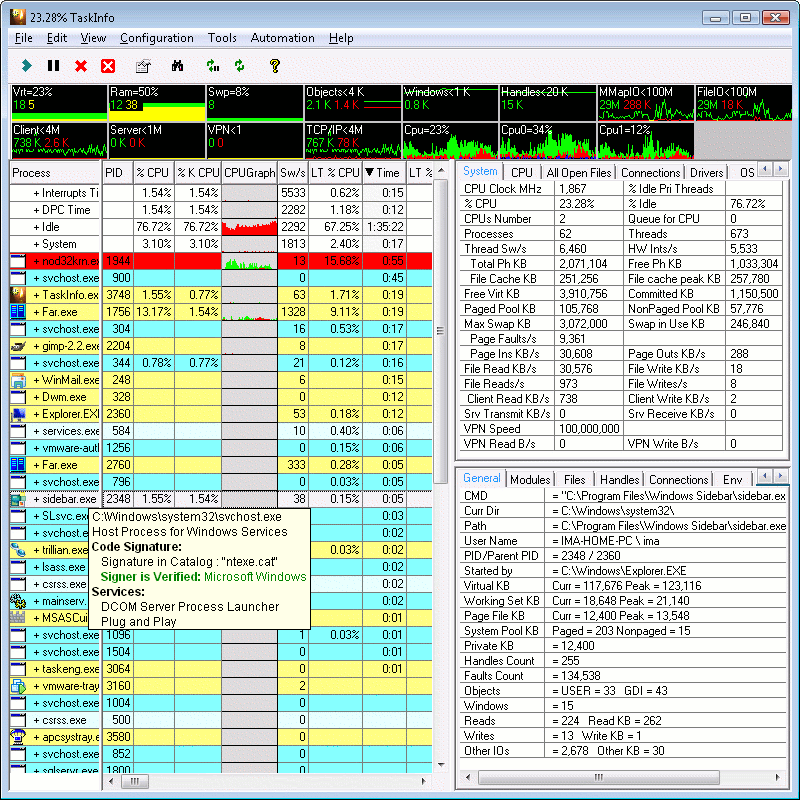
Iarsn System Software: download TaskInfo2003 demo and install it...
http://www.iarsn.com
It will tell you about everything that is running on your system. I would venture to bet that something is opening a thread in/under the IExplorer process and is transfering something or is bleeding all over your systems memory and cpu resources.
One thing I would do is view your tcp-ip status...
if the icon is in the system tray, right click it and then click (status)
then look as see if you have more packets going out than you do coming in when you click a link of something in IE...
Another would be to delete all activeX components installed under this users name in the IE settings.
IE tool bar - Tools - Internet Options - (Temp Internet Files section on first window) Settings - View Objects and then right click each one and view the version info...
Mine has IBM Access Support, acpRunner Class, the Java Runtime 1.4.1_01, Office Update Install Engine, Shockware Flash Object and Symantic RuFSI Registy Information Class... there things are a constant and should be there on my system, if for any reason IE flakes out and a simple restoring defaults does not work, I check here and almost always find something in there that is new and I delete it, seems to fix the problems 90 % of the time...
I would also consider the following for sanities sake
Iarsn System Software: download TaskInfo2003 demo and install it...
http://www.iarsn.com
It will tell you about everything that is running on your system. I would venture to bet that something is opening a thread in/under the IExplorer process and is transfering something or is bleeding all over your systems memory and cpu resources.
yrag
Reply #35 Thursday, October 2, 2003 4:04 PM
Reply #35 Thursday, October 2, 2003 4:04 PM
That's great John...it's explorer. exe
BTW: your presentation was great...
[Message Edited]
BTW: your presentation was great...
[Message Edited]
IPlural
Reply #36 Thursday, October 2, 2003 4:08 PM
Reply #36 Thursday, October 2, 2003 4:08 PM
Oh and ObjectDock and IE might be fighting over a memory block...
does ObjectDock slowly slow down also? and if you do not load ObjectDock does IE still behave the same?
for some reason I can not run ObjectDock on this system and I didn't put any effort into figuring out why because I figure it has more to do with the Video Chipset for this laptop...
Which if it is doing this to you only when ObjectDock and IE are open I would venture to guess your running an older video chipset which can not handle the the punishment with all the graphics software running all at one time and IE constantly pushing for room and CPU time...
Low end video cards and some of the older higher end ones passed some work load to the CPU and at some point *pushed* it on top of the CPEver had your resources so low that if you moved your mouse your cursor would move in jerky motion and not keep up and your drive would grind away?
does ObjectDock slowly slow down also? and if you do not load ObjectDock does IE still behave the same?
for some reason I can not run ObjectDock on this system and I didn't put any effort into figuring out why because I figure it has more to do with the Video Chipset for this laptop...
Which if it is doing this to you only when ObjectDock and IE are open I would venture to guess your running an older video chipset which can not handle the the punishment with all the graphics software running all at one time and IE constantly pushing for room and CPU time...
Low end video cards and some of the older higher end ones passed some work load to the CPU and at some point *pushed* it on top of the CPEver had your resources so low that if you moved your mouse your cursor would move in jerky motion and not keep up and your drive would grind away?
IPlural
Reply #37 Thursday, October 2, 2003 4:09 PM
Reply #37 Thursday, October 2, 2003 4:09 PM
lol
I've had 6 hours sleep in 72 hours
sorry about that, Explorer...
same same...
Taskinfo will let you see what is opening up under explorers process in detail
I've had 6 hours sleep in 72 hours

sorry about that, Explorer...
same same...
Taskinfo will let you see what is opening up under explorers process in detail
IPlural
Reply #38 Thursday, October 2, 2003 4:10 PM
Reply #38 Thursday, October 2, 2003 4:10 PM
need to re-read this, mind was on that thread that No.75 posted about IE...
lol
lol
IPlural
Reply #39 Thursday, October 2, 2003 4:15 PM
Reply #39 Thursday, October 2, 2003 4:15 PM
oh...
ObjectDock causes this same thing on this IBM T22 laptop...
900mhz
512 meg ram
1024x768 S3 SavageXI 8 meg video
WindowsXP Pro.
and the damn thing ends up crawling after a bit when I load ObjectDock...
it's the video Chip, I have basically the same laptop with the ATI in it and it flys right along....
guess I should play with it and record whats happening and send it in to SD (print outs in pdf) so if they are interested they can see if they can recreate it...
ObjectDock causes this same thing on this IBM T22 laptop...
900mhz
512 meg ram
1024x768 S3 SavageXI 8 meg video
WindowsXP Pro.
and the damn thing ends up crawling after a bit when I load ObjectDock...
it's the video Chip, I have basically the same laptop with the ATI in it and it flys right along....
guess I should play with it and record whats happening and send it in to SD (print outs in pdf) so if they are interested they can see if they can recreate it...
Zodiaq~
Reply #40 Thursday, October 2, 2003 4:33 PM That most definitely was an awesome presentation
IPlural,
My Specs:
ASUS P4S533 MB
512 MB PC 2700
P4 2.53Ghz
ATI 8500DV (benched over 10,000 with 3dmark 2001se)
WD 80GB with 8mb cache
Antec True Blue 480 watt PSU
Pioneer DVD-RW A-04
Seems to handle any graphics or video related stuff with no problems
Gary,
I disabled/unloaded 'Everything' and restarted...was still just over 25,000K and an hour later it's at 31,000... That's without touching a thing.
Thanks you guys...This is very odd
Reply #40 Thursday, October 2, 2003 4:33 PM
That most definitely was an awesome presentation IPlural,
My Specs:
ASUS P4S533 MB
512 MB PC 2700
P4 2.53Ghz
ATI 8500DV (benched over 10,000 with 3dmark 2001se)
WD 80GB with 8mb cache
Antec True Blue 480 watt PSU
Pioneer DVD-RW A-04
Seems to handle any graphics or video related stuff with no problems
Gary,
I disabled/unloaded 'Everything' and restarted...was still just over 25,000K and an hour later it's at 31,000...
That's without touching a thing.Thanks you guys...This is very odd
Please login to comment and/or vote for this skin.
Welcome Guest! Please take the time to register with us.
There are many great features available to you once you register, including:
- Richer content, access to many features that are disabled for guests like commenting on the forums and downloading skins.
- Access to a great community, with a massive database of many, many areas of interest.
- Access to contests & subscription offers like exclusive emails.
- It's simple, and FREE!
|
|
Page 2 of 5 | |
|
|---|
Reply #21 Thursday, October 2, 2003 12:54 PM