








































SysMetrix METAR data
weather data retrieval
Saturday, January 2, 2010 by machinehd | Discussion: OS Customization
Has anyone else noticed that as of Jan 1st, the METAR data doesn't work for most sites to retrieve weather info? Almost every site responds with a Parse error. I've R&R'd Sysmetrix thinking it may be a corrupt data file but the problem persists. I read some forums saying it's possibly the Weather Channel but Sysmetrix retrieves it's data from NOAA. Does anyone have a line of why this is happening? NOAA's weather site still uses the same 4-character METAR codes and they don't mention any changes.
 |
|
Page 2 of 5 | |
|
|---|

Reply #22 Sunday, January 3, 2010 4:28 PM
I apologize for not helping you. I thought the link would be helpful in sussing things out.
Reply #23 Sunday, January 3, 2010 5:44 PM
os1smith: If what you say is true about NOAA changing html sites, it's possible still to change the URL within the weather configuration and possibly save the link. We'll just have to be vigilant and get the right URL and plug it in so SysMetrix can access the data. It could happen!! 
Reply #24 Sunday, January 3, 2010 6:14 PM
OK here is where the advanced guys will come in handy. Someone needs to write a new script. I got to wondering WHERE was sysmetrix doing all this parsing stuff and where was it maintaining the info. Because there were no files being changed in the directory, except the ini file, and the wether info wasn't in there..then bingo ..THE REGISTRY...sure enough, sysmetrix does everything in there, that is where he put the script too.
HKEY_USERS>Software>VB and VB Program settings>Sysmetrix>Program configurations
or you can find it like I did, put my METAR code (KLRF) in (you'll need to put yours in) and did a find under edit in the registry. Had to hit it a few times to get there, mostly just poking around. Under the group METARStringBuffer he put the script to grab the info from the website. Thinking if someone makes a new script, we can cut and paste that sucker in there...lol...Might work.
Reply #25 Sunday, January 3, 2010 6:25 PM
Never mind, didn't work, I deleted that group METARStringBuffer and it came right back after I openned and closed Sysmetrix.
As too the new URL tried it already, the internal sysmetrix program that grabs that info from the METAR code does the same thing .. Parse Error.. so it seems to be the report itself it doesn't like regardless of where you get it from.

Reply #26 Sunday, January 3, 2010 6:39 PM
I think what we see here is the end of SysMetrix, especially if Mr. Decker won't return emails.
I think it's time to break into 'Turn out the lights the parties over'. 

Reply #27 Monday, January 4, 2010 6:38 PM
I think your right there Philly, the URL function in sysmetrix doesn't seem to do anything. You can delete it or put something different and it does the same thing. Tried leaving the Mtetarcode field blank and doing a direct point in the URL for my weather, didn't work still get the Parse error. Oh well time to come up with a different gadget for the weather.

Reply #28 Tuesday, January 5, 2010 5:19 PM
Perhaps it will be more efficient to send a mail to Xymantix (wich will be signed by different users for example ...) and ask him to solve the trouble ? 
Reply #29 Saturday, January 9, 2010 7:31 PM
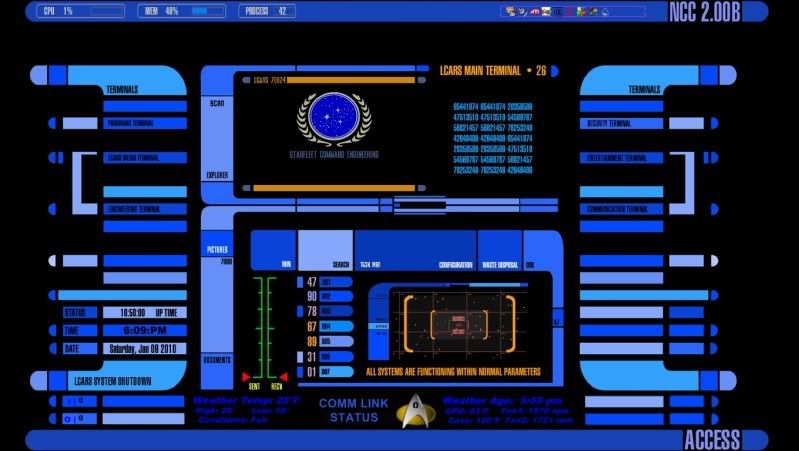
Ok I gave up, looks like Sysmetrix is dead. It was good while it lasted. I switched to Rainmeter, took about a day and half to recreate my skin I had in Sysmetrix, but it works better then the SYS and Rainmeter seems to be much more powerful meter program. Sure it is scripted not object oriented like sysmetrix. I have been using DesktopX for about five years now, the old LCARS Star Trek theme. I love Star Trek..lol...also love that nobody know how to do anything on my computer , but me...hehehehe, but DX is a little slow and hard to setup any system info, so I had made a sysmetrix skin to acompany my dx theme the long skinny part at the bottom was what I had to recreate, tons of info being displayed including cpu temps, fan speeds, the comm link is functional, any activity on the network including internet changes to Comm Link Activity instead of Comm Link Status, and shows the I/O activity on the right. So if your on the fence about Sysmetrix, my advise, go ahead and switch Rainmeters great, steep learning curve, but worth it.
Reply #30 Thursday, January 14, 2010 3:49 PM
http://www.xymantix.com/sysmetrix/download.html I got this from Nicholas Decker. He fixed it.
Reply #31 Thursday, January 14, 2010 3:57 PM
He did not say if he is going to post a public link on the main page, but I would assume he will. The new version is v.3.42. the new version corrects the parse error and also gives the alternate source as weather.com for weather information.
Thanks Mr. Decker
Reply #32 Thursday, January 14, 2010 9:04 PM
os1smith: I used to use Lite Step years ago for the same reason! They didn't kow how to manuver on my desktop!

Reply #33 Thursday, January 14, 2010 10:23 PM
Went and got the update and now all is working fine with the weather function. 
Reply #34 Sunday, January 17, 2010 10:34 AM
Thanks a lot to Xymantix to have update Sysmetrix 
But things are going strangly:
1°) if in Weather Sysmetrix configuration i choose "use Weather.com" (with metrics units), i know my zip code (FRXX0280), click on "get the weather report", i get no error in connection and get back informations from weather.com BUT they do not display in the skin, i have to unload Sysmetrix, and then reload it  ... If i right click on the skin, go to "Weather" then choose "Show Weather.com information" Sysmetrix crash (and windows XP want a report)
2°) if in Weather Sysmetrix configuration i choose "use Metar code" (still with metrics units), (my Metar code is the LFPN for Toussus le Noble - France), then click on "get the weather report", i get no error in connection and get back informations from weather.noa.gov BUT they do not display in skin and even after unloading / reloading Sysmetrix informations are no more displayed (as textual informations), and if i right click on the skin, go to "Weather" then choose "Show Metar Weather informations", no more crash and informations are correctly displayed in the "Metar Weather Information" Window
Seems to me it keeps a little bug somewhere in Sysmetrix 3.42
EDIT: just find out some other things are no more working such as Histograms, and other textual informations

Reply #35 Wednesday, January 20, 2010 1:41 PM
Hi Guys,
Sorry about all of the weather problems. Originally my code was looking for the year in the METAR report using '200x', so obviously that stopped working when the year rolled over to 2010. I fixed that and put up a 3.42 version, but unfortunately included an executable that had some of the new weather.com functionality in there that wasn't complete yet. So I replaced it with a 3.43 version that *should* be just like the 3.41 version except for the part about making the METAR weather working.
Thanks again for all of your patience and I apologize for the mistake(s)!
Nick
Reply #36 Wednesday, January 20, 2010 1:49 PM
Xymantix, I'm sure everyone appreciates the update as SysMetrix is a nice program.
Will you be doing any other updates to look at higher/larger amounts of memory and multiple core CPUs?


Reply #37 Wednesday, January 20, 2010 2:08 PM
Appreciation is one thing.....motivation is something else.....
http://www.xymantix.com/sysmetrix/download.html
Donate!!
Reply #38 Wednesday, January 20, 2010 2:34 PM
Oops! You make a very good point yarg.
Wonder how many of us overlook that little thing. 
Reply #39 Wednesday, January 20, 2010 3:43 PM
No need to apologize for anything
That's us who thank you to have corrected all buggies 
Reply #40 Wednesday, January 20, 2010 7:35 PM
Should the 3.41 be uninstalled first, or can you just install it on top of the old one?
One more thing, will we be having the same problem with Weather.com like we had with the Widgets? I would hate to uninstall the old one and have this new one be unable to load tomorrow because of Weather.com.
Version 3.41 without the weather is better than none at all.
Thanks Nick for the update. I would hate to be without SysMetrix.
Darco
Please login to comment and/or vote for this skin.
Welcome Guest! Please take the time to register with us.
There are many great features available to you once you register, including:
- Richer content, access to many features that are disabled for guests like commenting on the forums and downloading skins.
- Access to a great community, with a massive database of many, many areas of interest.
- Access to contests & subscription offers like exclusive emails.
- It's simple, and FREE!
|
|
Page 2 of 5 | |
|
|---|
Reply #21 Sunday, January 3, 2010 4:09 PM
Well what ever they use to send or didn't send, regardless of it being a format or site, just symatics. In the end, it still means NOAA changed it's way of doing things and sysmetrix ain't gonna work....lol....how about coming up with a solution. I have been looking for an alternate site. Sysmetrix documentation was pretty vague about how the URL function works, but does say alternate sites can be used, but you have to be an advanced user. I am not, so how about you advanced user guys or gals...help..give us another site that works.