








































DesktopX 4 Beta Bug reports
Thursday, November 12, 2009 by ZubaZ | Discussion: OS Customization
Another Desktopx 4 beta has been released. The standard and the professional version have both gotten the same updates This build focuses the feedback that has been recieved after the initial release last week.
Post anything that looks odd. Make sure to give us system information like your OS (including 32 or 64 bit), and if it's hard to explain (or even if it isn't) a screenshot.
 |
|
Page 8 of 15 | |
|
|---|
Reply #142 Thursday, December 17, 2009 3:08 PM
I can't get DesktopX Pro to install....I get an error telling me it's not compatible with my system!!!????? 

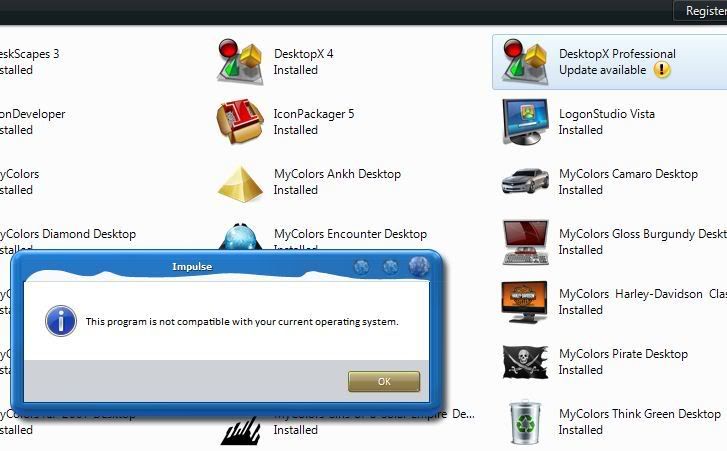



Reply #144 Friday, December 18, 2009 8:53 PM
I don't see an update for Pro. Jim, you sure that's not the same update you rolled back from? What's the version # and update date?
Reply #145 Saturday, December 19, 2009 1:07 AM
3.89[b].046 And now it shows installed, but I get that same error when I try to run it from Impulse. And when I run it normally, it isn't Pro and I can't export as a Gadget.



Reply #147 Saturday, December 19, 2009 2:30 AM
Uh, oh... I din't pay attention that much. Now I have both Pro and Standard installed. Hm...
Reply #148 Saturday, December 19, 2009 6:03 AM
Do you have as well two installation folders (or at least two .exe files) ?
(depending on your answer, perhaps i'll give a try to update to DX4 to see what goes on  )
)
Reply #149 Saturday, December 19, 2009 10:17 AM
Quoting c242,
reply 147
Uh, oh... I din't pay attention that much. Now I have both Pro and Standard installed. Hm...
Do you have as well two installation folders (or at least two .exe files) ?
(depending on your answer, perhaps i'll give a try to update to DX4 to see what goes on )
No...... 
Reply #150 Saturday, December 19, 2009 10:33 AM
Yeah, the only 3.89[b].046 beta I see is for Standard. I'm not entirely sure why Standard is listed at all, since I don't have that. But at least it works for those who do.
Reply #151 Saturday, December 19, 2009 10:56 AM
I reverted to 3.5. I am done with DX betas. I need my DX to work, so I'll do other betas, but no more DX. I'll wait for the releases. 
EDIT: I will try out DX betas on my other rig, but not the one on which I skin. ( Suggestion by Wizard1956) 
Reply #152 Saturday, December 19, 2009 10:58 AM


Reply #153 Saturday, December 19, 2009 1:58 PM
Today is a good day for me. I finally found a way to work with DLL libraries in DX 3.5. This allow me not only to measure temperature and speed of CPU (for each core) and HDD in the real time but to make the Audio Spectrum Analyzer and display all of this data in DX objects. The test scripts works with 0% of CPU usage! 
So the update to DX 4.X is not interesting for me anymore. I don't need it to begin my work on a new desktop for Win-7 right now. You will see the screen shots as soon as it will be possible.
QUESTIONS: Why SD couldn't make the similar plugins for DX till now? Why DX meters still use the Windows Performance Monitor (perfmon.exe) which takes a lot of CPU and RAM instead of WMI? What do you think? 

Reply #154 Saturday, December 19, 2009 2:00 PM
Vad,
Would love to see how your doing the dll call.
Reply #155 Saturday, December 19, 2009 3:41 PM
Hi Dave,
It's really easy!
1. You need to create in Visual Studio 8.0 (or find with Google) the necessary ActiveX DLL (!!!) which you need add to DX package.
2. Then register it in the HKEY_CLASSES_ROOT and HKEY_CURRENT_USER (the dll path must be: object.directory&"some.dll") 3. Use it as a usual COM Object by CreateObject("ProgID") or CreateObject("ClassName.ClassID"). That's all in a short theory. But let me to keep several details in a little secret. I've spent more than 3 months to learn this.
I've never used built-in DX functions so it's totally indifferent for me what version of DX (3.5 or 4.0) I will use for uniting images and scripts to export them as a gadget. The other things are already unnecessary to me.
Reply #156 Saturday, December 19, 2009 4:40 PM
Vad,
very cool,. will have to see what i can do, im not an expert on all that dll stuff at all.
Reply #157 Saturday, December 19, 2009 5:12 PM
Me too... But the "permanent and timely updating of DX" during these years has compelled me to learn this area. So thanks to Stardock - I've acquired new important knowledges. 
Excuse me David but I really can't figure out why I find any information about VBScript, WMI, DLL, etc... in Google.com (en-us) even without understanding English but a lot of US and UK people can't do the same? P.S. Here is very useful links that may help you: http://izfree.sourceforge.net/Tutorials/tut05.html http://msdn.microsoft.com/en-us/library/aa262304(VS.60).aspx What is it - a trivial laziness or inability to work with Search Engines? It's very strange...
Reply #158 Saturday, December 19, 2009 5:41 PM
I recently started trying to learn more about Visual Studio, DLLs also. It seemed to me that many of the basic widgets (weather, etc, etc) would be more useful as plugins...kinda like the DXPlayer plugin makes it easy to put together a media player and all you have to do is provide the graphics.
Reply #159 Saturday, December 19, 2009 5:53 PM
it only works if i know what to look for, and since i have never used VB Studio its not an area i have looked into. I have googled all kinds of things, it is how i manage to make about 80% of my works.

Reply #160 Saturday, December 19, 2009 5:58 PM
http://www.microsoft.com/express/vb/Default.aspx ??
Please login to comment and/or vote for this skin.
Welcome Guest! Please take the time to register with us.
There are many great features available to you once you register, including:
- Richer content, access to many features that are disabled for guests like commenting on the forums and downloading skins.
- Access to a great community, with a massive database of many, many areas of interest.
- Access to contests & subscription offers like exclusive emails.
- It's simple, and FREE!
|
|
Page 8 of 15 | |
|
|---|
Reply #141 Thursday, December 17, 2009 2:18 PM
The DX Welcome looks for widgets in the new Public Docs location but still looks for themes and objects in Program Files.Is this normal or is there a setting I am missing? Btw,the Welcome now reads DesktopX Professional,which it isn't.
On further testing I have found that the Configure DX Builder dialog looks for themes and objects in the NEW location.To be able to use it and the Welcome all widgets and desktops would need to be in both Public Documents/Stardock/DesktopX and program files. I don't really need or want two copies of everything in these folders.