






































DesktopX 4 Beta Bug reports
Thursday, November 12, 2009 by ZubaZ | Discussion: OS Customization
Another Desktopx 4 beta has been released. The standard and the professional version have both gotten the same updates This build focuses the feedback that has been recieved after the initial release last week.
Post anything that looks odd. Make sure to give us system information like your OS (including 32 or 64 bit), and if it's hard to explain (or even if it isn't) a screenshot.
 |
|
Page 13 of 15 | |
|
|---|
Reply #242 Tuesday, January 26, 2010 7:46 AM
Quoting thomassen,
reply 239
- Not reproduced: layout/font issues with script editor and object browser
Am I the only one that get that stupid Bangshe font when I use the Script editor? I've have that on ALL computers I've tried running Vista or W7...
Ohh! Is that what that font is called? I thought that crossed out W for a backslash was some kind of glitch. Yeah. I get the same, and I've heard others do, too.
Me too...dangit!! 

Reply #243 Tuesday, January 26, 2010 8:31 AM
- Not reproduced: layout/font issues with script editor and object browser
Am I the only one that get that stupid Bangshe font when I use the Script editor? I've have that on ALL computers I've tried running Vista or W7...

Reply #244 Tuesday, January 26, 2010 12:01 PM
I'm not sure what the issue is with the object browser - not something I've mentioned along with my reports of the script editor font.
I'm only aware of the script editor font issue. Which would not be an issue if the propery page that let you set the script editor font would remember the setting.
I wonder if that entry in the changelog refer to this issue. Seeing how we're quite a few people affected it's odd if it can't be reproduced.

Reply #245 Wednesday, January 27, 2010 8:42 PM
Is it just me or is the object list now stuck always on top of all windows?


Reply #247 Friday, January 29, 2010 12:04 PM
i need to start messing with 4.0 but i want to keep 3.5 so i can go back to it easily.. im sure its out there, but can someone point me to a link or post that shows me how to go back and forth easily?
thanks.

Reply #248 Friday, January 29, 2010 4:52 PM
How to run DX 3.5 And DX 4.0 "side-by-side" (you can't have both of them running at the same time though)
- Go to %Program Files%\Stardock\ and make a copy of the DesktopX folder (and rename it to DesktopX3 for example).
- Install DX4.0 (doing a clean install might be preferable)
- Plugin path is hardcoded (and probably object/desktops), so you will have to copy the SDPlugin folder from the old location (DesktopX3) to the new version folder.
- If you want to have the old plugins available to DX4.0, you need to copy them to the new plugin location too. There are located in %ProgramData%\Stardock\DesktopX. Simply copy the files you want from the SDPlugin folder in the DesktopX3 installation (do not overwrite the new dll files, especially DXAxHost.app/dll)
Reply #249 Friday, January 29, 2010 4:56 PM
What about archiving? Haven't tried it myself (I forgot to set this before I updated to 4) You can set Impulse Preferences to archive programs before updating. Then you could always restore to an earlier version.
Reply #252 Saturday, January 30, 2010 9:38 PM
I don't know if this is a DX4 thing, but it seems object.persiststorage fails on export to gadget. Gadgets do not remember settings stored in this manner. I didn't notice this happening before. Can anyone else confirm?
Reply #253 Sunday, January 31, 2010 2:22 PM
I'll check it on XP if you point me to a gadget on WC that I can try it with. (Or is it just on something you create at this point?)
Reply #254 Sunday, January 31, 2010 6:33 PM
Here's a recent object I was working on http://www.box.net/shared/jzcr4shkzd
It's pretty simple. Saves the image to persiststorage on click. Restores the image from storage on start up. Export to gadget and it doesn't remember the last saved image, reverts back to the image it was exported with.
Reply #255 Monday, February 1, 2010 7:15 AM
I'm on DTXStandard so I can't export to gadgets (I guess I can say that lockout is working). I exported it as a widget and it does retain the last image setting but I know that's not what you were asking. It would have to already be a gadget before I can check that.
Reply #256 Monday, February 1, 2010 6:15 PM
Mostly, I wanted to know if it's my DX that isn't exporting right or if the problem is universal.
But here's the gadget, anyway: http://www.box.net/shared/2podz8mh6b
Reply #257 Monday, February 1, 2010 9:35 PM
With the gadget I see the image that was up at close (landscape or abstract) pop up for about a quarter of a second when it starts up, then it immediately flips back to the original flower.
In case it has anything to do with it, immediately after I close the gadget I consistently get the "Unknown Publisher / Are you sure you want to run this software" dialog that XP puts out when starting an exe, then clicking on run or cancel at that point does nothing besides close the dialog box. I don't get the erroneous message when I close the widget I exported.
Still doesn't really answer your question but that's about the best I can do.
Reply #258 Saturday, February 6, 2010 12:03 AM
This isn't exactly a bug, but I have a question for the people behind all this....
I have 3 instances of DesktopX on my system. Which is needed and which isn't?
Where is the real DesktopX install found? I have Pro and normal versions, according to Impulse, why both? Please someone help a redneck sort this crap out.
There is one set in Program Files under Stardock.
There is one in Program Files under Stardock/ObjectDesktop.
Then there is the one in Public Documents/Stardock.
Reply #259 Saturday, February 6, 2010 1:25 AM
OK, not only did I have the above problem....I have these errors also. Windows 7 32 bit. IE8.
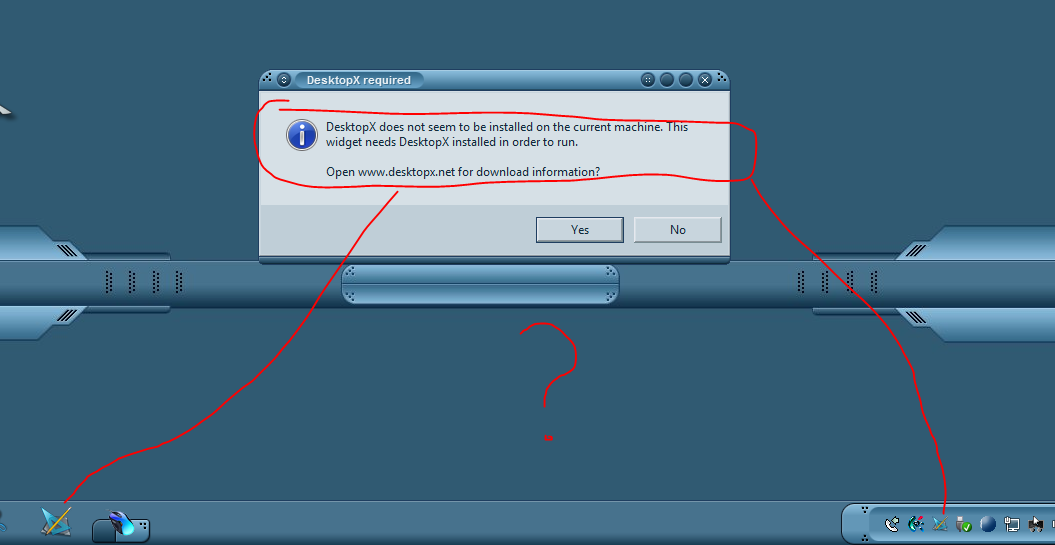
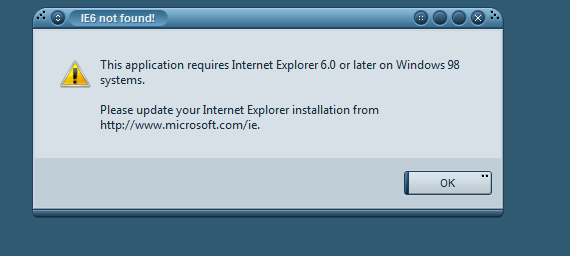
Needless to say, my fix for this was to revert to 3.5. I have to be able to use DX.
Please login to comment and/or vote for this skin.
Welcome Guest! Please take the time to register with us.
There are many great features available to you once you register, including:
- Richer content, access to many features that are disabled for guests like commenting on the forums and downloading skins.
- Access to a great community, with a massive database of many, many areas of interest.
- Access to contests & subscription offers like exclusive emails.
- It's simple, and FREE!
|
|
Page 13 of 15 | |
|
|---|
Reply #241 Tuesday, January 26, 2010 6:43 AM
Object browser font is fine here.