































Steampunk XP, style 1
Wednesday, September 16, 2009 by k10w3 | Discussion: Sneak Previews
I need some opinions on what I have so far. Here's a screenshot.

Here's the download for anybody who is willing to give her a spin.
http://www.mediafire.com/?0b4nmdyzunz
All comments appreciated.
 |
|
Page 2 of 3 | |
|
|---|

Reply #22 Friday, September 18, 2009 1:45 PM
You caught me...I was going to be lazy; animation is a real challenge for me, and that group of gears was particularly difficult so I was going to keep them static, but that wouldn't be true to the skin, now would it? So...I fixed it. They are now spinning.
Thanks for that -- fixed that now, too. Expanded the size, made the mouse over a copper color and the pressed a brighter brass -- it is now much more usable.
Anybody else have some advice/suggestions?

Reply #23 Friday, September 18, 2009 3:36 PM
Hi Karen, it actually looks good on Win7. I would like to see the text a bit darker on the right side of the Start menu where the "Computer" "Control Panel" etc. links are but It's good as it is.  even without the text change. Great work and thank you for making my desktop look so good.




Reply #27 Friday, September 18, 2009 4:14 PM
On vista it already looks superb, the roll-ups meet perfectly, animations on start panel are great as is start button and the all programs scrolls are cool too, overall it is outstanding already. Scrollbar just tad hard to see is only slight problem. 

Reply #28 Friday, September 18, 2009 9:58 PM
Quoting willistuder,
reply 21
You caught me...I was going to be lazy; animation is a real challenge for me, and that group of gears was particularly difficult so I was going to keep them static, but that wouldn't be true to the skin, now would it? So...I fixed it. They are now spinning.
You didn't have to go that far, but I'm glad you did. I didn't know what was supposed to be animated or not; I just reported what I saw.
Thanks for fixing the scroll bar.

Reply #29 Friday, September 18, 2009 10:16 PM
karen thats absolutely amazing....a great piece of art, super cool to look at, and the animations are awesome too hun....your great

Reply #31 Wednesday, September 23, 2009 12:30 PM
I'm using it right now, and I absolutely love the way that it's going! Works beautifully so far under Windows 7 RTM, I might add... Here's a screenshot...
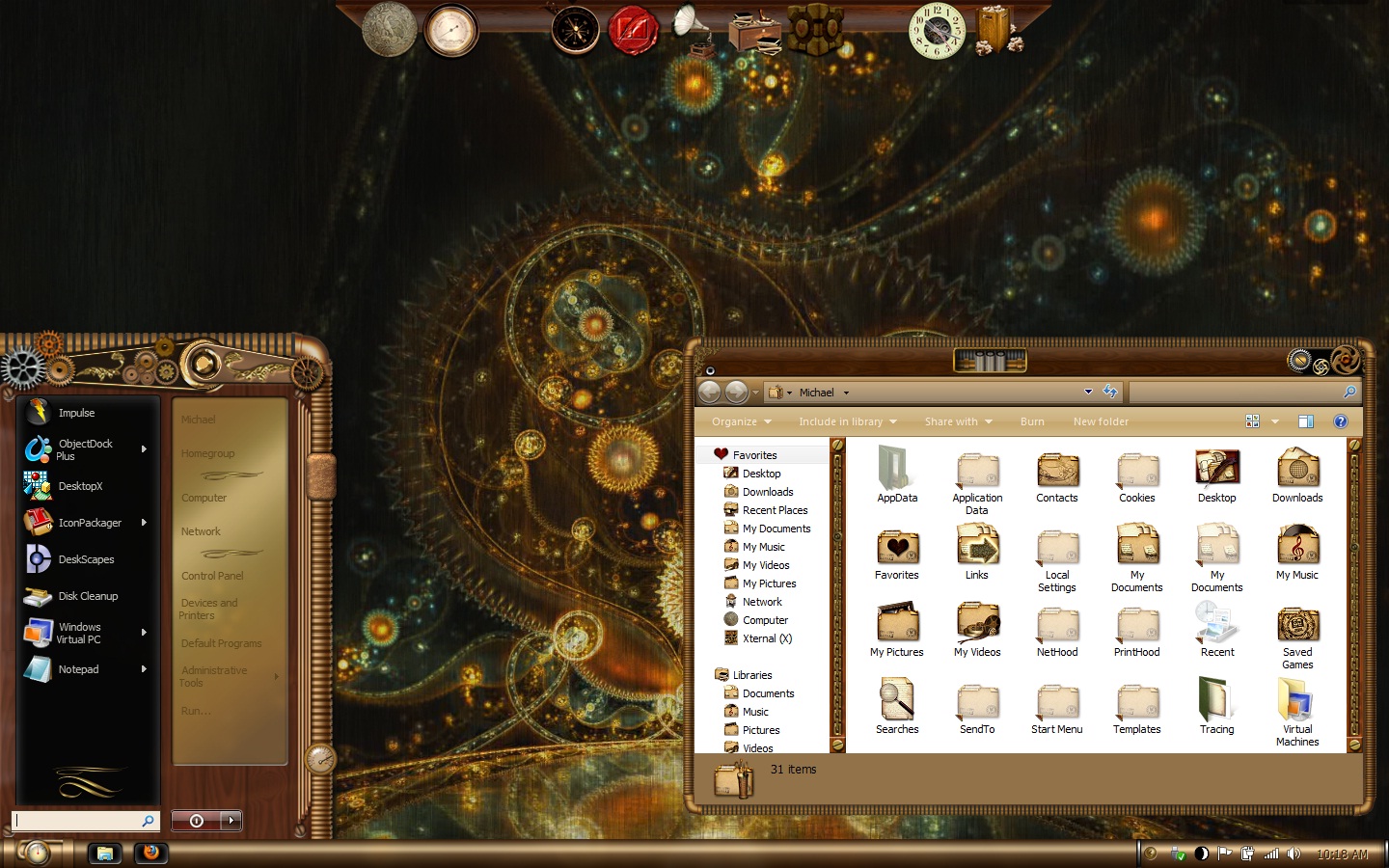
The wallpaper is actually Deskscapes... It's Dream Machine by Master Baron with the textured effect. The ObjectDock skin was designed by DragonXP on DeviantArt, and the icons were applied with IconPackager, and are from a set again, available on DeviantArt, from Samantha-Wright.
Reply #32 Wednesday, September 23, 2009 1:45 PM
Karen, if you're pretty sure you're done with the start panel, shoot me whatever graphics ya got, PSD and PNG preferred, and I can start the DX. Looking good!!
Reply #33 Wednesday, September 23, 2009 1:49 PM
I have a few adjustment to make to the Vista substyle, and I'm almost done with the grunge substyle for XP. I bought a laptop yesterday because I have ill family members up north and I can't afford to not be working if I have to attend a funeral or spend some time up there helping out with the recovery of those battling cancer. The laptop has Vista on it so now I know where to make those corrections, plus because it's new, it's elligible for the Windows 7 upgrade when it comes out. I'm going to miss XP, but it's time to embrace the new.
I think it may be 2 to 2-1/2 more weeks until she's ready for upload.
Reply #34 Wednesday, September 23, 2009 2:06 PM
well karen your doing a bang up job hunnie and im glad you got you a new laptop and its good to see your gonna get the win 7...THIS SKIN ROCKS

Reply #35 Wednesday, September 23, 2009 2:16 PM
Lookin great Karen, really a step up in ur skinning so far, only thing I'll gripe about is getting the cogs to rotate on a smoother axis, unless thats intentional,
Keep up the fast learning curve ! 

Reply #36 Wednesday, September 23, 2009 2:20 PM
Sorry to hear about your family illness. I shall be thinking of you.
Same here. When my new PC is fully functional XP will be gone for good. I shall miss it, but will be upgrading to W7, so working with Vista for a while won't seem so bad.
Reply #39 Wednesday, September 23, 2009 4:38 PM
OK, I've come up with a problem -- not all that noticeable at first, but it's bugging me. The top of the window frame won't go all the way up to the top of the monitor. How do I fix that?
Reply #40 Wednesday, September 23, 2009 5:47 PM
Personally, I wouldn't want it to. But I'm not making it...lol. I wish I could help you, Karen, but I'm a noob at blinds.
Please login to comment and/or vote for this skin.
Welcome Guest! Please take the time to register with us.
There are many great features available to you once you register, including:
- Richer content, access to many features that are disabled for guests like commenting on the forums and downloading skins.
- Access to a great community, with a massive database of many, many areas of interest.
- Access to contests & subscription offers like exclusive emails.
- It's simple, and FREE!
|
|
Page 2 of 3 | |
|
|---|
Reply #21 Friday, September 18, 2009 1:32 AM
The gears on the left and right top are animated, and the gauge on the lower right side is as well. The gears in the middle (on the top) aren't. (I'm using XP).
The windows are great. The only problem I have is the scroll bar. It's hard to tell where it is because it blends too well.
Thanks for the links.