DeskScapes 3 Beta 1 Bug reports

Thursday, August 20, 2009 by ZubaZ | Discussion: DeskScapes

A DeskScapes beta has been released.  This build has a new user interface, effects that can be applied to dreams, and works on XP, Vista, and Windows 7.  Sadly, the effects are Windows Vista and Windows 7 only.

Double-clicking a dream no longer loads a dream.  You will need to use the "Apply changes" button.

Post anything that looks odd.  Make sure to give us your system information including your video card, your OS (including 32 or 64 bit), and if it's hard to explain (or even if it isn't) a screenshot.

You may want to ensure you have the latest DirectX9 runtimes (even on Win7) by installing the following : http://www.microsoft.com/downloads/details.aspx?FamilyID=2DA43D38-DB71-4C1B-BC6A-9B6652CD92A3&displaylang=en

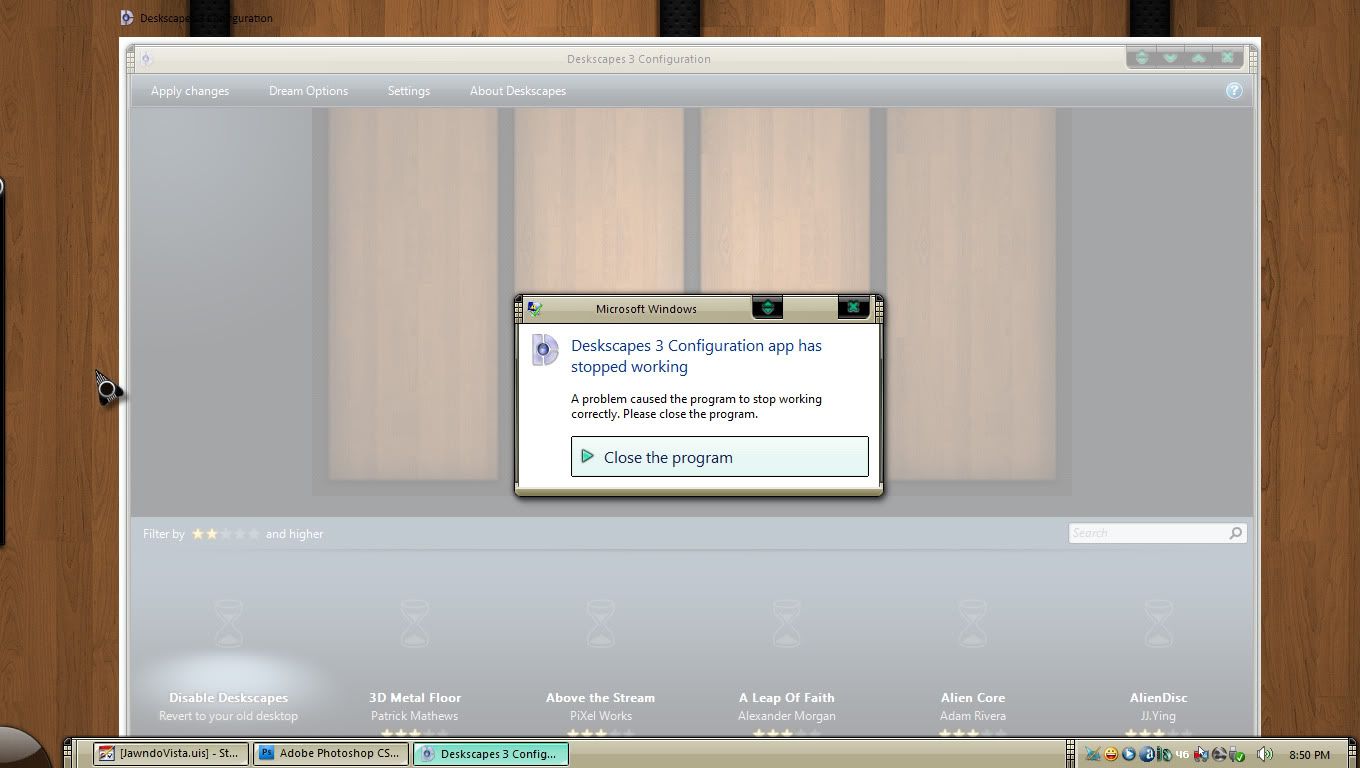
There is an issue on some machines with some dreams where the UI may crash out when it builds the dream list.  There will be an update on Friday morning to resolve this.

First Previous Page 2 of 7 Next Last
MadDeez
Reply #21 Thursday, August 20, 2009 7:57 PM

update: i just installed the small (9 megs or so) update to Deskscapes. after rebooting, same undesired result. sorry, neil

CarGuy1
Reply #22 Thursday, August 20, 2009 7:58 PM

Edit: Problem solved with the newest update.

ShelbyGT_The_Car
Reply #23 Thursday, August 20, 2009 8:16 PM

Rebooted after install and dx is updated in win7 rtm ultimate - here we go - works like a new one - Thank you Stardock!

DanDaBear
Reply #24 Thursday, August 20, 2009 8:20 PM

PianoArt: On my Vista 32 machine it's under: C:\Users\Your User Name\Documents\Stardock\Dreams

(Substitute your user name here)


I took a bunch of dreams out of my dream folder and it's working now, except,

when I run a dream now, my icons in Fences all show on the desktop (not the fences, just the icons).

they disappear when I right click and the menu shows, but when I close the menu, the icons

all appear again!


I'm gonna boot into Win 7 and try it there!

(betas are SO much fun!)

Neil Banfield
Reply #25 Thursday, August 20, 2009 8:23 PM

Which dreams did you remove?

DanDaBear
Reply #26 Thursday, August 20, 2009 8:41 PM

I removed 38 dreams

I will add them one at a time to see which are problems.

So far:

  • 2D3DCubic
  • 3Molecules
  • Alternate_Reality
  • BlueHank
  • WelcometotheMachine
  • AUBars
  • AuroraBurn
  • AustraliaSquare
  • BlueRing
  • BlueTechWall
  • Cascades
  • ChromeGlobe

All work, in that they don't crash the interface.

paulmr
Reply #27 Thursday, August 20, 2009 8:42 PM

On an XP SP3 Athlon64 3G RAM ATI Radeon 3600 1G system update to 2.9 fails and crashes system. Even error reflected in Safe Mode. Error : unable to find d3dx9_40.dll. Real concern if able to have successful System Restore session.

paulmr
Reply #28 Thursday, August 20, 2009 8:44 PM

Addendum: I have been able to Restore to 2.5 Deskscapes and system working ok.

After downloading DirectX update from the link, update took smoothly-

Very nice layout - wish I had a laptop to show others what has been achieved so far . . .

Thanks Neil

mickeko
Reply #29 Thursday, August 20, 2009 8:45 PM

It looks nice. But:

When I try to select the "Stars" dynamic dream, it instacrashes.

"Desktop Collage" preview is all buggered up.

(Vista Home Premium x64 swedish)

On a sidenote:

Pick a picture of a nice landscape and load it as background on the water dream, set drops to occur with a minimum time between drops and put drop size to 75% or so. Finally, switch on extreme motion blur effect... That's really eerie

MadDeez
Reply #30 Thursday, August 20, 2009 8:56 PM

neil, if it matters, i'm using an ati 4870 with the newest cat drivers, win 7 ultimate 64.

DanDaBear
Reply #31 Thursday, August 20, 2009 9:04 PM

Apparently it was Redside Cove Triggered  By amitsaran that was causing the problem for me.


When I added it to the folder and started dreamscapes, it crashed.

when I removed it and started dreamscapes it works!


Now to boot into Win 7 and play with it there!


JvCipo
Reply #32 Thursday, August 20, 2009 9:08 PM

yah, when i updated to the beta it did launch, but when i loaded my megabites of dreams it crashed and also i had some of the dreams in separate folders i.e. nature, planets ect.

Neil Banfield
Reply #33 Thursday, August 20, 2009 9:09 PM

paulmr
On an XP SP3 Athlon64 3G RAM ATI Radeon 3600 1G system update to 2.9 fails and crashes system. Even error reflected in Safe Mode. Error : unable to find d3dx9_40.dll. Real concern if able to have successful System Restore session.

There is an update on the servers which should solve this, or download the latest DX runtimes from the link on the first post.

Neil Banfield
Reply #34 Thursday, August 20, 2009 9:10 PM

The issue with the UI crashing out on some machines and with some dreams has been found and should be resolved in the next set of updates.

Neil Banfield
Reply #35 Thursday, August 20, 2009 9:12 PM

mickeko
It looks nice. But:

When I try to select the "Stars" dynamic dream, it instacrashes.

"Desktop Collage" preview is all buggered up.

(Vista Home Premium x64 swedish)

On a sidenote:

Pick a picture of a nice landscape and load it as background on the water dream, set drops to occur with a minimum time between drops and put drop size to 75% or so. Finally, switch on extreme motion blur effect... That's really eerie

I am not aware of any problems with the desktop collage preview on Vista.  There is a known issue with the Photo dream preview and some of the other dynamic dreams don't preview quite right on XP.

MadDeez
Reply #36 Thursday, August 20, 2009 9:20 PM

an original deskscapes 3 and two updates in one evening, neil?


RedneckDude
Reply #37 Thursday, August 20, 2009 9:28 PM

Mine won't run. I can't run any dreams. They are no longer listed under Personalize, choose desktop background. My dream manager from Master Baron won't even load a dream!!!!  Rollback city!!

MadDeez
Reply #38 Thursday, August 20, 2009 9:31 PM

with the latest update, all is well for me. thanks, neil. i appreciate your hard work and efforts.

Neil Banfield
Reply #39 Thursday, August 20, 2009 9:44 PM

RedneckDude
Mine won't run. I can't run any dreams. They are no longer listed under Personalize, choose desktop background. My dream manager from Master Baron won't even load a dream!!!!  Rollback city!!

Reduced 44%

Original 1360 x 768

Dream manager from Master Baron does not appear to be able to detect Deskscapes 3.  I don't know if he plans to update it or not for Deskscapes 3.

The dreams will no longer be shown under personalize, instead you should use the new UI.

The very latest update on Impulse should hopefully resolve your crash issue as it did for IAmPas just above this post.

RedneckDude
Reply #40 Thursday, August 20, 2009 10:00 PM

The very latest update on Impulse should hopefully resolve your crash issue as it did for IAmPas just above this post.

And it did. I regret having a dream manager, for which I paid, that no longer works now. It would seem to me that stardock should fix it so that the dream mgr. does see them. I paid for the program, and now it don't work, bummer.

Other than that, I love the interface.

Please login to comment and/or vote for this skin.

Welcome Guest! Please take the time to register with us.
There are many great features available to you once you register, including:

  • Richer content, access to many features that are disabled for guests like commenting on the forums and downloading skins.
  • Access to a great community, with a massive database of many, many areas of interest.
  • Access to contests & subscription offers like exclusive emails.
  • It's simple, and FREE!


web-wc01