































logon studio can't work with sp2 sp3?
Friday, March 13, 2009 by LeeJarod | Discussion: Windows XP
why show this?
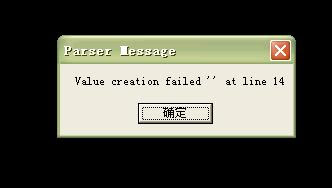

Reply #2 Wednesday, March 25, 2009 9:40 PM
The line 14 error is usually when bmp.100, the background image, is a .jpg or some other file format that has been renamed to .bmp and is not a true .bmp.
Go to the logon folder...C:/Program Files/Wincustomize/Logon Studio/"name of logon", and open bmp.100 in Paint or any graphics program and save the file as bmp.100. That should solve the problem. 
Reply #3 Friday, April 17, 2009 2:06 PM
i have the same message come up anytime i try to log on/off no matter what skin i use, it seems to be something with xp SP3, any sample loggins known to work on sp3 i can try please, i do love the new live style which i have as my boot, desktop x & windowblinds it's just the logon i need!!
cheers mike
Please login to comment and/or vote for this skin.
Welcome Guest! Please take the time to register with us.
There are many great features available to you once you register, including:
- Richer content, access to many features that are disabled for guests like commenting on the forums and downloading skins.
- Access to a great community, with a massive database of many, many areas of interest.
- Access to contests & subscription offers like exclusive emails.
- It's simple, and FREE!
Reply #1 Wednesday, March 25, 2009 8:44 PM
It's not Logonstudio that is not working. It's the skin you have applied. There may be a bug in the coding of the logon skin you have used. What skin is it anyway?
While you are seeing that error, you don't need to force restart you system. you just need to click OK for about 10 times and then your computer brings you to the default Win2K logon. Use that to log in back to your account, and choose another logon screen or you may disable logonstudio for the meantime.