




































DX Coders, lend me your ears!
Thursday, April 12, 2007 by sViz | Discussion: DesktopX
Hi, guys. I'm working on a widget that is like a code snipper(?). It allows you to compile all the snippets of code you frequently use into a list. When you l-click on an item in that list say "OnScriptEnter" it'll automatically copy the code:
Sub Object_OnScriptEnter
End Sub
into system clipboard. So you basically click and paste. I'm always opening up multiple text files where I keep my scripts (or even opening up web pages) and highlighting, copying, pasting, and I thought it would be easier and less cluttered to have a convenient place to grab them from. At the moment all the information in the lists are formatted (rss style) and written to a text file in Local Settings > Temp. I will ultimately make it attached to the widget in the object directory. I can also add codes in the textfile itself and when I load up the widget the list will be compiled with the additional changes, creating a text object for each new item.
Here's where I need your input. There will be three lists. A custom list where you put the ones you've constructed, a standard list with all the basic DX sub procedures and funtions, and a resource list where you put links to tutorials on the web or a file on your computer.
I've already compiled as many codes as I can think of for the DX standard list but can you guys tell me if I've left any out? Also, what DX/scripting resources on the web do you think should be included with the widget?
Please look over the lists and let me know what I should add.
Here's the DX standard list:
OnScriptEnter
OnScriptExit
OnStateChange (can easily be modified to OnStateChanged)
OnMouseEnter
OnMouseLeave
OnShow
OnMove
OnSize
OnDropFiles
OnDrag
OnDragFinish
OnSetFocus
OnKillFocus
OnChar
OnKeyDown
OnLButtonDown
OnRButtonDown
OnLButtonUp
OnRButtonUp
OnLButtonUpEx
OnRButtonUpEx
OnScreenChange
OnWorkAreaChange
Pop Up Menu
DesktopX Form
Font Form (One setup specifically for font options and how to apply them to text objects. Will be asking Vad_M for permission.)
Dialog Box- files (for browsing)
Dialog Box- folders (for browsing)
Widget Preferences (including OnPreferencesChange)
For each elem (just as an enumeration example)
Select Case (I use this alot)
I didn't include any for the ActiveX controls as most come with script wizards but let me know if there are any you feel should be included.
Here's the resource list so far:
DX User's Guide online
DX tutorials on WC
Wincustomize DX forums
Stardock DX forums
Wincustomize
W3Schools VBScript Reference
MSDN VBScript Reference
Thanks.
Sub Object_OnScriptEnter
End Sub
into system clipboard. So you basically click and paste. I'm always opening up multiple text files where I keep my scripts (or even opening up web pages) and highlighting, copying, pasting, and I thought it would be easier and less cluttered to have a convenient place to grab them from. At the moment all the information in the lists are formatted (rss style) and written to a text file in Local Settings > Temp. I will ultimately make it attached to the widget in the object directory. I can also add codes in the textfile itself and when I load up the widget the list will be compiled with the additional changes, creating a text object for each new item.
Here's where I need your input. There will be three lists. A custom list where you put the ones you've constructed, a standard list with all the basic DX sub procedures and funtions, and a resource list where you put links to tutorials on the web or a file on your computer.
I've already compiled as many codes as I can think of for the DX standard list but can you guys tell me if I've left any out? Also, what DX/scripting resources on the web do you think should be included with the widget?
Please look over the lists and let me know what I should add.
Here's the DX standard list:
OnScriptEnter
OnScriptExit
OnStateChange (can easily be modified to OnStateChanged)
OnMouseEnter
OnMouseLeave
OnShow
OnMove
OnSize
OnDropFiles
OnDrag
OnDragFinish
OnSetFocus
OnKillFocus
OnChar
OnKeyDown
OnLButtonDown
OnRButtonDown
OnLButtonUp
OnRButtonUp
OnLButtonUpEx
OnRButtonUpEx
OnScreenChange
OnWorkAreaChange
Pop Up Menu
DesktopX Form
Font Form (One setup specifically for font options and how to apply them to text objects. Will be asking Vad_M for permission.)
Dialog Box- files (for browsing)
Dialog Box- folders (for browsing)
Widget Preferences (including OnPreferencesChange)
For each elem (just as an enumeration example)
Select Case (I use this alot)
I didn't include any for the ActiveX controls as most come with script wizards but let me know if there are any you feel should be included.
Here's the resource list so far:
DX User's Guide online
DX tutorials on WC
Wincustomize DX forums
Stardock DX forums
Wincustomize
W3Schools VBScript Reference
MSDN VBScript Reference
Thanks.

 |
|
Page 2 of 4 | |
|
|---|
RomanDA
Reply #22 Friday, April 13, 2007 2:09 PM

Reply #22 Friday, April 13, 2007 2:09 PM
oops.. moron here.. lol
THANKS!! thats the same (or similar to) the one i use in ASP.
The Q is, does this file have to be there (same location) when its RUN as an EXE or does it compile it into the code???
That is the big drawback to making gadgets with external scripts.
THANKS!! thats the same (or similar to) the one i use in ASP.
The Q is, does this file have to be there (same location) when its RUN as an EXE or does it compile it into the code???
That is the big drawback to making gadgets with external scripts.
sViz
Reply #23 Friday, April 13, 2007 2:22 PM

Reply #23 Friday, April 13, 2007 2:22 PM
Thanks for stopping by rabidrobot.
Those tend to include setting up the objects first. I'm aiming more for scripts that the user can easily start using without having to explain setting the parent/child relationships and such. I think that might be one the user would add to their custom list instead.
How about resources? Any favorite sites you guys find useful?
Sliders / Scrollbars
Those tend to include setting up the objects first. I'm aiming more for scripts that the user can easily start using without having to explain setting the parent/child relationships and such. I think that might be one the user would add to their custom list instead.
How about resources? Any favorite sites you guys find useful?
RomanDA
Reply #24 Friday, April 13, 2007 2:38 PM
Reply #24 Friday, April 13, 2007 2:38 PM
well answered my own question.
Tried using the above "code" to import my functions into Dx, then compiled it as a gadget.
It looks for the external script.
Would need a way to encrypt that info somehow. I did it in my HC PRO by making it all link into a database that was protected, wonder if that could work.
Im sure there is a way to encrypt a text file, and decrypt it as well.
But this makes it more complicated.
You would need to package the .VBS file with your gadget, and encrypt it first, then have the corresponding decryper in the gadget to read the file with. This could still be done because you would only need to encrypt the VBS file when you make changes.
Will have to look into this one.
I do like the idea that it can read all my functions into the object, but i think using the method i talked about before where you have a single object with all your functions in it, and then call them from that object. It gets compiled with the widget/gadget making external scripts not needed to be ZIPPED into the EXE.
Still has potential.
Tried using the above "code" to import my functions into Dx, then compiled it as a gadget.
It looks for the external script.
Would need a way to encrypt that info somehow. I did it in my HC PRO by making it all link into a database that was protected, wonder if that could work.
Im sure there is a way to encrypt a text file, and decrypt it as well.
But this makes it more complicated.
You would need to package the .VBS file with your gadget, and encrypt it first, then have the corresponding decryper in the gadget to read the file with. This could still be done because you would only need to encrypt the VBS file when you make changes.
Will have to look into this one.
I do like the idea that it can read all my functions into the object, but i think using the method i talked about before where you have a single object with all your functions in it, and then call them from that object. It gets compiled with the widget/gadget making external scripts not needed to be ZIPPED into the EXE.
Still has potential.
rabidrobot
Reply #25 Friday, April 13, 2007 4:59 PM
Glad to be here! I love the idea of a snippet tool, particularly one with DesktopX in mind from the start. I can understand the idea coming from you sViz, because I know from your many tutorials you enjoy both sharing knowledge and aiding the community selflessly.
A snippet widget, which I imagine as a tool serving up handy snippets to the--as you say--beginner, exemplifies this spirit of coorperative community and exploration of shared interests.
The very spirit in which I joined in this discussion, providing information that I personally spent many hours uncovering, deducing, working on, and in this case even writing up to try and kick off the Community DesktopX wiki.
And the very spirit--in some ways not unlike those wonderful and woefully overlooked tutorials of yours, sViz--in which it has been so graciously recieved.

Reply #25 Friday, April 13, 2007 4:59 PM
Thanks for stopping by rabidrobot.
Glad to be here!
 I love the idea of a snippet tool, particularly one with DesktopX in mind from the start. I can understand the idea coming from you sViz, because I know from your many tutorials you enjoy both sharing knowledge and aiding the community selflessly.
A snippet widget, which I imagine as a tool serving up handy snippets to the--as you say--beginner, exemplifies this spirit of coorperative community and exploration of shared interests.
The very spirit in which I joined in this discussion, providing information that I personally spent many hours uncovering, deducing, working on, and in this case even writing up to try and kick off the Community DesktopX wiki.
And the very spirit--in some ways not unlike those wonderful and woefully overlooked tutorials of yours, sViz--in which it has been so graciously recieved.
sViz
Reply #26 Saturday, April 14, 2007 12:51 PM
Reply #26 Saturday, April 14, 2007 12:51 PM
Thanks for your kind words, rabidrobot. It really is this wonderful community that inspires me and encourages me to give back where I can because of all the help I've recieved (from everyone in this thread and many others).
I tweaked something in the writing to file process which screwed up the format in the file. All the codes were lost. I've got some backups which weren't totally up to date so I'll be working my way up with those.
It's almost time to release the widget for testing-- not today though(thanks to the unwelcome setback. I also still haven't done any graphics ). If anyone would be interested in testing it out let me know and I'll send you a download link via PM once it's ready.
Suggestions for codes and resources are still welcome.
This has been the daily BUMP.
I tweaked something in the writing to file process which screwed up the format in the file. All the codes were lost.
 I've got some backups which weren't totally up to date so I'll be working my way up with those.
 It's almost time to release the widget for testing-- not today though(thanks to the unwelcome setback. I also still haven't done any graphics
 ). If anyone would be interested in testing it out let me know and I'll send you a download link via PM once it's ready.
Suggestions for codes and resources are still welcome.
This has been the daily BUMP.
ZubaZ
Reply #27 Saturday, April 14, 2007 1:12 PM

Reply #27 Saturday, April 14, 2007 1:12 PM
You all know what a hack I am at DX but I'd be honored to test whatever you put together. Thanks for doing this.
SirSmiley
Reply #28 Saturday, April 14, 2007 3:03 PM

Reply #28 Saturday, April 14, 2007 3:03 PM
I think I'm going to post a couple simple examples (input/message boxes) of using the include script in the DesktopX forums. Of course you're more than welcome to use anything I've posted.
That's a good suggestion but, I prefer the WMI Code Creator. Get it Here Script Center: Scripting Tools and Utilities
For WMI, there is a very handy tool called Scriptomatic. Check it out for examples of how to access anything WMI has to offer.
That's a good suggestion but, I prefer the WMI Code Creator. Get it Here Script Center: Scripting Tools and Utilities
thomassen
Reply #30 Sunday, April 15, 2007 12:10 PM
if you are using JavaScript, you can load external files and add them to your executing script. I'm currently working on a project where I have a set of objects which all have similar functions, but some of them differ slightly. I have created a file for each module and include the modules as required.
Problem is that it's very hard to debug any errors occuring in included scriptas it'd return Error on line 0. So you have to make very good error trappings to handle it. (which is a good practice anyways)
An example would be:
For VB script you have to do it differently. Check out the DX Wiki for a VB example Justin posted.

Reply #30 Sunday, April 15, 2007 12:10 PM
I tried using external scripts for a "functions" library, doesn't work.
When you run the object.SetScript("script") it stops all further script processing in the object, and the only script to run in from the "Script" file.
When you run the object.SetScript("script") it stops all further script processing in the object, and the only script to run in from the "Script" file.
I tried using external scripts for a "functions" library, doesn't work.
When you run the object.SetScript("script") it stops all further script processing in the object, and the only script to run in from the "Script" file.
When you run the object.SetScript("script") it stops all further script processing in the object, and the only script to run in from the "Script" file.
if you are using JavaScript, you can load external files and add them to your executing script. I'm currently working on a project where I have a set of objects which all have similar functions, but some of them differ slightly. I have created a file for each module and include the modules as required.
Problem is that it's very hard to debug any errors occuring in included scriptas it'd return Error on line 0. So you have to make very good error trappings to handle it. (which is a good practice anyways)
An example would be:
Code: javascript
- var exScript = System.SimpleRead('externalscript.js');
- eval(exScript);
For VB script you have to do it differently. Check out the DX Wiki for a VB example Justin posted.
thomassen
Reply #31 Sunday, April 15, 2007 12:23 PM
Only if they are included in the Custom Files list of an object.
Reply #31 Sunday, April 15, 2007 12:23 PM
I don't think external files are compiled into the gadget.
Only if they are included in the Custom Files list of an object.
thomassen
Reply #32 Sunday, April 15, 2007 12:40 PM
Reply #32 Sunday, April 15, 2007 12:40 PM
Ah. I see that the question on how to include external script files was answered. Didn't notice it when I scimmed through the page before I replied.
Problem with having one object to contain global functions is that if you need to use these functions from another object as the widget or desktop is loaded the script might not be availible.
If you add the external files to your Custom Files they will be included as you compile it. But if you are worried about people seeing your code you need to encrypt it somehow before compiling.
I like this widget idea sViz. I was about to make one myself to accompany the Script Manual. But it'd be a while before it'd be done as I'm quite busy.
I do like the idea that it can read all my functions into the object, but i think using the method i talked about before where you have a single object with all your functions in it, and then call them from that object. It gets compiled with the widget/gadget making external scripts not needed to be ZIPPED into the EXE.
Problem with having one object to contain global functions is that if you need to use these functions from another object as the widget or desktop is loaded the script might not be availible.
If you add the external files to your Custom Files they will be included as you compile it. But if you are worried about people seeing your code you need to encrypt it somehow before compiling.
I like this widget idea sViz. I was about to make one myself to accompany the Script Manual. But it'd be a while before it'd be done as I'm quite busy.
thomassen
Reply #33 Sunday, April 15, 2007 12:41 PM
Reply #33 Sunday, April 15, 2007 12:41 PM
also, I'd like to test it out. send it to thom DOT t AT online DOT no
sViz
Reply #35 Sunday, April 15, 2007 6:06 PM
Reply #35 Sunday, April 15, 2007 6:06 PM
Thanks alot Thomassen.
Still tweaking the scripts and adding some features, but I finally put the graphics together.
Here are some pics:
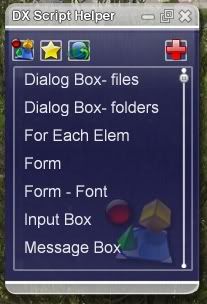

I wanted it to match the real DX Helper so I used some of their graphics. I'll be working on a different look just in case that's not allowed. As you can see the widget can be minimized. In the mini mode, clicking on the list buttons will make the lists appear as pop up menus and you can still click on an item to copy the code. To edit the lists you have to be in full mode.
Suggestions and volunteers are still welcome.
That's the BUMP of the day.
Still tweaking the scripts and adding some features, but I finally put the graphics together.
Here are some pics:
I wanted it to match the real DX Helper so I used some of their graphics. I'll be working on a different look just in case that's not allowed. As you can see the widget can be minimized. In the mini mode, clicking on the list buttons will make the lists appear as pop up menus and you can still click on an item to copy the code. To edit the lists you have to be in full mode.
Suggestions and volunteers are still welcome.
That's the BUMP of the day.
sViz
Reply #36 Sunday, April 15, 2007 6:23 PM
Well, if we can have tons of clock and weather widgets in the gallery, I don't see why we can't have more than one DX code snipper. I already have and use your excellent Script Manual.
Reply #36 Sunday, April 15, 2007 6:23 PM
I was about to make one myself to accompany the Script Manual.
Well, if we can have tons of clock and weather widgets in the gallery, I don't see why we can't have more than one DX code snipper. I already have and use your excellent Script Manual.
SirSmiley
Reply #37 Sunday, April 15, 2007 7:13 PM
Reply #37 Sunday, April 15, 2007 7:13 PM
I'll throw my name into the beta testing hat. RomanDA can atest to the fact that I'm a very annoying tester!
thomassen
Reply #38 Sunday, April 15, 2007 8:10 PM
Reply #38 Sunday, April 15, 2007 8:10 PM
I think the listitems are to big. will require too much scrolling.
How about a button that will sync the list with an online repository maintained by the community? I plan such a function with my Script Manual. You can see it allready beeing layed out in that you can edit the references.xml file in the programs directory.
How about a button that will sync the list with an online repository maintained by the community? I plan such a function with my Script Manual. You can see it allready beeing layed out in that you can edit the references.xml file in the programs directory.
sViz
Reply #39 Monday, April 16, 2007 7:52 PM
Reply #39 Monday, April 16, 2007 7:52 PM
Hi guys. I've uploaded the widget to a file sharing site. Those who have volunteered should be getting a PM shortly with the download link.
Thomassen, I made the font size and gaps between items smaller as you suggested.
I wouldn't know where to begin with that one; way out of my league. I guess that's something to look forward to with your code snipper.
You guys are welcome to have a look at the widget in DXBuilder and scrutinize my scripts (any suggestions on efficiency or general clean coding are welcome as I'm always ready to learn).
This zip includes the widget and a textfile with instructions.
Features to be aware of:
Click on the list buttons to change lists on display
L-click on item to copy code
R-click on item to edit (this brings up the editing box)
In editing box, click ok to save or 'X' to cancel and close the box.
In mini mode, click on the list button to pop up lists. L-click on items to copy code.
It's not too late to suggest a code or resource, or to volunteer.
Thanks everyone. That's the daily BUMP.
Thomassen, I made the font size and gaps between items smaller as you suggested.
How about a button that will sync the list with an online repository maintained by the community?
I wouldn't know where to begin with that one; way out of my league. I guess that's something to look forward to with your code snipper.
You guys are welcome to have a look at the widget in DXBuilder and scrutinize my scripts (any suggestions on efficiency or general clean coding are welcome as I'm always ready to learn).
This zip includes the widget and a textfile with instructions.
Features to be aware of:
Click on the list buttons to change lists on display
L-click on item to copy code
R-click on item to edit (this brings up the editing box)
In editing box, click ok to save or 'X' to cancel and close the box.
In mini mode, click on the list button to pop up lists. L-click on items to copy code.
It's not too late to suggest a code or resource, or to volunteer.
Thanks everyone. That's the daily BUMP.


Please login to comment and/or vote for this skin.
Welcome Guest! Please take the time to register with us.
There are many great features available to you once you register, including:
- Richer content, access to many features that are disabled for guests like commenting on the forums and downloading skins.
- Access to a great community, with a massive database of many, many areas of interest.
- Access to contests & subscription offers like exclusive emails.
- It's simple, and FREE!
|
|
Page 2 of 4 | |
|
|---|
Reply #21 Friday, April 13, 2007 1:44 PM
EDIT r#21: Hope that helps.