





































|
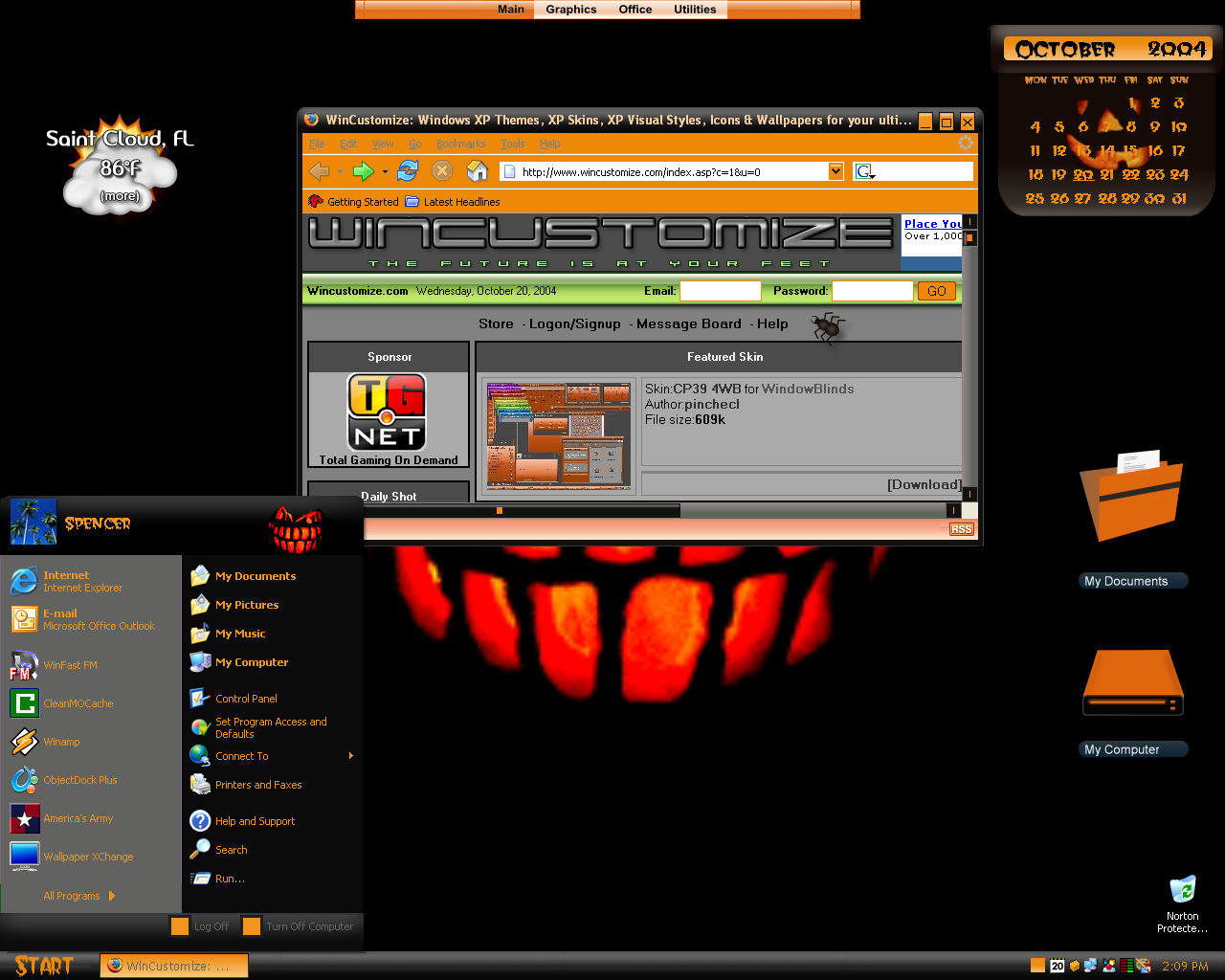
CreepersUpdated Oct 20, 2004 by Island Dog |
||||||||
 |
|
Page 1 of 2 | |
|
|---|
Ladysarajane
Comment #2 Friday, September 24, 2004 2:51 PM

Comment #2 Friday, September 24, 2004 2:51 PM
I like! Nice desktop for Halloween. What wallpaper did you use?
For some reason when you download it, Stardock Central cannot install it(I think because the extension is a .zip instead of .wba but for people having trouble with it, extract the file into your windowblind skin folder and double click on the .wba inside that folder, and it should install itself.
For some reason when you download it, Stardock Central cannot install it(I think because the extension is a .zip instead of .wba but for people having trouble with it, extract the file into your windowblind skin folder and double click on the .wba inside that folder, and it should install itself.
Island Dog
Comment #3 Friday, September 24, 2004 3:22 PM

Comment #3 Friday, September 24, 2004 3:22 PM
Thanks. It is a .zip file because I included a font with the wb.
jaidaksghost
Comment #4 Friday, September 24, 2004 3:52 PM

Comment #4 Friday, September 24, 2004 3:52 PM
my pet peeeeeeeeeve! ya make a dark theme and leave these stark white windows backgrounds that blind you when everything else is dark! it's simple - go to classic windows in skinstudio and change it - i always make my windows match the theme.  the rest looks great - please update - not everyone has skinstudio like you and me.


 the rest looks great - please update - not everyone has skinstudio like you and me.


jaidaksghost
Comment #5 Friday, September 24, 2004 4:05 PM
Comment #5 Friday, September 24, 2004 4:05 PM
i posted a screenshot showing what i was talking about - hope it wasd helpful.
eieio
Comment #6 Friday, September 24, 2004 8:49 PM

Comment #6 Friday, September 24, 2004 8:49 PM
Not too bad for a first. You did leave a few things undone, mostly colors. A little fine tuning and this one will be pretty nice.
One tip. You can put the font in the skin folder and choose it in "Fonts to Install" in the Misc section in SkinStudio. That will allow you to have a single wba file instead of two files in a zip.
One tip. You can put the font in the skin folder and choose it in "Fonts to Install" in the Misc section in SkinStudio. That will allow you to have a single wba file instead of two files in a zip.
SelfExiled
Comment #7 Friday, September 24, 2004 10:51 PM
Comment #7 Friday, September 24, 2004 10:51 PM
Personally, I like the white background. It makes working with a theme easier in word processing programs. More usable that way in my opinion. In case anyone didn't know, the default background is white, like the printer paper. But, I'm sure that all are welcomed to change it for personal use. It's tough doing dark themes for this reason and others. Good job for a first, Island Dog. (Hint: Work a little with feathering and antialiasing on the buttons.)

Ladysarajane
Comment #8 Friday, September 24, 2004 11:35 PM
Comment #8 Friday, September 24, 2004 11:35 PM
I like the white background also!  What is the name of the background and do you have a link to it?
 What is the name of the background and do you have a link to it?
Rutabaga64
Comment #9 Saturday, September 25, 2004 12:43 AM

Comment #9 Saturday, September 25, 2004 12:43 AM
Halloween is my favorite holiday, so I've already been looking forward to seeing what new skins we'd get this year. I like this one quite a bit, from the screenshot.
However, I have one question, and a slight favor to ask...your .wba file is named "Creepers," but when it installs, it installs a WB named "Halloween." There's already a skin in the library here at WC named "Halloween," so is there any chance you could change your file so that it installs as "Creepers"? I'd really appreciate it!
However, I have one question, and a slight favor to ask...your .wba file is named "Creepers," but when it installs, it installs a WB named "Halloween." There's already a skin in the library here at WC named "Halloween," so is there any chance you could change your file so that it installs as "Creepers"? I'd really appreciate it!
Ladysarajane
Comment #10 Saturday, September 25, 2004 1:14 AM
Comment #10 Saturday, September 25, 2004 1:14 AM
So that is what happened to the file!  I was trying to find it to see if it had a wallpaper in it. I finally moved the .wba file to the windowblind directory and clicked on it twice to install it. Now it is under Creepers. I just made sure to install the font to the font folder.
 I was trying to find it to see if it had a wallpaper in it. I finally moved the .wba file to the windowblind directory and clicked on it twice to install it. Now it is under Creepers. I just made sure to install the font to the font folder.
flrose
Comment #11 Saturday, September 25, 2004 8:18 PM
Comment #11 Saturday, September 25, 2004 8:18 PM
I keep tryen to get this program but it keeps coming up failed to download, what wrong that I can't download it.
jaidaksghost
Comment #12 Sunday, September 26, 2004 8:12 AM
Comment #12 Sunday, September 26, 2004 8:12 AM
read the note - killed the shot - hope it helped. if you want to see my personal tweaks drop me a line [email protected] i'll send them along.
and good work on the skins!
and good work on the skins!
Dovelady8
Comment #13 Sunday, September 26, 2004 10:04 AM

Comment #13 Sunday, September 26, 2004 10:04 AM
This theme doesn't install properly for me. I tried Ladysarajane's suggestions and even tho it says 'Creepers' in my WB directory, what shows up is an older Halloween theme I have by the same name. Can you please create a .wba file so that it will show up under 'Creepers' and auto downloads & installs properly?
Rutabaga64
Comment #14 Tuesday, September 28, 2004 6:30 PM
Comment #14 Tuesday, September 28, 2004 6:30 PM
thank you very much for fixing the downloading problem, it installed just fine as "Creepers" now
Island Dog
Comment #15 Wednesday, September 29, 2004 7:08 AM
Comment #15 Wednesday, September 29, 2004 7:08 AM
Sorry for the delay in fixing it, but I have had some hurricanes to deal with here. I appreciate everyone's comments and suggestions.
cj84
Comment #16 Wednesday, September 29, 2004 3:30 PM

Comment #16 Wednesday, September 29, 2004 3:30 PM
Still cant find the wallpaper [email protected]
[email protected]
Dovelady8
Comment #17 Wednesday, September 29, 2004 9:54 PM
Comment #17 Wednesday, September 29, 2004 9:54 PM
Thanks for fixing 'Creepers', Island Dog, it now works for me too. Hope you're recovering from the hurricanes & didn't sustain much damage.
Rutabaga64
Comment #18 Friday, October 1, 2004 10:55 PM
Comment #18 Friday, October 1, 2004 10:55 PM
oh dear, the taskbar and start menu aren't skinning...is it just me?
AuburnIce
Comment #19 Tuesday, October 5, 2004 5:12 AM
Comment #19 Tuesday, October 5, 2004 5:12 AM
love the theme, but no wallpaaper. e-mail me please with info
AuburnIce
Comment #20 Tuesday, October 5, 2004 5:16 AM
Comment #20 Tuesday, October 5, 2004 5:16 AM
Sorry, forgot to include e-mail [email protected]
Please login to comment and/or vote for this skin.
Welcome Guest! Please take the time to register with us.
There are many great features available to you once you register, including:
- Richer content, access to many features that are disabled for guests like commenting on the forums and downloading files.
- Access to a great community, with a massive database of many, many areas of interest.
- Access to contests & subscription offers like exclusive emails.
- It's simple, and FREE!
|
|
Page 1 of 2 | |
|
|---|







Comment #1 Friday, September 24, 2004 1:24 PM